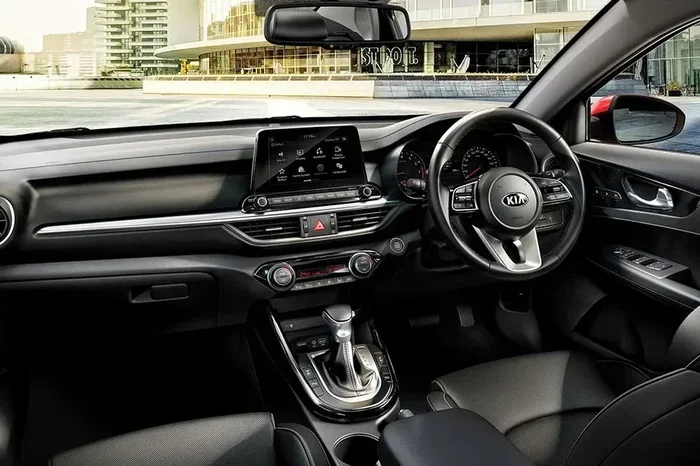
Kia Cerato Information System Not Working Troubleshooting
Dealing with a Kia Cerato information system not working can be frustrating, but most issues are easy to fix at home. This guide walks you through the most common causes, quick resets, and when to see a mechanic. You will learn how to troubleshoot your Kia Cerato infotainment system step by step with clear, simple instructions.
You turn the key, hop in, and go to tap your Kia Cerato information system — but nothing happens. The screen stays black. Or maybe it freezes right when you need directions. Either way, it is annoying. A Kia Cerato information system not working can throw off your whole drive.
The good news? Most of the time, this is not a big repair job. In fact, you can fix it yourself in minutes. This guide covers every common reason your Kia Cerato screen or display might act up. We will walk you through easy fixes, resets, and tips to keep your system running smooth. Whether your Kia Cerato infotainment system is frozen, showing errors, or completely dead — we have you covered.
Key Takeaways
- Soft Reset First: A simple restart fixes most Kia Cerato information system glitches and freezes.
- Check the Fuse Box: A blown fuse is one of the most common reasons your Kia Cerato display stops working.
- Update Your Software: Outdated firmware can cause your Kia Cerato touchscreen and navigation system to fail.
- Factory Reset Helps: A full factory reset can solve persistent software issues with your Kia Cerato infotainment.
- Know When to Seek Help: Some problems need a professional mechanic or Kia dealer to fix properly.
- Prevention Works: Regular maintenance and simple habits can stop future Kia Cerato display problems.
📑 Table of Contents
- Why Does the Kia Cerato Information System Fail?
- Common Symptoms of a Faulty Information System
- How to Reset the Kia Cerato Information System
- Common Mistakes That Cause System Failures
- When to Seek Professional Help for Your Kia Cerato
- Preventing Future Information System Problems
- Key Takeaways
- Final Thoughts on Fixing Your Kia Cerato Information System
Why Does the Kia Cerato Information System Fail?
Before you jump into fixes, it helps to understand what might be going wrong. The Kia Cerato uses a smart infotainment system that handles your radio, navigation, Bluetooth, and dashboard display. When one part fails, the whole thing can stop working.
Here are the most common reasons your Kia Cerato information system not working:
Software Glitches and Freezes
Like any computer, your Kia Cerato’s system can freeze or crash. A software glitch happens when the system gets stuck and will not respond. This is the number one cause of a frozen or blank screen. It can happen after a long drive, during a software update, or for no clear reason at all.
Blown Fuses
Your Kia Cerato has a fuse box that protects the electrical system. If a fuse blows, the infotainment display loses power. This is simple but often overlooked. A blown fuse is cheap and easy to replace — if you know where to look.
Outdated Firmware
Kia releases software updates to fix bugs and improve performance. If your Kia Cerato multimedia system has old firmware, it may not work right. Updates can fix display errors, Bluetooth problems, and navigation glitches.
Wiring or Connection Issues
Loose cables or bad connections behind the dashboard can cause your Kia Cerato touchscreen problems. Vibration from driving, heat, or age can loosen wires over time.
Battery or Power Problems
A weak car battery can cause all kinds of electrical issues. If your Kia Cerato display error shows up randomly, a low battery might be the cause. The infotainment system needs steady power to work well.
Common Symptoms of a Faulty Information System
How do you know your Kia Cerato information system has a problem? Here are the signs to watch for:
- Black Screen: The display stays completely dark when you start the car.
- Frozen Screen: The system locks up and will not respond to taps or buttons.
- Error Messages: You see warning text on the dashboard or screen.
- No Sound: The radio or Bluetooth audio cuts out even though the screen works.
- Navigation Fails: Your map or GPS stops loading or shows wrong directions.
- Bluetooth Won’t Connect: Your phone will not pair with the Kia Cerato audio system.
- Slow Response: The system takes forever to start or respond to inputs.
If you notice any of these signs, do not panic. Most of them have simple fixes that we will cover next.
How to Reset the Kia Cerato Information System
Resetting is the fastest way to fix most Kia Cerato infotainment reboot issues. There are two types of resets — soft and factory. Start with the soft reset first.
Soft Reset (Quick Fix)
A soft reset is like restarting your phone. It clears temporary glitches without deleting anything. Here is how to do it:
- Turn off the engine and remove the key from the ignition.
- Open the driver’s door and wait for 60 seconds.
- Close the door and reinsert the key.
- Start the engine and wait for the system to boot up fully.
This simple step fixes the issue in most cases. If the Kia Cerato screen not responding problem continues, move to the next step.
Factory Reset (Deep Fix)
A factory reset wipes all your settings and restores the system to its original state. Use this only if the soft reset does not work.
- Go to the Settings menu on your Kia Cerato display.
- Look for System or General Settings.
- Find the Factory Reset or Reset to Default option.
- Confirm the reset and wait for the system to restart.
After the reset, you may need to reconnect your Bluetooth devices and update your preferences. The Kia Cerato information system not working issue caused by software corruption usually goes away after a factory reset.
Hard Reset (Power Cycle Method)
If the screen is completely unresponsive and you cannot access the menu, try a hard reset:
- Disconnect the negative battery terminal for 5 minutes.
- Reconnect it and start the car.
- The system will reboot and reload fresh.
This method works like hitting the power button on a frozen computer. It forces the Kia Cerato multimedia system to restart from scratch.
Common Mistakes That Cause System Failures
Some habits can make your Kia Cerato information system worse over time. Here are mistakes to avoid:
- Ignoring Update Prompts: Skipping firmware updates leaves your system exposed to bugs.
- Using Harsh Cleaners on the Screen: Strong chemicals can damage the touchscreen and sensors.
- Overloading the System: Running too many apps at once can freeze your Kia Cerato display.
- Ignoring Warning Lights: Dashboard warning lights tell you something is wrong. Dismissing them can lead to bigger problems.
- DIY Wiring Repairs: Tugging at wires behind the dash without proper knowledge can cause permanent damage.
Avoiding these simple mistakes can keep your Kia Cerato infotainment system healthy for years.
When to Seek Professional Help for Your Kia Cerato
Most Kia Cerato information system not working issues are easy to fix at home. But some problems need a trained mechanic or Kia dealer.
Take your car to a professional if:
- The Kia Cerato display black screen happens right after a reset.
- You smell burning or see smoke from the dashboard.
- The system keeps freezing even after multiple resets.
- You hear strange clicking or buzzing sounds from the speakers.
- The navigation system shows a hardware error code.
- Your Kia Cerato Bluetooth connection problems persist after updating software.
A Kia dealer has special diagnostic tools that can read error codes from your infotainment unit. They can tell if a part needs replacing. Sometimes the issue is a faulty display unit, a bad amplifier, or a wiring harness that needs professional repair.
How Much Does It Cost to Fix?
The cost depends on what is wrong. Here is a rough comparison:
| Issue | Fix | Estimated Cost |
|---|---|---|
| Software Glitch | Soft Reset or Update | Free |
| Blown Fuse | Fuse Replacement | $5 – $20 |
| Outdated Firmware | Dealer Software Update | Free – $50 |
| Faulty Display Unit | Display Replacement | $300 – $800 |
| Wiring Damage | Wiring Repair | $100 – $400 |
| Infotainment Unit Failure | Full Unit Replacement | $500 – $1,500 |
As you can see, simple fixes cost very little. The sooner you address the problem, the less you will spend.
Preventing Future Information System Problems
Prevention is always better than cure. Here are simple habits that keep your Kia Cerato multimedia system running strong:
Keep Your Software Updated
Check for firmware updates at your Kia dealer at least twice a year. Updates fix known bugs and improve performance. Many newer Kia models also support over-the-air updates through the UVO infotainment system.
Protect the System from Heat
Extreme heat is the enemy of electronics. Use a windshield sunshade when parking outdoors. This keeps the dashboard and Kia Cerato display from overheating.
Clean the Screen Gently
Use a soft microfiber cloth to clean your touchscreen. Avoid alcohol-based cleaners. They can wear down the screen coating over time.
Avoid Overloading the System
Do not run too many apps at once. Close apps you are not using. Keep your music library organized to prevent lag.
Check the Battery Regularly
A healthy car battery keeps all electrical systems running smoothly. Have your battery tested during every oil change. Replace it every 3 to 5 years.
Key Takeaways
- Soft Reset First: A simple restart fixes most Kia Cerato information system glitches and freezes.
- Check the Fuse Box: A blown fuse is one of the most common reasons your Kia Cerato display stops working.
- Update Your Software: Outdated firmware can cause your Kia Cerato touchscreen and navigation system to fail.
- Factory Reset Helps: A full factory reset can solve persistent software issues with your Kia Cerato infotainment.
- Know When to Seek Help: Some problems need a professional mechanic or Kia dealer to fix properly.
- Prevention Works: Regular maintenance and simple habits can stop future Kia Cerato display problems.
Final Thoughts on Fixing Your Kia Cerato Information System
Dealing with a Kia Cerato information system not working is stressful, but it does not have to be. Most of the time, a simple reset or software update solves the problem fast. You do not need to be a car expert to try these fixes at home.
Start with the soft reset. If that does not work, try a factory reset. Check the fuse box and look for loose connections. Keep your software updated to prevent future issues. And when in doubt, visit your Kia dealer or a trusted mechanic.
Your Kia Cerato infotainment system is designed to make driving easier and more enjoyable. With the right care, it will keep working smoothly for years to come. Take action today and get back on the road with confidence.
Remember, a little attention goes a long way. Your Kia Cerato display and multimedia system will thank you for it.
Frequently Asked Questions
Why is my Kia Cerato information system completely black?
A black screen is often caused by a blown fuse, a loose connection, or a frozen system. Start with a soft reset by turning off the engine, waiting 60 seconds, and restarting. If the screen stays black, check the fuse box under the dashboard or hood for a blown fuse related to the infotainment unit.
How do I update the firmware on my Kia Cerato?
You can update your Kia Cerato infotainment system firmware by visiting a Kia dealer or authorized service center. Some newer models support over-the-air updates through the UVO app. You can also check for updates by going to Settings, then System, and looking for a Software Update option on your display.
Can a dead car battery cause the Kia Cerato information system to fail?
Yes, absolutely. A weak or dying battery can cause electrical issues throughout the car, including your Kia Cerato multimedia system. If the system acts up randomly or resets itself, have your battery tested. Replacing an old battery often fixes mysterious electrical problems.
Is it safe to do a factory reset on my Kia Cerato?
Yes, a factory reset is safe and will not damage your car. However, it will erase all your saved settings, Bluetooth pairings, and radio presets. Write down important information before performing the reset. Afterward, you will need to set up your preferences again.
How much does it cost to fix a Kia Cerato infotainment system?
Costs vary depending on the problem. A software fix or reset is free. A fuse replacement costs around $5 to $20. More complex repairs like display or unit replacement can range from $300 to $1,500. Always get a quote from a Kia dealer before approving major repairs.
What should I do if my Kia Cerato touchscreen is unresponsive?
First, try a soft reset by turning off the car and waiting 60 seconds. If the screen is still unresponsive, perform a hard reset by disconnecting the negative battery terminal for 5 minutes. If neither works, the touchscreen or its cable may need professional inspection at a Kia service center.