How To Set Cruise Control In Nissan Rogue Step By Step
Learning how to set cruise control in Nissan Rogue is simple and quick. This guide walks you through every step, from finding the buttons to adjusting your speed on the highway. You will also discover smart tips for safe and efficient driving with cruise control.
Driving long distances on the highway can be tiring. Your feet get sore. Your legs start to cramp. And staying at a steady speed feels like a full-time job. That is exactly where how to set cruise control in Nissan Rogue becomes a game changer. The Nissan Rogue comes with a built-in cruise control system that makes highway driving easier, safer, and more comfortable. Whether you are on a road trip or just commuting to work, this feature helps you maintain a consistent speed without pressing the gas pedal.
In this guide, we will walk you through every step of setting cruise control in your Nissan Rogue. We will cover where the buttons are, how to adjust your speed, and what to do when you need to cancel or resume. We will also share expert tips for getting the most out of this feature. By the end, you will feel confident using cruise control every time you hit the road.
Key Takeaways
- Easy Setup: Setting cruise control in the Nissan Rogue takes just a few simple steps using the steering wheel controls.
- Adjustable Speed: You can increase or decrease your set speed in small increments for precise control.
- Cancel and Resume: The cruise control system lets you temporarily cancel and easily resume your set speed.
- Adaptive Features: Newer Rogue models include adaptive cruise control that adjusts to traffic flow.
- Fuel Savings: Using cruise control on highways can improve fuel efficiency and reduce driver fatigue.
- Safety First: Always stay alert and avoid using cruise control in heavy traffic or bad weather.
📑 Table of Contents
Understanding Cruise Control in the Nissan Rogue
Before you learn how to set cruise control in Nissan Rogue, it helps to understand what it does and why it matters. Cruise control is a driver assistance feature that maintains your vehicle’s speed without you needing to press the accelerator pedal. You set a desired speed, and the car handles the rest. This is especially useful on long, open highway stretches where the speed limit stays the same for miles.
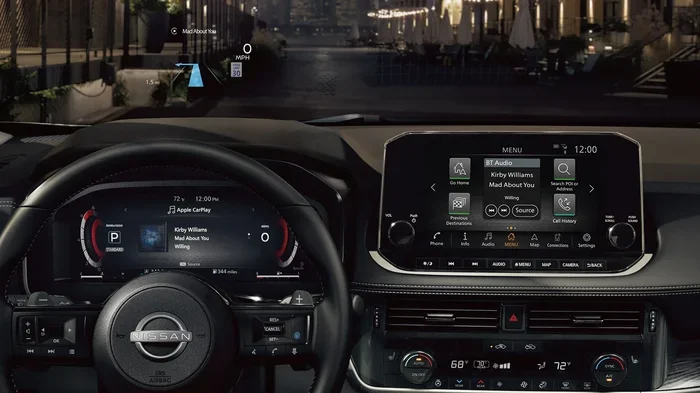
The Nissan Rogue offers standard cruise control on most trim levels. Some newer models also include adaptive cruise control, which uses sensors to keep a safe distance from the vehicle ahead of you. Both versions are designed to reduce driver fatigue and make long drives more enjoyable. The controls for cruise control are located on the right side of the steering wheel, making them easy to reach while driving.
Which Nissan Rogue Models Have Cruise Control?
Most Nissan Rogue models come equipped with cruise control. This includes the Rogue, Rogue Sport, and Rogue Platinum trims. If you are unsure whether your specific model year has cruise control, check your owner’s manual or look for the cruise control buttons on your steering wheel. The buttons typically feature icons that look like a speedometer or arrows pointing up and down.
Benefits of Using Cruise Control
There are several real benefits to using cruise control on the road:
- Reduces driver fatigue on long trips
- Helps maintain a steady speed, which can improve fuel efficiency
- Reduces the risk of speeding by locking in a set speed limit
- Provides a more relaxed driving experience on highways and interstates
- Keeps your feet free for other driving tasks like braking
How to Set Cruise Control Step by Step
Now let us get into the practical part. Learning how to set cruise control in Nissan Rogue is straightforward. Follow these steps carefully, and you will have it set up in under a minute.
Step 1: Find the Cruise Control Buttons
Look at the right side of your steering wheel. You will see a set of buttons with small icons. The main buttons you need are:
- ON/OFF – Turns the cruise control system on or off
- SET – Sets your current speed as the cruise control speed
- RESUME – Returns to your previously set speed after a cancellation
- COAST – Gently reduces your speed
- ACCEL (up arrow) – Increases your set speed
- DECEL (down arrow) – Decreases your set speed
Step 2: Turn on the Cruise Control System
Press the ON/OFF button on the steering wheel. A small indicator light on your dashboard will turn on. This tells you the cruise control system is active and ready to use. If the light is off, the system is not on, and you cannot set a speed.
Step 3: Reach Your Desired Speed
Drive your Nissan Rogue at the speed you want to maintain. This could be the highway speed limit, such as 65 mph or 70 mph. Use the gas pedal to reach that speed. Make sure you are in a safe driving condition before proceeding.
Step 4: Press the SET Button
Once you are at your desired speed, press the SET button on the steering wheel. You will hear a soft click, and the dashboard indicator will change to show your set speed. Now you can take your foot off the gas pedal. Your Nissan Rogue will maintain that speed on its own.
Step 5: Confirm the Cruise Control Is Active
Look at your dashboard display. You should see a green or white cruise control icon with your set speed displayed. This confirms that cruise control is set and your vehicle is maintaining the speed you chose. You are now free to relax your foot and enjoy a more comfortable drive.
Quick Tips for Setting Cruise Control
- Always set cruise control at a safe and legal speed for the road conditions.
- Make sure the road ahead is clear and straight before activating cruise control.
- Use the SET button only when you are already at your target speed.
- Keep your hands on the steering wheel at all times, even when cruise control is on.
How to Adjust, Cancel, and Resume Cruise Control
Once your cruise control is set, you may need to make changes during your drive. The Nissan Rogue makes this easy with intuitive controls right at your fingertips.
Increasing or Decreasing Your Set Speed
Need to go a little faster or slower? Use the ACCEL and DECEL buttons on the steering wheel. Each press changes your set speed by about 1 mph. If you hold the button down, the speed changes more quickly. This lets you fine-tune your speed without taking your eyes off the road for too long.
For bigger adjustments, you can also use the COAST button to gently slow down. Just press it once, and your vehicle will reduce speed gradually until you press SET again to lock in the new speed.
Canceling Cruise Control
There are several reasons you might need to cancel cruise control:
- You need to slow down for traffic or a curve
- Road conditions change, like rain or fog
- You want to use the gas pedal for a bit
- You are approaching your exit
To cancel cruise control, simply tap the CANCEL button or lightly press the brake pedal. The cruise control indicator on your dashboard will turn off, and your vehicle will return to normal speed control. Your previously set speed is still stored in the system.
Resuming Your Set Speed
After you cancel cruise control, you can easily resume it. Once the road is clear and you are traveling at a safe speed, press the RESUME button on the steering wheel. Your Nissan Rogue will automatically accelerate back to your previously set speed. This is a great feature because you do not need to re-enter your speed every time you slow down briefly.
Common Situations That Require Cancellation
It is important to know when to cancel cruise control for safety reasons:
- Heavy traffic: Stop-and-go driving is not suitable for cruise control
- Wet or icy roads: Sudden speed changes can cause loss of traction
- Sharp curves: You need more control on winding roads
- Construction zones: Speed limits often change frequently
- Hilly terrain: Steep hills may cause your speed to vary too much
Adaptive Cruise Control in the Nissan Rogue
If your Nissan Rogue has adaptive cruise control, you have an even more advanced driving assistant. Adaptive cruise control, often called ACC, uses radar sensors and cameras to detect vehicles ahead of you. It automatically adjusts your speed to maintain a safe following distance.
How Adaptive Cruise Control Works
When you set adaptive cruise control, the system monitors the speed of the vehicle in front of you. If that car slows down, your Nissan Rogue will also slow down. When the road clears again, your vehicle will accelerate back to your set speed. This is incredibly helpful in stop-and-go highway traffic or when driving at varying speeds.
The controls for adaptive cruise control are similar to standard cruise control but include additional settings for your preferred following distance. You can usually choose between short, medium, and long following distances using the steering wheel controls.
When to Use Adaptive Cruise Control
Adaptive cruise control works best in these situations:
- Highway driving with moderate traffic
- Long road trips where you want a relaxed pace
- Open roads with consistent flow of traffic
Always remember that adaptive cruise control is a driver assistance feature, not a replacement for active driving. You still need to stay alert and be ready to take control at any moment.
Quick Tips for Adaptive Cruise Control
- Set your following distance to at least 2-3 seconds for safety
- Check that the sensors near the front grille are clean and unobstructed
- Disable adaptive cruise control in heavy rain or snow when sensors may not work properly
- Use the RESUME button after temporary stops to return to your set speed
Tips for Safe and Efficient Cruise Control Use
Using cruise control the right way makes your drives safer and more efficient. Here are some practical tips to keep in mind every time you use this feature in your Nissan Rogue.
Best Driving Conditions for Cruise Control
Cruise control works best on clear, dry highways with steady traffic flow. These are the ideal conditions:
- Open highways with minimal curves
- Clear weather with good visibility
- Consistent speed limits throughout your route
- Light to moderate traffic
Fuel Efficiency Benefits
One often-overlooked benefit of cruise control is improved fuel economy. By maintaining a constant speed, your engine does not work as hard. This is especially true on flat highways where constant acceleration and braking would otherwise waste fuel. Many drivers find that using cruise control on long trips helps them save money at the pump.
However, keep in mind that cruise control may not always save fuel on hilly terrain. On steep uphill grades, the system may use more fuel trying to maintain speed. On downhills, it may not slow down as much as a cautious driver would. Use your judgment based on the road you are driving.
Common Mistakes to Avoid
Even experienced drivers make mistakes with cruise control. Here are some common errors to watch out for:
- Using cruise control in heavy traffic: This can lead to rear-end collisions if the car ahead stops suddenly.
- Falling asleep or becoming too relaxed: Cruise control is not autopilot. You must always stay alert.
- Ignoring weather conditions: Rain, ice, and fog can make cruise control dangerous.
- Not checking your set speed: Always confirm the speed displayed on your dashboard matches the safe limit.
- Forgetting to cancel before exits: Always cancel cruise control well before your exit ramp.
Expert Insights on Cruise Control Use
Driving experts recommend treating cruise control as a helpful tool, not a replacement for active driving. According to the National Highway Traffic Safety Administration, driver assistance features like cruise control work best when the driver remains fully engaged. Keep both hands on the wheel. Stay aware of your surroundings. And never rely solely on technology to keep you safe on the road.
Another expert tip is to practice using cruise control in low-risk environments first. Try it out on a clear, empty highway during off-peak hours. Get comfortable with the buttons and the feel of the system before using it in busier traffic. This builds confidence and helps you react more naturally when conditions change.
Maintaining Your Cruise Control System
Like any feature in your Nissan Rogue, cruise control needs basic maintenance to work properly. Here are a few things to keep in mind:
- Keep the cruise control button area clean and free of debris
- Make sure your dashboard indicators are working properly
- If cruise control behaves strangely, have it checked by a certified mechanic
- For adaptive cruise control, keep the front sensors clean and free of snow or dirt
Regular maintenance ensures that your cruise control system works reliably every time you need it. A well-maintained system also contributes to overall safety on the road.
Final Thoughts on Using Cruise Control in Your Nissan Rogue
Learning how to set cruise control in Nissan Rogue is one of the simplest ways to make your drives more comfortable and efficient. From the easy steering wheel controls to the helpful adaptive cruise control feature, the Nissan Rogue gives you everything you need for a relaxed highway experience. Just remember to use cruise control responsibly, stay alert, and adjust your settings based on road and weather conditions.
Next time you hit the highway, try setting cruise control and feel the difference it makes. Your feet will thank you, your fuel economy may improve, and your long drives will feel less tiring. Safe travels, and enjoy the ride.
Frequently Asked Questions
Can I set cruise control below the speed limit in my Nissan Rogue?
Yes, you can set cruise control at any speed you choose. However, it is important to follow posted speed limits and drive safely for current road conditions. Cruise control is a convenience feature, not a replacement for obeying traffic laws.
What should I do if cruise control stops working in my Nissan Rogue?
First, check that the ON/OFF button is engaged and the indicator light is on. Make sure your brake pedal is not pressed, as this cancels cruise control. If the system still does not work, consult your owner’s manual or visit a certified Nissan service center for diagnosis.
Does the Nissan Rogue have adaptive cruise control on all trim levels?
Adaptive cruise control is typically available on higher trim levels or as part of the Nissan ProPilot Assist package. Standard cruise control is available on most trims. Check your specific model year and trim to confirm which features are included.
Can I use cruise control in the rain?
It is best to avoid using cruise control on wet roads. When you use cruise control in rain, your tires have less traction, and if you hydroplane, the system may not respond as quickly as you would manually. Cancel cruise control in adverse weather conditions for safety.
How do I know if cruise control is active in my Nissan Rogue?
Look at your dashboard display. When cruise control is active, a green or white cruise control icon will appear along with your set speed. If the icon is off or the color changes, cruise control is not currently engaged.
Is it safe to use cruise control on long road trips?
Yes, cruise control is safe and beneficial on long road trips, especially on highways with steady traffic flow. It reduces driver fatigue and helps maintain a consistent speed. However, always take breaks every couple of hours and stay alert behind the wheel.
=== CONCLUSION ===
Mastering how to set cruise control in Nissan Rogue is a simple yet valuable skill for any Rogue owner. The step-by-step process is easy to follow, and the benefits are clear. You get a more comfortable drive, better fuel efficiency, and less foot fatigue on long highways. Just remember to use cruise control wisely, stay aware of road conditions, and always keep your hands on the wheel. With practice, using cruise control will become second nature, and your drives will feel smoother and more enjoyable every time you turn the key.