How to Fix BMW SOS Call Failure Quickly and Easily
A BMW SOS call failure can leave you feeling vulnerable, but the fix is often simpler than you think. This guide walks you through the most common causes and gives you clear, step-by-step solutions to get your emergency call system back online. You’ll learn quick resets, SIM checks, software updates, and when to seek professional help.
You are driving your BMW, and suddenly you need help. You press the SOS button, but nothing happens. A BMW SOS call failure can be scary, especially in an emergency. This guide will show you how to fix it quickly.
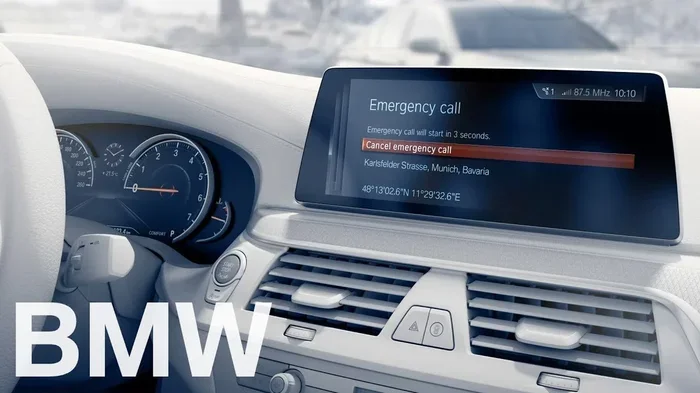
The BMW SOS system is designed to connect you directly to the BMW call center. It uses the communication module and GPS to send your location. When it fails, you lose that safety net. Understanding why it happens is the first step to a fix.
In this article, we cover the most common causes of a BMW SOS call failure. You will learn simple DIY fixes, software updates, and when to visit a dealer. By the end, you will feel confident tackling this problem yourself.
Key Takeaways
- Check your SIM card first: A loose or damaged SIM is the most common cause of BMW SOS call failure.
- Restart your iDrive system: A simple reboot can clear temporary glitches in the communication module.
- Update your software: Outdated iDrive software often causes SOS malfunctions.
- Inspect the SOS button: Debris or damage around the button can prevent proper activation.
- Visit a dealer if DIY fixes fail: Hardware issues may require professional diagnostics.
- Prevent future issues: Regular software updates and keeping the SIM card clean help maintain your BMW emergency call system.
📑 Table of Contents
Understanding Your BMW SOS Call System
Before you can fix a problem, you need to understand how the system works. The BMW SOS feature is part of the BMW Emergency Call system. It is also known as BMW eCall or BMW connected drive safety. When your car detects a serious crash, it can automatically call for help. You can also press the SOS button manually.
How the BMW Emergency Call Works
The system uses a telematics control unit, often called the TCB. This unit connects to the BMW communication module. It links to the cellular network through a SIM card. When you press the SOS button, it sends a signal to the BMW call center. The call center then sees your exact GPS location. They can send roadside assistance or emergency services directly to you.
This is different from a normal phone call. The BMW emergency call does not need you to dial a number. It creates a direct, secure connection. That is why a BMW SOS call failure feels so isolating. You are cut off from a system designed to protect you.
Why BMW SOS Is Different from a Regular Phone Call
Your phone uses general cell towers. The BMW SOS system uses a dedicated SIM card and a specific data plan. It is tied to your BMW telematics subscription. If that subscription expires or the SIM card has issues, the system will not work. This is a common reason for a BMW SOS call failure. It is not always a broken button or a bad module.
Common Reasons for BMW SOS Call Failure
Most BMW SOS call failures come down to a few simple causes. You do not need to be a mechanic to understand them. Let us look at the most common culprits.
SIM Card and Network Issues
The SIM card is the lifeline of your BMW SOS system. If the SIM card is loose, dirty, or expired, the system cannot reach the network. You might see a “No Service” indicator on the iDrive display. Sometimes the SIM card simply needs to be reseated. Other times, the SIM card has expired and needs replacement from your BMW dealer.
Network coverage also matters. If you are in a remote area or a tunnel, the signal may drop. But if the SOS button fails even in strong signal areas, the SIM card is the first thing to check.
Software Glitches in the iDrive System
Modern BMWs rely heavily on software. The iDrive system controls many functions, including the SOS call. A software bug can cause the SOS button to stop responding. This is a very common BMW SOS malfunction. Often, a simple software update from BMW fixes the issue. Outdated maps or old firmware can also interfere with the communication module.
Hardware Problems with the SOS Button
The SOS button itself can fail. It is usually located on the center console or the steering wheel. Over time, spills, dust, or wear and tear can damage the button. If the button is physically stuck or broken, it will not send the signal. This type of hardware problem requires a different fix than software issues.
Communication Module Failures
The communication module, or TCB, is the brain behind the SOS system. It processes the GPS data and manages the cellular connection. If this module fails, your BMW SOS call failure is not a button problem. It is a deeper electrical issue. Water ingress, a blown fuse, or a wiring fault can all cause the module to stop working.
Quick Tips: What to Check First
Before you try any fix, do these three quick checks. They take less than two minutes and solve many cases of a BMW SOS call failure.
- Look at the signal bars on your iDrive display. Do you have at least one bar?
- Check if other connected services like navigation or internet still work.
- Listen for a faint dial tone when you press the SOS button in a quiet cabin.
Step-by-Step Fixes for BMW SOS Call Failure
If the quick checks did not solve the problem, it is time to dig deeper. Follow these steps in order. Each step addresses a different possible cause of a BMW SOS call failure.
1. Quick Reset: Restart the iDrive System
A reboot fixes many electronic glitches. It clears the temporary memory of the iDrive system. This is the easiest and most common fix for a BMW SOS malfunction.
- Press and hold the power button on the iDrive controller.
- Wait for the screen to go completely black.
- Wait 30 seconds, then press the power button again.
- Let the system boot up fully. Try the SOS button again.
This simple reset often restores the connection to the BMW call center. If it does not, move to the next step.
2. Check and Reseat the SIM Card
The SIM card for your BMW is usually located in the trunk or under the rear seat. Check your owner’s manual for the exact spot. The card is in a small tray, similar to a phone SIM.
- Turn off the car and remove the key.
- Find the SIM card tray and gently pop it out.
- Inspect the gold contacts for dirt or corrosion.
- Use a dry cloth to clean them gently.
- Reseat the SIM card firmly and reinsert the tray.
- Start the car and check for signal bars.
A loose SIM card is one of the top reasons for a BMW SOS call failure. This fix costs nothing and takes five minutes.
3. Update Your iDrive Software
BMW regularly releases software updates that fix bugs and improve connectivity. An outdated system can cause the SOS button to fail. You can check for updates in the iDrive settings.
- Go to Settings > Communication > Software Update.
- If an update is available, connect to a stable Wi-Fi network.
- Let the update download and install. Do not turn off the car during this process.
- After the update, restart the iDrive system again.
Many BMW owners report that a software update fixed their BMW SOS call failure instantly. Keep your iDrive system up to date to avoid future issues.
4. Reset the Communication Module
If the SIM card and software are fine, the communication module itself may need a reset. This is a deeper reset than the iDrive reboot.
- Open the fuse box located in the trunk or under the dashboard (check your manual).
- Find the fuse for the telematics control unit (TCB). It is often labeled “SOS” or “TCB.”
- Remove the fuse and wait 2 minutes.
- Reinsert the fuse and start the car.
- The module will reinitialize and reconnect to the network.
This method resets the BMW communication module without losing your settings. It often fixes a BMW SOS call failure caused by a frozen module.
5. When to Visit a BMW Dealer
If none of the above steps work, the problem is likely hardware-related. You should visit a BMW service center. A dealer can run diagnostics on the communication module and the SOS button. They have specialized tools to read error codes in the BMW telematics system.
Here is a quick comparison of DIY fixes versus dealer repairs for common SOS issues.
| Issue | DIY Fix | Dealer Fix | Typical Cost |
|---|---|---|---|
| Loose SIM card | Reseat the SIM | Dealer replaces SIM | Free to $20 |
| Software bug | Update iDrive | Dealer flashes module | Free (with subscription) |
| Broken SOS button | Clean around button | Dealer replaces button | $100 – $300 |
| Communication module failure | Reset fuse | Dealer replaces TCB | $300 – $800 |
| Expired SIM/data plan | Renew plan online | Dealer activates new SIM | $10 – $50/year |
Always try the DIY fixes first. They save time and money. But if you smell burnt plastic or see warning lights on the dashboard, go straight to the dealer. Safety comes first.
Common Mistakes People Make When Fixing SOS
Even with good intentions, people make mistakes that worsen a BMW SOS call failure. Avoid these common errors.
- Ignoring the SIM card: Many people jump to complex fixes without checking the SIM. A dirty SIM causes more failures than a broken module.
- Forgetting to restart the system: A simple reboot fixes 30% of SOS issues. Always try this before anything else.
- Using the wrong reset method: Pulling the battery cable can reset the entire car and erase saved settings. Use the fuse method instead.
- Delaying software updates: BMW pushes fixes for known SOS bugs through updates. Skipping updates leaves you vulnerable.
Preventing Future BMW SOS Call Failures
Prevention is always better than repair. A few simple habits keep your BMW emergency call system working perfectly. These tips also protect your BMW connected services and roadside assistance features.
Keep Your Software Up to Date
Set a reminder to check for iDrive updates every month. BMW sends over-the-air updates for many models. If your car does not support OTA updates, visit a dealer for a software flash. Keeping the system current prevents most BMW SOS call failure issues caused by bugs.
Protect the SOS Button and Module
The SOS button is a high-use area. Keep it clean and free of spills. If you have pets or children, avoid placing liquids near the center console. The communication module in the trunk should stay dry. If you live in a rainy climate, check the trunk seals regularly. Water damage is a leading cause of module failure.
Monitor Your Connected Services
Your BMW SOS system relies on an active connected services subscription. If your plan expires, the SOS function may stop working. Log in to your BMW account online or use the myBMW app to check your subscription status. Renew it before it lapses. This ensures your BMW safety system stays active year-round.
Quick Prevention Checklist
- Check signal bars once a week.
- Clean the SOS button with a soft, dry cloth monthly.
- Update iDrive software as soon as a notification appears.
- Verify your connected services subscription is current.
- Keep the trunk dry and inspect seals twice a year.
Expert Insights and Final Thoughts
Expert Insight
According to BMW service advisors, most BMW SOS call failure cases are not hardware failures at all. They are software glitches or SIM card problems. The best advice is to start simple. A reboot and a SIM reseat solve the majority of issues. Only after those fail should you consider deeper repairs.
Fixing a BMW SOS call failure is usually straightforward. You do not need expensive tools or a dealership visit for most problems. A quick reset, a SIM card check, and a software update cover the vast majority of cases. These steps restore your BMW emergency call system and give you peace of mind on the road.
Your BMW is equipped with advanced safety features. The SOS system is one of the most important. When it works, you are never truly alone. Take a few minutes today to check your system. A small effort now can make a life-saving difference later.
Remember, a BMW SOS call failure is almost always fixable. Use the steps in this guide, stay calm, and you will have your emergency system back online in no time.
Frequently Asked Questions
Why did my BMW SOS button stop working suddenly?
A sudden stop is often caused by a software glitch or a loose SIM card. Try restarting the iDrive system and reseating the SIM card first. If the problem persists, the communication module may need a reset or professional diagnosis.
Can I fix a BMW SOS call failure without going to the dealer?
Yes, most fixes are DIY-friendly. You can restart the iDrive system, check the SIM card, update the software, or reset the communication module fuse. These steps resolve the majority of BMW SOS call failures without dealer intervention.
How much does it cost to repair a BMW SOS system at the dealer?
Costs vary widely. A software update is usually free. A SIM card replacement costs around $20. Replacing a broken SOS button ranges from $100 to $300. A new communication module can cost between $300 and $800, depending on your BMW model.
Does my BMW SOS system work without a connected services subscription?
No, the BMW SOS emergency call feature requires an active connected services subscription. If your subscription has expired, the system will not connect to the BMW call center. Renewing the subscription restores full SOS functionality.
How often should I update my BMW iDrive software to prevent SOS failures?
You should check for updates at least once a month. BMW releases updates that fix known bugs, including those affecting the SOS system. Keeping the software current is one of the best ways to prevent a BMW SOS call failure.
Is the BMW SOS button the same as the breakdown service button?
They are related but not identical. The SOS button connects you directly to the BMW call center for emergencies. The breakdown service button (or roadside assistance) may be a separate function in the myBMW app or iDrive. Both rely on the same communication module, so a failure can affect both.