Where Is the RAB Button on My Subaru and What Does It Do
The RAB button on your Subaru is part of the EyeSight safety system and stands for Rear Automatic Braking. Located typically on the center console near the gear shifter, this button lets you turn the rear obstacle detection feature on or off. When activated, RAB automatically applies the brakes if it senses an object while you’re reversing, helping you avoid costly damage and injuries.
If you’ve been wondering where is the RAB button on my Subaru, you’re in the right place. The RAB button is a small but mighty part of your Subaru’s EyeSight safety system. It stands for Rear Automatic Braking, and it can save you from costly bumper damage. Many Subaru owners never even notice the button until they need it. In this guide, I’ll show you exactly where to find it and how it works.
The RAB button is not just a random toggle. It controls a smart sensor system that watches the area behind your car when you’re in reverse. When you press the button, the system becomes active and scans for obstacles. If it detects something in your path, it can apply the brakes automatically. This feature is especially helpful in tight parking lots and crowded driveways. I’ll walk you through the location, the step-by-step usage, and what to do if the button acts up.
Let’s dive into the details. You’ll learn the exact spot on the center console and steering wheel. I’ll also share quick tips to keep the system working perfectly. By the end, you’ll feel confident using the RAB button every time you back up.
Key Takeaways
- RAB Button Location: Usually on the center console behind the gear shifter, or integrated into the steering wheel controls on newer models.
- What RAB Means: Rear Automatic Braking, a Subaru EyeSight feature that prevents reverse collisions.
- How It Works: Uses rear sensors to detect obstacles and automatically applies the brakes when you’re backing up.
- When to Use It: Keep RAB on in tight parking lots, driveways, and crowded areas to avoid bumper damage.
- Common Issues: A yellow warning light means the sensor is blocked; a red light indicates a system fault.
- Difference from AEB: RAB works only in reverse, while Automatic Emergency Braking works in forward driving.
- Expert Tip: Clean the rear sensors regularly to ensure RAB functions properly.
📑 Table of Contents
- What Does RAB Stand For and How Does It Work?
- Where Is the RAB Button Located on My Subaru?
- How to Use the RAB Button – A Simple Step-by-Step Guide
- Common Issues with the RAB Button and What They Mean
- RAB vs. Other Subaru Safety Features: What’s the Difference?
- Final Thoughts: Why the RAB Button Matters for Your Subaru
What Does RAB Stand For and How Does It Work?
RAB stands for Rear Automatic Braking. It’s a key part of the Subaru EyeSight driver-assist suite. The system uses rear sensors to monitor the area behind your vehicle. When you shift into reverse, the sensors become active. They look for objects, pedestrians, and even slow-moving vehicles. If something gets too close, the system can apply the brakes on its own.
How the RAB System Detects Obstacles
The RAB button connects to radar and camera sensors mounted at the rear of the car. These sensors send out signals that bounce off objects. The system then calculates the distance and speed of the obstacle. If a collision seems likely, it triggers the brakes. This happens in a fraction of a second. You don’t need to lift your foot off the gas pedal. The system works alongside your pre-collision braking and brake assist features.
Subaru designed this collision avoidance technology to reduce reverse accidents. The rear sensors work at low speeds, usually under 15 miles per hour. They can detect stationary objects like walls, poles, and parked cars. Some models also detect moving objects like pedestrians stepping behind the vehicle. The system is a smart safety net that operates quietly in the background.
When the RAB Button Illuminates
You’ll see a small light on the dash when the RAB button is active. It usually looks like a car reversing with a curved arrow. A green light means the system is on and ready. A yellow or amber light means something is off. It could be a dirty sensor or a system warning. A red light is rare and means you should visit a dealer. I’ll cover these lights in more detail later.
Where Is the RAB Button Located on My Subaru?
The exact spot of the RAB button can vary slightly depending on your model year and trim. However, most Subaru vehicles place it in one of two common areas. I’ll walk you through both so you can find it quickly.
RAB Button on the Center Console
On many Subaru models, the RAB button sits on the center console. Look just behind the gear shifter. You’ll see a small rectangular or circular switch with a symbol on it. The symbol often shows a car reversing and a curved brake line. On the Subaru Outback, Forester, and Legacy, this is the most common location. The button is easy to reach when you’re sitting in the driver’s seat.
Steering Wheel Controls and the RAB Toggle
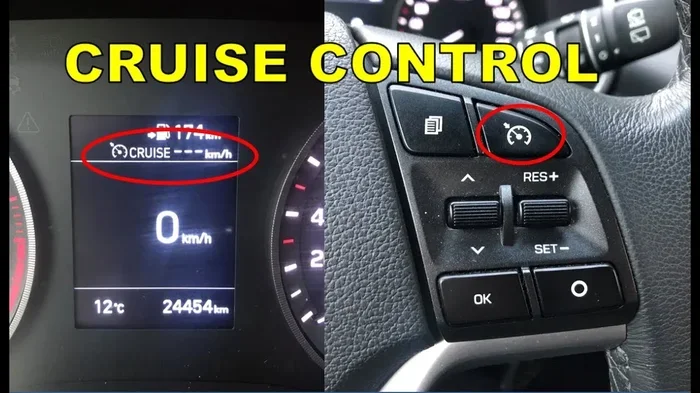
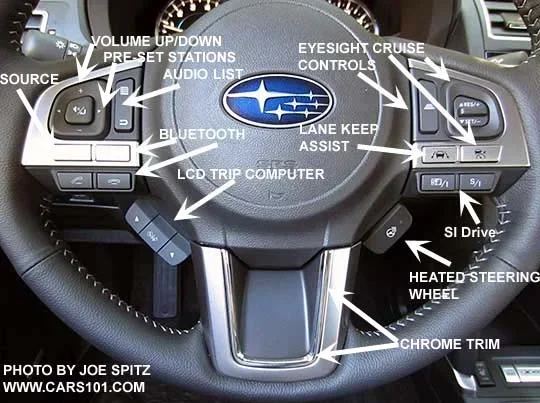
In newer Subaru models like the 2023 and 2024 Ascent, the RAB button is integrated into the steering wheel controls. You’ll find it near the cruise control stalk. Pressing the steering wheel buttons lets you toggle RAB on and off. This design keeps the center console clutter-free. If you can’t find it on the console, check the steering wheel side.
Model-Specific Locations
Here’s a quick breakdown by popular Subaru models:
- Subaru Outback: Center console, behind the gear shifter.
- Subaru Forester: Center console, same spot as the Outback.
- Subaru Crosstrek: Center console or steering wheel, depending on the year.
- Subaru Legacy: Center console, near the climate controls.
- Subaru Ascent: Steering wheel controls, integrated into the EyeSight menu.
If you’re still unsure, check your owner’s manual. The manual will have a diagram showing the exact location of the RAB button for your specific trim.
How to Use the RAB Button – A Simple Step-by-Step Guide
Using the RAB button is straightforward. You don’t need any special training. Just follow these steps every time you get behind the wheel.
Turning RAB On and Off
- Sit in the driver’s seat and close the door.
- Press the RAB button on the center console or steering wheel.
- Look at the dashboard for the green indicator light.
- The system is now active. You’ll hear a soft beep if your model has audio cues.
- To turn it off, press the same button again. The light will go off.
What Happens When You Press the Button
When you activate RAB, the rear sensors start scanning. They work at low speeds, usually under 15 mph. The system is designed for backing up scenarios. If you’re reversing and an object enters the detection zone, the car will either warn you or apply the brakes. The warning is often a beep and a message on the dashboard. If you don’t react, the brakes engage automatically. This is called automatic emergency braking in reverse.
Quick Tips for Daily Use
- Keep RAB on by default. It only activates in reverse, so it won’t interfere with normal driving.
- Use it in parking lots. Tight spaces are where RAB shines. It helps you avoid shopping carts and poles.
- Don’t rely on it completely. Always check your mirrors and turn your head. The system is a backup, not a replacement for vigilance.
- Clean the sensors after a car wash. Water and debris can block the rear sensors temporarily.
Common Mistakes Drivers Make with the RAB Button
Even though the system is simple, drivers sometimes make avoidable errors. One common mistake is turning the RAB button off and forgetting to turn it back on. This leaves you without rear protection the next time you reverse. Another mistake is assuming the system works at high speeds. RAB only activates below 15 mph. Trying to use it on the highway won’t help. Some drivers also ignore the yellow warning light. A yellow light usually means the sensor is dirty. Cleaning the rear bumper often fixes the problem right away.
Common Issues with the RAB Button and What They Mean
Like any electronic system, the RAB button can sometimes show warning signs. Most of these are easy to fix.
RAB Warning Light Colors and Their Meaning
The dashboard light tells you a lot about the system’s health:
- Green light: RAB is active and working normally.
- Yellow or amber light: The sensor is blocked or dirty. Clean the rear bumper area. A yellow light can also mean the system is testing itself after you start the car.
- Red light: This is rare. It means a serious fault has been detected. Visit a Subaru dealer for diagnosis.
When the RAB Button Doesn’t Respond
If pressing the RAB button does nothing, try a few things first. Make sure the car is in park or reverse. Some systems only allow toggling when the ignition is on. If the button is sticky, it might need cleaning. A quick wipe with a dry cloth around the button edge can help. If the system still won’t activate, the rear sensor module might need a reset.
How to Reset the System
You can often reset the RAB system with a simple reboot. Turn the ignition off, wait 30 seconds, and turn it back on. This refreshes the sensors. If the yellow light stays on, the sensor might be covered in mud or ice. Clear the rear bumper sensors and the light should go off. I’ll share more about sensor cleaning in the next section.
Expert Insights: When to See a Dealer
If the red warning light appears or the system fails to reset after a reboot, don’t ignore it. A dealer can run a diagnostic scan on the EyeSight module. They can check the rear radar and camera. Sometimes a simple software update fixes the problem. Other times, a sensor replacement is needed. Early attention can prevent bigger issues down the road.
RAB vs. Other Subaru Safety Features: What’s the Difference?
Subaru’s safety suite includes many features. It’s easy to mix them up. Here’s how the RAB button compares to other systems.
Pre-Collision Braking vs. Rear Automatic Braking
Pre-collision braking (also called Automatic Emergency Braking) works when you’re driving forward. It detects cars, pedestrians, and cyclists ahead. The RAB button does the same thing but only in reverse. Both use similar sensors, but they face different directions.
Comparison Table: RAB vs. Other Subaru Driver Assistance Features
| Feature | Direction | Activation | What It Does |
|---|---|---|---|
| Rear Automatic Braking (RAB) | Reverse | RAB button toggle | Applies brakes automatically when an obstacle is detected behind the car while backing up. |
| Pre-Collision Braking (AEB) | Forward | Always on with EyeSight | Detects forward obstacles and applies brakes to avoid or reduce collision severity. |
| Adaptive Cruise Control | Forward | Steering wheel button | Maintains a safe following distance from the car ahead. |
| Lane Keep Assist | Forward | Steering wheel button | Gently steers the car back into the lane if it drifts. |
| Brake Assist | Both | Automatic | Boosts braking force when you slam the pedal during an emergency. |
As you can see, the RAB button is specifically for reverse maneuvers. It’s a targeted safety net that complements the forward-facing systems. The pre-collision throttle management and steering for obstacle avoidance features work together with RAB to create a full-circle safety net around your Subaru.
Final Thoughts: Why the RAB Button Matters for Your Subaru
The RAB button is one of those features you might overlook until you need it. I’ve seen how it saves Subaru owners from minor fender benders in parking lots. It’s a small button with a big impact. Whether you drive a Subaru Outback, Forester, Crosstrek, or Ascent, knowing where the RAB button is and how it works gives you peace of mind.
Keep the system active whenever you’re reversing in tight spaces. Clean the rear sensors regularly to ensure accurate detection. If you ever see a warning light, don’t panic. Most issues are simple fixes. The RAB button is a testament to Subaru’s commitment to safety. It works quietly in the background, protecting your car and the people around you.
Next time you get in your Subaru, take a moment to locate the RAB button. Give it a press and watch the green light come on. You’ll feel more confident every time you back out of a spot. Safe reversing!
Frequently Asked Questions
What does the RAB button look like on a Subaru?
The RAB button is usually a small switch with a symbol showing a car reversing and a curved brake line. On the center console, it sits behind the gear shifter. On newer models, it may be a touchscreen icon within the EyeSight settings menu.
Can I turn off the RAB button, and should I?
Yes, you can turn it off by pressing the same button. However, I recommend keeping it on by default. RAB only activates in reverse, so it won’t interfere with normal driving. Turning it off removes a valuable layer of collision avoidance protection.
Why is my RAB button flashing yellow?
A yellow or amber light usually means the rear sensor is blocked or dirty. Check the rear bumper for mud, snow, or debris. A yellow light can also appear during a system self-check when you start the car. If it stays on, clean the sensors and try again.
Does RAB work on all Subaru models?
Most Subaru models with the EyeSight system include RAB. This covers the Outback, Forester, Crosstrek, Legacy, and Ascent. However, some base trims may not have the feature. Check your owner’s manual or look for the RAB button on the console or steering wheel.
Is RAB the same as automatic emergency braking?
No, they are related but different. Automatic Emergency Braking (AEB) works when you’re driving forward. The RAB button controls the Rear Automatic Braking feature, which works only in reverse. Both use similar sensor technology but face opposite directions.
How much does it cost to repair the RAB system?
Simple fixes like cleaning the sensors are free. If a sensor needs replacement, costs can range from $200 to $600 per sensor depending on the model. A dealer can run a diagnostic to pinpoint the exact issue. Regular maintenance keeps the system working and avoids expensive repairs.