How to Reset a Kia
Knowing how to reset a Kia is essential for every owner. Whether you need to clear a service light, reboot the infotainment system, or reset the oil life indicator, this guide walks you through every method with simple, clear steps. We cover popular Kia models and common reset scenarios so you can handle it yourself in minutes.
If you own a Kia, you have probably needed to reset a Kia at some point. Maybe the service light just won’t go away. Perhaps the infotainment screen froze right when you needed directions. Or your battery died and now everything on the dashboard looks off. Whatever the reason, learning how to reset different systems in your Kia can save you time and money.
This guide covers every common reset scenario for Kia vehicles. We will walk you through oil resets, battery resets, infotainment reboots, tire pressure resets, and more. The steps are simple, and most take less than five minutes. You do not need to be a mechanic to handle these tasks.
We have written this article to be your one-stop resource for resetting your Kia correctly the first time. Each section focuses on a specific system so you can jump straight to what you need. Let us get started.
Key Takeaways
- Resetting the oil life system on a Kia is quick and can be done through the steering wheel controls or dashboard menu.
- A factory reset on the infotainment screen fixes most freezing and glitching issues without a visit to the dealer.
- Resetting the battery on a Kia requires a proper disconnect procedure to avoid damaging the onboard computer.
- The tire pressure monitoring system can be reset easily after you inflate your tires to the correct PSI.
- Always consult your Kia owner’s manual because reset steps vary by model year and trim level.
- Common mistakes like holding buttons too long can cause error codes, so follow each step carefully.
📑 Table of Contents
- How to Reset the Oil Life System on a Kia
- How to Reset the Kia Infotainment System
- How to Reset the Battery on a Kia
- How to Reset the Tire Pressure Monitoring System
- How to Reset the Check Engine Light on a Kia
- Common Mistakes When Resetting a Kia
- Expert Tips for Maintaining Your Kia After a Reset
- When to See a Professional Instead of Resetting Yourself
- Final Thoughts
How to Reset the Oil Life System on a Kia
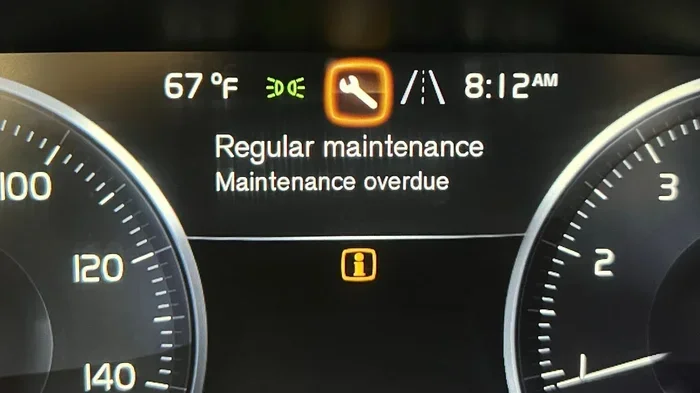
The oil life system tracks your driving habits and tells you when it is time for an oil change. After you get your oil changed, you need to reset the oil life indicator so it starts counting from zero again. This is one of the most common reasons people search for how to reset a Kia.
Steps to Reset the Oil Life System
The exact steps depend on your Kia model, but the general process is very similar across most vehicles. Here is what to do:
- Turn the ignition to the “On” position without starting the engine. You can do this by pressing the start button without pressing the brake pedal.
- Press the steering wheel button that looks like a small gauge or meter icon. On some models, this is the “OK” button on the steering wheel.
- Use the arrow buttons on the steering wheel to scroll until you see the “Oil Life” or “Maintenance” menu.
- Press and hold the “OK” button for about two to three seconds.
- The display should show “Reset Successful” or the oil life percentage should go back to 100 percent.
For newer Kia models like the Sorento, Telluride, and EV6, you may need to go through the center touchscreen instead. Navigate to Settings, then Vehicle, then Maintenance, and select “Reset Oil Life.”
When the Reset Does Not Work
Sometimes the reset will not take, and that can be frustrating. Here are a few things to try:
- Make sure the vehicle is completely stationary and in Park.
- Try turning the ignition off and back on, then repeat the steps.
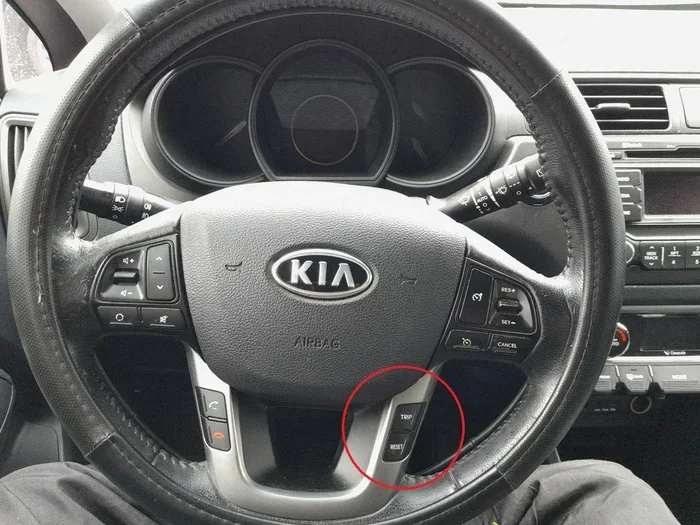
- On older models, you may need to hold the trip button on the instrument cluster for several seconds while the ignition is on.
- If nothing works, a small battery disconnect for about ten minutes can reset the entire system.
How to Reset the Kia Infotainment System
The infotainment system is the brain of your Kia’s entertainment and navigation features. Over time, it can freeze, lag, or show error messages. A factory reset on the infotainment screen often fixes these problems quickly.
Soft Reset vs Factory Reset
There are two types of resets you can perform. A soft reset simply restarts the system, while a factory reset wipes all settings and returns the system to its original state.
Soft Reset:
- Press and hold the power button on the infotainment screen for about ten seconds.
- The screen will turn off and then turn back on automatically.
- Wait for the system to fully reload before using it again.
Factory Reset:
- Go to Settings on the infotainment screen.
- Select “System” or “General Settings.”
- Choose “Factory Reset” or “Reset to Default.”
- Confirm your choice when prompted.
- The system will restart and return to its original settings.
Important Tips Before You Reset
- Make sure your phone is connected and paired before you do a factory reset, because all paired devices will be erased.
- Write down any custom settings you want to keep, like your preferred radio stations or navigation home address.
- Do not turn off the vehicle during a factory reset, as this can damage the system software.
How to Reset the Battery on a Kia
A battery reset is necessary when you have replaced your Kia’s battery or when the electrical system is acting up. This type of reset tells the onboard computer to relearn your driving patterns and recalibrate all sensors.
Steps to Reset the Battery
- Turn off the engine and remove the key from the ignition.
- Open the hood and locate the negative battery terminal. It will have a black cable and a minus (-) symbol.
- Use a wrench to loosen the nut on the negative terminal clamp.
- Carefully pull the cable off the battery post and tuck it away so it does not touch the terminal.
- Wait at least fifteen to twenty minutes.
- Reconnect the negative cable and tighten the nut securely.
- Start the engine and let it idle for a few minutes so the onboard computer can recalibrate.
After a battery reset, you may notice some warning lights on the dashboard. These should turn off after a few short drives as the system recalibrates. If they stay on, you may need to manually clear them.
What to Do After a Battery Reset
- Check that the date and time on your infotainment system are correct, because these often reset during a battery change.
- Re-pair your Bluetooth devices if they do not reconnect automatically.
- Reset your power window auto-up/auto-down features if they are not working correctly.
- Monitor the battery voltage with an OBD2 scanner to make sure it is charging properly.
How to Reset the Tire Pressure Monitoring System
The tire pressure monitoring system, or TPMS, lights up on your dashboard when one or more tires are underinflated. After you fill your tires to the correct pressure, you need to reset the TPMS so the warning light goes off.
Steps to Reset the TPMS
- Make sure all tires are inflated to the recommended PSI listed on the driver’s side door jamb.
- Start the engine and make sure the vehicle is stationary.
- On the steering wheel, press and hold the TPMS reset button. On most Kias, this button is located below the steering column on the left side of the dashboard.
- Hold the button until the TPMS warning light on the dashboard blinks three times.
- Release the button and turn the ignition off.
- Start the engine again to confirm the light has turned off.
On newer Kia models with a touchscreen, you can also reset the TPMS through the vehicle settings menu. Go to Settings, then Vehicle Settings, then TPMS, and select “Reset.”
When the TPMS Light Stays On
If the light does not turn off after you reset it, there may be a real problem. Check each tire again, including the spare. A slow leak or a faulty sensor could be the cause. In that case, it is best to visit a Kia dealership or a trusted tire shop.
How to Reset the Check Engine Light on a Kia
The check engine light can come on for many reasons, from a loose gas cap to a serious engine problem. Sometimes, after you fix the issue, the light stays on and needs to be manually reset. Here is how to handle it.
Method 1: Disconnect the Battery
Follow the same battery disconnect steps we covered in the battery reset section above. Wait about fifteen minutes, then reconnect. This clears the error codes stored in the onboard computer.
Method 2: Use an OBD2 Scanner
An OBD2 scanner is a small device that plugs into the diagnostic port under your Kia’s dashboard. Here is how to use one:
- Locate the OBD2 port, usually under the steering column on the driver’s side.
- Plug the scanner into the port.
- Turn the ignition to the “On” position.
- Follow the scanner’s on-screen instructions to read and clear the error codes.
- Once the codes are cleared, start the engine and check if the light stays off.
Important Warning
If the check engine light comes back on after you reset it, there is a real problem that needs attention. Do not ignore it. Continuing to drive with a check engine light on can cause more damage and lead to expensive repairs.
Common Mistakes When Resetting a Kia
Even simple reset procedures can go wrong if you are not careful. Here are the most common mistakes Kia owners make and how to avoid them.
Mistake 1: Holding Buttons Too Long
Many owners think holding a button longer will speed up the reset process. This is not true. Holding buttons too long can trigger error codes or put the system into a mode that is hard to exit. Always follow the recommended hold time exactly.
Mistake 2: Resetting Before Fixing the Problem
A reset clears the warning, but it does not fix the underlying issue. If your oil life system says it is time for a change, reset it after the oil change, not before. If the check engine light is on, get the car diagnosed first.
Mistake 3: Skipping the Owner’s Manual
Every Kia model has slightly different reset procedures. The owner’s manual is your best friend when it comes to resetting your Kia correctly. It will tell you exactly where the buttons are and what to do for each system.
Mistake 4: Resetting While Driving
Never attempt to reset any system while the vehicle is in motion. Always pull over to a safe, stationary location first. This keeps you safe and prevents accidental inputs to the system.
Mistake 5: Forgetting to Re-Pair Devices
After a factory reset or battery disconnect, your Bluetooth phone, saved Wi-Fi networks, and radio presets may be gone. Take a moment to reconnect everything before you hit the road.
Expert Tips for Maintaining Your Kia After a Reset
Resetting your Kia is just one part of keeping it running smoothly. Here are some expert tips that help maintain your vehicle between service visits.
- Keep your owner’s manual accessible, either in the glove box or saved as a PDF on your phone. You will refer to it often for reset procedures and maintenance schedules.
- Reset your oil life system immediately after every oil change. This keeps your maintenance schedule accurate and helps you track service intervals.
- Perform a soft reset on the infotainment system once a month. This clears temporary glitches and keeps the system running smoothly.
- Check your tire pressure monthly. Proper inflation improves fuel economy and keeps the TPMS light off.
- Use a quality OBD2 scanner at home. It helps you catch small issues before they become big problems, saving you money on repairs.
When to See a Professional Instead of Resetting Yourself
Most resets are simple and safe to do on your own. However, there are times when you should let a professional handle it. If you notice any of the following situations, it is time to visit a Kia dealership or certified mechanic:
- The check engine light comes on and stays on after you reset it multiple times.
- Warning lights flash instead of staying solid, which often indicates a serious issue.
- Your Kia will not start even after a battery reset.
- The infotainment system freezes repeatedly, even after a factory reset.
- You see fluid leaks under the vehicle along with dashboard warning lights.
- Unusual noises like grinding, squealing, or knocking accompany any warning light.
Knowing when to stop troubleshooting and seek help is just as important as knowing how to reset your Kia. A professional diagnosis can catch problems early and keep your vehicle safe on the road.
Final Thoughts
Learning how to reset a Kia gives you confidence as a car owner. You can handle oil resets, infotainment reboots, battery resets, TPMS resets, and check engine light resets without visiting a dealership. Most of these procedures take just a few minutes and require no special tools.
Always refer to your owner’s manual for model-specific instructions. If a reset does not work or a warning light comes back, do not hesitate to seek professional help. Taking care of your Kia with simple resets and regular maintenance keeps it running strong for years to come.
Now that you know how to handle the most common resets, you are better equipped to troubleshoot issues on your own. Keep this guide bookmarked for the next time a warning light pops up or a system needs a reboot.
Frequently Asked Questions
How do I reset the oil life on my Kia?
Turn the ignition to “On” without starting the engine. Use the steering wheel buttons to navigate to the “Oil Life” or “Maintenance” menu on the dashboard display. Press and hold the “OK” button for two to three seconds until the display shows “Reset Successful.” The oil life indicator will return to 100 percent.
Can I reset the check engine light myself?
Yes, you can. You can either disconnect the negative battery terminal for about fifteen minutes or use an OBD2 scanner to read and clear the error codes. However, if the light comes back on, there is an underlying issue that needs professional attention.
How long does a Kia infotainment factory reset take?
A factory reset typically takes about five to ten minutes. The screen will turn off and back on during the process. Do not turn off the vehicle while the reset is in progress, as this can cause software issues.
Why is my TPMS light still on after I reset it?
The TPMS light may stay on if one or more tires are still underinflated, if a tire sensor is faulty, or if the reset procedure was not completed correctly. Double-check your tire pressure against the recommended PSI on the driver’s door jamb and try resetting again.
Will resetting my Kia battery erase my settings?
Yes, a battery reset can erase some settings like the date and time, radio presets, and Bluetooth pairings. You will need to reconnect your devices and adjust your preferences after reconnecting the battery.
Do I need any special tools to reset a Kia?
Most resets on a Kia require no special tools at all. You only need the steering wheel buttons or the center touchscreen. The only exception is an OBD2 scanner, which is helpful for clearing check engine codes and costs around twenty to fifty dollars.