Connect Kia 2023 to Bluetooth
Connecting your Kia 2023 to Bluetooth is simple and keeps you hands-free while driving. This guide walks you through pairing your phone, streaming music, and fixing common connection issues. You will also learn pro tips to get the best sound quality from your Kia’s audio system.
You just got behind the wheel of a shiny new Kia 2023, and the first thing you want to do is stream your favorite playlist. But wait, how do you actually connect Kia 2023 to Bluetooth? It sounds technical, but here is the good news, it is really straightforward. Whether you own a Kia Sportage, Sorento, or any other 2023 model, the process is almost the same across the lineup.
In this guide, we will walk you through every step of pairing your phone with your Kia 2023. We will cover the basics, share quick tips, and even help you troubleshoot if something goes wrong. By the end, you will be streaming music and taking calls hands-free like a pro. Let us get started.
Key Takeaways
- Easy Pairing Process: Connecting your phone to a Kia 2023 takes just a few minutes using the UVO infotainment system.
- Multiple Devices Supported: Kia 2023 models allow you to pair more than one phone at a time for shared driving.
- Wireless Streaming Works Great: You can stream music, podcasts, and take calls without any wires.
- Troubleshooting Is Simple: Most Bluetooth problems can be fixed by restarting your phone or deleting old pairings.
- Apple CarPlay and Android Auto Help Too: These wireless features work alongside Bluetooth for a full connected experience.
- Firmware Updates Matter: Keeping your Kia’s software updated prevents many Bluetooth connection problems.
📑 Table of Contents
- Why Connecting Your Kia 2023 to Bluetooth Matters
- How to Connect Kia 2023 to Bluetooth: Step-by-Step
- Troubleshooting Common Bluetooth Connection Issues
- Pro Tips for the Best Bluetooth Experience in Your Kia 2023
- Comparison: Kia 2023 Bluetooth vs. Wired Connections
- Quick Tips and Common Mistakes to Avoid
- Expert Insight: What Kia Engineers Say About Bluetooth
- Final Thoughts
Why Connecting Your Kia 2023 to Bluetooth Matters
Bluetooth is not just a fancy tech feature. It is a safety tool and a convenience tool rolled into one. When you connect Kia 2023 to Bluetooth, you unlock a whole new way to interact with your car. Here is why it matters so much.
First, it keeps your hands on the wheel and your eyes on the road. You can answer calls, skip songs, and adjust volume using steering wheel controls. Second, wireless audio streaming means no more fumbling with aux cords or FM transmitters. Third, modern Kia models support both Apple CarPlay and Android Auto, which pair seamlessly over Bluetooth. These wireless connectivity features make every drive more enjoyable.
What Bluetooth Features Does the Kia 2023 Support?
The 2023 Kia lineup comes packed with solid Bluetooth capabilities. Here is what you can expect:
- Hands-Free Calling: Make and receive calls without touching your phone.
- Audio Streaming: Play music, audiobooks, and podcasts from your phone through your car speakers.
- Voice Recognition: Use voice commands to control calls and media.
- Multi-Device Pairing: Connect more than one phone to the car at the same time.
- Wireless Apple CarPlay and Android Auto: Mirror your phone screen on the infotainment display.
The Kia UVO infotainment system manages all of these features from one central screen. It is intuitive and responsive, which makes the whole experience smooth.
How to Connect Kia 2023 to Bluetooth: Step-by-Step
Now let us get into the actual steps. Whether you are using an iPhone or an Android device, the process is very similar. Follow along and you will be connected in minutes.
Step 1: Prepare Your Phone and Your Kia
Before you start, make sure a few things are in place. First, turn on your Kia 2023 and let the infotainment system fully boot up. Second, make sure Bluetooth is turned on your phone. You can usually find this in your quick settings panel by swiping down from the top of your screen.
It also helps to turn off Bluetooth on any other devices nearby. This prevents your Kia from trying to connect to the wrong phone. A clean slate makes the pairing process much faster.
Step 2: Put Your Kia in Pairing Mode
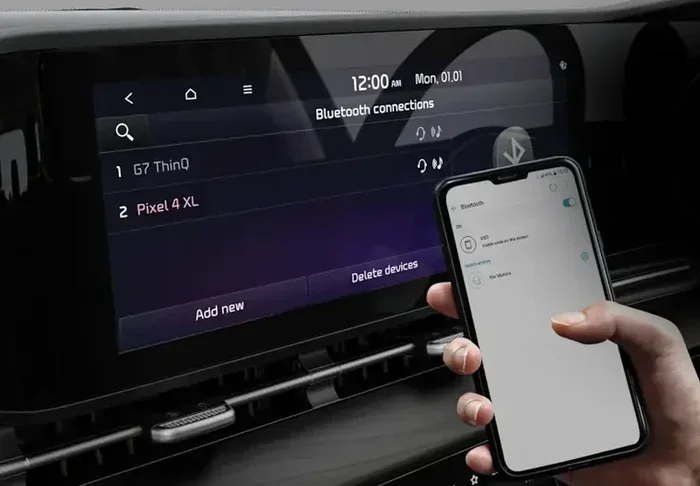
On the Kia 2023, navigate to the Settings menu on the infotainment screen. Look for the Bluetooth option. Tap on it and select the option to add a new device. Your Kia will now search for nearby Bluetooth signals.
You should see your car’s name appear on your phone’s Bluetooth list. It might show up as “Kia UVO” or simply “Kia 2023.” Tap on it to begin the pairing process.
Step 3: Confirm the Pairing on Both Devices
Your phone and your Kia will each display a pairing code. Make sure the codes match, then tap “Pair” or “Confirm” on both screens. This step ensures that only your trusted devices can connect to the car.
Once paired, your Kia 2023 will automatically connect to your phone whenever you get in the car, as long as Bluetooth is turned on. This is called automatic reconnection, and it is one of the best parts about modern Bluetooth systems.
Step 4: Test Your Connection
Play a song on your phone and see if it comes through the car speakers. Try making a test call to make sure the microphone picks up your voice clearly. Adjust the volume using the steering wheel buttons to confirm everything is working.
If you hear sound and the call connects, congratulations, you are all set. If not, do not worry, we have a troubleshooting section coming up.
Troubleshooting Common Bluetooth Connection Issues
Even with the best technology, things can go wrong sometimes. Bluetooth connection problems are common, but they are almost always easy to fix. Here are the most frequent issues and how to solve them.
Bluetooth Won’t Turn On
If the Bluetooth option is grayed out or won’t switch on, try restarting the infotainment system. You can do this by holding down the power button on the Kia screen for about 10 seconds. The system will reboot, and Bluetooth should work again.
Also check that your phone’s Bluetooth is fully enabled. Sometimes toggling it off and back on does the trick. Restarting your phone is another simple fix that works surprisingly well.
Paired but No Sound
This is a common frustration. Your phone shows as connected, but no music plays through the speakers. The first thing to check is the audio source on your Kia. Make sure the infotainment system is set to “Bluetooth Audio” or “Media” mode, not Radio or Aux.
On your phone, check the volume and make sure media audio is not muted. Sometimes a phone update changes audio routing settings. Going back into your phone’s Bluetooth settings and toggling the media audio option on can fix this quickly.
Connection Drops Frequently
If your Kia Bluetooth pairing keeps disconnecting, the issue might be distance or interference. Bluetooth works best within about 30 feet. If your phone is buried deep in a bag or pocket, the signal may weaken.
Another cause is too many paired devices. Your Kia can remember multiple phones, but old or unused pairings can cause confusion. Go into your Kia’s Bluetooth settings and delete any devices you no longer use. This clears the list and helps the system focus on your active phone.
Phone Won’t Pair at All
If your phone refuses to connect, try “forgetting” the car on your phone’s Bluetooth list and then pairing fresh. On the Kia side, delete the phone entry too. Start the pairing process from scratch. This solves the problem about 90% of the time.
If that does not work, check for software updates. Both your phone and your Kia may have pending updates that fix compatibility issues with Bluetooth. Keeping everything up to date is a great habit for any connected car owner.
Pro Tips for the Best Bluetooth Experience in Your Kia 2023
You have connected Kia 2023 to Bluetooth, but you can make the experience even better with a few smart tips. These are the kind of things that seasoned Kia owners know but don’t always share.
Keep Your Phone Close to the Center Console
The Bluetooth antenna in your Kia is located near the center console. Placing your phone in the center console tray or on the passenger seat gives you the strongest and most stable signal. This is especially helpful if you notice dropouts on longer drives.
Use Voice Commands for Safety
The Kia 2023 supports voice recognition technology through the UVO system. Once connected, you can say “Hey Kia” followed by a command. Try saying something like “Call Mom” or “Play my driving playlist.” This keeps your hands free and your focus on the road.
Set Up Multiple Profiles for Different Drivers
If more than one person drives the car, each person can have their own Bluetooth profile. The Kia 2023 remembers multiple paired phones and will automatically connect to the last one used. You can also set up different audio preferences for each profile, like favorite radio stations or streaming apps.
Update Your UVO System Regularly
Kia releases UVO software updates that improve Bluetooth performance and fix bugs. Check your dealer or the Kia app for available updates. A simple update can resolve connection issues you did not even know you had.
Use Wireless Apple CarPlay or Android Auto for More Features
If your Kia 2023 supports wireless Apple CarPlay or Android Auto, use it alongside Bluetooth. These features give you a mirrored version of your phone on the car screen. You get navigation, messaging, and music all in one place. They rely on the same Bluetooth connection, so a strong pairing is the foundation.
Comparison: Kia 2023 Bluetooth vs. Wired Connections
You might wonder if a wired connection is still better than Bluetooth. Here is a quick look at how they compare.
| Feature | Bluetooth | Wired (USB/Aux) |
|---|---|---|
| Convenience | Wireless, no cables needed | Requires plugging in a cable |
| Sound Quality | Very good, especially with aptX codecs | Good, but depends on cable quality |
| Hands-Free Calling | Full support with car microphone | Limited or no support |
| Automatic Connection | Connects when you get in the car | Manual connection each time |
| Multi-Device Support | Yes, multiple phones can pair | Only one device at a time |
| Charging | Phone charges separately | Phone charges through USB |
As you can see, Bluetooth connectivity wins on convenience and flexibility. Wired connections still have a place, especially for charging, but Bluetooth is the go-to choice for most Kia 2023 owners.
Quick Tips and Common Mistakes to Avoid
Here are some quick tips to keep your Bluetooth connection running smoothly:
- Always delete old pairings. Cluttered Bluetooth lists slow things down.
- Restart both devices if the connection acts up.
- Keep your Kia’s firmware updated through the UVO system.
- Avoid placing your phone near metal objects that can block the Bluetooth signal.
- Turn off Bluetooth on devices you are not using to reduce interference.
Now, here are a few common mistakes that trip people up:
- Not checking the audio source: Many people connect Bluetooth but forget to switch the audio input to Bluetooth mode.
- Ignoring phone permissions: Your phone may ask for permission to share contacts and media with the car. Always allow these for the full experience.
- Pairing in a crowded area: Busy parking lots with dozens of Bluetooth devices can confuse the system. Pair your car in a quiet spot for the best results.
Expert Insight: What Kia Engineers Say About Bluetooth
According to Kia’s engineering team, the 2023 models use the latest Bluetooth 5.0 standard. This offers a stronger signal, longer range, and lower power consumption than older versions. The team also emphasizes that keeping the infotainment system updated is the single best thing owners can do to maintain a strong Bluetooth connection.
“Bluetooth technology evolves fast, and we build our systems to keep up,” says a Kia spokesperson. “Regular updates ensure that owners always have the best wireless experience possible.”
Final Thoughts
Connecting Kia 2023 to Bluetooth is one of the first things you should do after picking up your new car. It transforms your driving experience by giving you hands-free calling, wireless music streaming, and seamless phone integration. The process is simple, the features are powerful, and the convenience is hard to beat.
If you run into any issues, remember that most problems have quick fixes. Restart your devices, clear old pairings, and keep your software updated. With these tips, you will enjoy a smooth and reliable Bluetooth connection every time you get behind the wheel.
Take a few minutes today to pair your phone and explore all the features your Kia 2023 has to offer. You will wonder how you ever drove without it. Happy listening and safe driving.