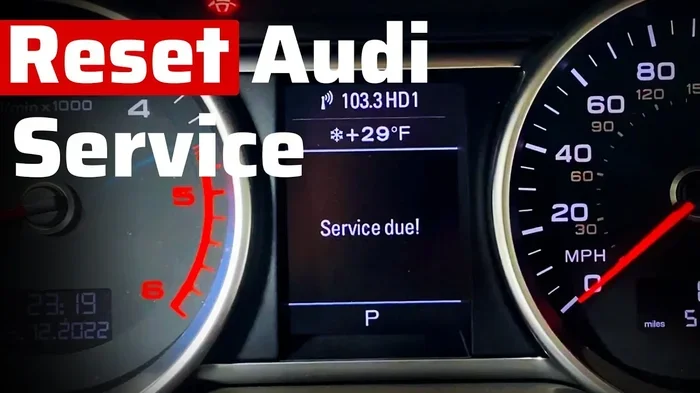
Audi Service Due Reset Tool The Ultimate Step by Step Guide
An audi service due reset tool is a simple device or software that helps you clear the service reminder on your Audi dashboard. Whether you own an A4, Q5, or any other model, resetting your service interval is quick and easy. This guide walks you through every step with clear instructions and helpful tips. You will learn what the tool does, why it matters, and how to use it safely. Keep your Audi maintenance schedule on track without visiting a dealer.
Owning an Audi comes with a great driving experience, but it also comes with maintenance responsibilities. Your dashboard lights up with a service due indicator when it is time for an oil change, inspection, or other scheduled work. Ignoring that light is not a good idea. It can lead to missed maintenance, reduced performance, and even warranty issues. That is where an audi service due reset tool becomes your best friend.
A service light reset tool does exactly what the name suggests. It clears the service reminder from your Audi’s instrument cluster after you have completed the needed maintenance. Whether you change your own oil or visit a trusted mechanic, resetting the light is a small step that makes a big difference. This guide will show you everything you need to know about using one of these tools, from choosing the right device to completing the reset process without any hassle.
Key Takeaways
- Easy DIY Reset: An audi service due reset tool lets you clear the service light at home in minutes.
- Saves Money: Avoid costly dealer visits by handling your own service interval reset.
- Works Across Models: The tool is compatible with most Audi models from A3 to Q7.
- Prevents Missed Maintenance: Resetting the reminder keeps your service history accurate and your car running well.
- Simple Process: You only need the tool, your car keys, and about 10 minutes of time.
- Multiple Tool Options: From OBD2 scanners to dedicated Audi software, there is a tool for every budget.
📑 Table of Contents
- What Is an Audi Service Due Reset Tool?
- Why Resetting Your Service Light Matters
- How to Choose the Right Reset Tool for Your Audi
- Step by Step Guide to Resetting Your Audi Service Light
- Common Mistakes to Avoid When Resetting the Service Light
- Expert Tips for Getting the Most Out of Your Reset Tool
- Quick Tips for a Smooth Reset Experience
- Frequently Asked Questions
- Conclusion
What Is an Audi Service Due Reset Tool?
A service due reset tool is a device or software application designed to clear the maintenance reminder on your Audi’s dashboard. Every Audi has a built-in service reminder system that tracks mileage and time intervals. When the system determines that maintenance is due, it displays a warning on the instrument cluster. The reset tool communicates with the car’s onboard computer to clear that warning once the service has been completed.
How the Service Reminder System Works
Your Audi tracks two main factors for maintenance reminders. The first is mileage. For example, your car may be programmed to remind you every 10,000 miles or 15,000 kilometers. The second factor is time. Even if you do not drive many miles, the system will still prompt you for service once a year passes. Both factors are managed by the Audi instrument cluster, which is the display panel behind your steering wheel.
The system uses a service interval counter that counts down from the last reset point. When the counter reaches zero, the service due indicator activates. A yellow or red wrench symbol typically appears on the dashboard. At that point, your car is telling you it is time for scheduled maintenance. Using an audi service due reset tool after completing the service brings that counter back to the starting point.
Types of Reset Tools Available
Not all reset tools are the same. There are several types available on the market, and each has its own strengths. Here is a quick look at the most common options:
- OBD2 Scanners: These are universal diagnostic tools that connect to your car’s OBD2 port. Many modern scanners support Audi-specific functions including service light reset.
- Dedicated Audi Tools: Devices like the VCDS (VAG-COM) or OBDeleven are designed specifically for Volkswagen Group vehicles. They offer deep access to Audi systems and reliable reset functions.
- Mobile Apps with Adapters: Some apps pair with a Bluetooth OBD2 adapter on your phone. They provide a user-friendly interface for resetting service lights.
- Dealer-Level Diagnostic Software: These professional tools offer the most comprehensive features but come at a higher price point.
Why Resetting Your Service Light Matters
Some Audi owners think the service light is just a minor annoyance. They ignore it or drive with it on for months. That is a mistake. The service due indicator is connected to your car’s overall health tracking system. Here is why resetting it properly after each service is important.
Maintaining Accurate Service History
Your service history log is a record of every maintenance task performed on your Audi. When you reset the service light with a proper tool, you are also updating the onboard computer’s records. This creates a clear trail of when services were completed. Accurate records are valuable if you ever sell your car or file a warranty claim. A messy service history can reduce your car’s resale value and create confusion during inspections.
Protecting Your Warranty
If your Audi is still under warranty, keeping up with the Audi maintenance schedule is essential. The manufacturer expects you to follow the recommended service intervals. Using an audi service due reset tool after each service visit proves that you are staying on top of maintenance. Skipping services or failing to reset the light could void your warranty coverage when you need it most.
Preventing Costly Repairs
Regular maintenance keeps small problems from turning into big expenses. Oil changes, filter replacements, and fluid checks are all part of the standard Audi repair schedule. When you reset the service light, you are setting a new baseline for the next service interval. This helps you stay on track and avoid overdue maintenance that could lead to engine damage or other serious issues.
How to Choose the Right Reset Tool for Your Audi
Not every reset tool works perfectly with every Audi model. Choosing the right one depends on your budget, your car model, and how much control you want over the process. Here is what to consider before making a purchase.
Compatibility With Your Audi Model
Before buying any tool, check that it supports your specific Audi model and year. Most quality tools work with models from the A3, A4, A6, Q5, and Q7 families. However, older models from before 2010 may require different adapters or software versions. Always check the product specifications to confirm compatibility with your Audi. A tool that works with your neighbor’s A3 may not support your 2015 Q5 without the right firmware update.
Budget Considerations
Reset tools range from under 30 dollars to over 300 dollars. Basic OBD2 scanners with reset functionality are the most affordable option. Dedicated Audi tools like the OBDeleven or VCDS cost more but offer much greater functionality. They can read and clear fault codes, adjust settings, and perform advanced diagnostics beyond just resetting the service light. If you plan to use the tool for multiple tasks, investing in a higher-quality option pays off in the long run.
Ease of Use
Some tools are plug-and-play with simple on-screen instructions. Others require technical knowledge and software setup. If you are not comfortable with car electronics, look for a tool with a user-friendly interface and clear step-by-step guidance. Many modern options come with video tutorials and customer support to walk you through the process. The goal is to make the service interval reset as simple as possible.
Step by Step Guide to Resetting Your Audi Service Light
Now that you understand what the tool does and how to choose one, let us walk through the actual reset process. The steps below apply to most Audi models, but always refer to your Audi owner’s manual for model-specific details.
Step 1: Complete Your Scheduled Service
Before you even think about resetting the light, make sure the service has been completed. Whether you changed the oil, replaced the air filter, or performed a full inspection, the work must be done first. Resetting the light without completing the service will only clear the reminder and hide the fact that maintenance is still overdue.
Step 2: Locate the OBD2 Port
On most Audi models, the OBD2 port is located under the dashboard on the driver’s side. It is usually near the steering column, below the fuse box cover. You may need to remove a small plastic cover to access it. Plug your reset tool or OBD2 scanner into the port firmly until it clicks into place.
Step 3: Turn the Ignition to the On Position
Do not start the engine. Simply turn the key to the “on” position or press the start button without pressing the brake pedal. This powers up the car’s electrical systems and allows the diagnostic tool to communicate with the onboard computer. The tool should light up or connect to a paired mobile app.
Step 4: Navigate to the Service Reset Function
Once the tool is connected, open the software or follow the on-screen prompts. Look for a menu option labeled “Service Reset,” “Maintenance Reset,” or “Clear Service Reminder.” On dedicated Audi tools like VCDS or OBDeleven, this function is usually found under the “Adaptation” or “Coding” section. Select your specific Audi model from the list if prompted.
Step 5: Confirm and Execute the Reset
The tool will display the current service interval status. Follow the prompts to confirm the reset. The tool will send a command to the Audi instrument cluster to clear the service counter. You may see a confirmation message on the tool’s screen. Wait for the process to complete before disconnecting the tool.
Step 6: Turn Off the Ignition and Verify
Turn the ignition off, wait a few seconds, and then turn it back on. Check the dashboard to confirm that the service warning light has disappeared. If the light is still on, repeat the process or check that the tool is fully compatible with your model. A successful reset means your service due indicator is now cleared and the counter has been reset to zero.
Common Mistakes to Avoid When Resetting the Service Light
Resetting the service light seems straightforward, but small mistakes can cause problems. Here are the most common errors Audi owners make and how to avoid them.
Resetting Before Completing the Service
This is the number one mistake people make. Clearing the light before the actual maintenance is done defeats the entire purpose. The service reminder exists to tell you when work needs attention. Resetting it too early means you may forget about the overdue service. Always complete the maintenance first, then reset.
Using an Incompatible Tool
Not every OBD2 scanner supports Audi-specific reset functions. Universal scanners may read and clear fault codes but fail at resetting the service interval. Before purchasing, confirm that the tool explicitly lists Audi service light reset as a supported feature. Using the wrong tool can lead to frustration and wasted money.
Disconnecting the Tool Too Early
The reset process takes a few moments to complete. If you disconnect the tool or turn off the ignition before the process finishes, the reset may not take effect. Wait for the confirmation message on the tool’s screen and allow the car’s computer a few seconds to process the command before turning anything off.
Ignoring Underlying Issues
Sometimes the service light comes on because of a deeper problem, not just a routine maintenance reminder. If the light returns shortly after resetting, there may be an underlying fault code stored in the system. Use your diagnostic tool to check for error codes and address any issues before resetting the light again.
Expert Tips for Getting the Most Out of Your Reset Tool
A few insider tips can help you get better results and protect your Audi’s systems. These practical insights come from experienced Audi owners and automotive professionals.
Keep Your Tool Updated
Audi releases software updates regularly that improve compatibility and add new features. If your tool supports firmware updates, keep it current. An outdated tool may not work correctly with newer Audi models or software versions. Check the manufacturer’s website for updates every few months.
Record Your Service Dates
Even with a reset tool, it is wise to keep a manual log of your service dates and mileage. Write down each oil change, tire rotation, and inspection in a notebook or a digital app. This creates a backup record that is independent of your car’s computer. If you ever sell your Audi or visit a new mechanic, this log will be invaluable.
Use the Tool for More Than Just Resets
Most quality diagnostic tools do much more than reset service lights. They can read and clear fault codes, monitor live sensor data, and check battery health. Take advantage of these features to stay proactive about your car’s condition. Catching small issues early can save you from expensive repairs later.
Know When to Visit a Professional
While an audi service due reset tool handles most routine resets easily, some situations require professional help. If your dashboard displays multiple warning lights, if the reset does not work after several attempts, or if you see error messages during the process, it is time to consult a certified Audi technician. A professional has access to advanced diagnostic equipment and factory-level software that goes beyond what consumer tools can do.
Quick Tips for a Smooth Reset Experience
- Always have your Audi owner’s manual nearby for model-specific instructions.
- Make sure your car battery is fully charged before starting the reset process.
- Keep the ignition in the “on” position throughout the entire process.
- Do not turn the steering wheel while the tool is connected to avoid locking the steering column.
- Save the user manual or software guide for your reset tool for future reference.
- Perform the reset immediately after completing the service for the best results.
Frequently Asked Questions
Can I reset the Audi service light without a tool?
Some older Audi models allow you to reset the service light using a combination of dashboard buttons. However, most modern Audis require a dedicated audi service due reset tool or diagnostic scanner. Check your Audi owner’s manual to see if your specific model supports a manual reset method. For the most reliable results, using a proper tool is always recommended.
How often should I reset my Audi service light?
You should reset the service light every time you complete a scheduled maintenance task. This could be an oil change, tire rotation, or annual inspection. Resetting after each service keeps your Audi maintenance schedule accurate and ensures the reminder system works correctly for the next interval.
Will resetting the service light void my Audi warranty?
No, resetting the service light with a proper tool does not void your warranty. The light is simply a reminder, not a warranty condition. What matters is that you actually complete the required maintenance on time. Keep records of all service visits to prove compliance with the Audi repair schedule if needed.
What is the difference between an OBD2 scanner and a dedicated Audi tool?
An OBD2 scanner is a universal tool that works with most vehicles. It reads and clears general fault codes. A dedicated Audi tool like VCDS or OBDeleven is specifically designed for Volkswagen Group vehicles. It offers deeper access to Audi systems, including advanced reset functions, coding options, and model-specific diagnostics. For Audi owners, a dedicated tool provides better accuracy and more features.
Can I use a mobile app and Bluetooth adapter to reset my service light?
Yes, many mobile apps paired with a Bluetooth OBD2 adapter can reset Audi service lights. Apps like OBDeleven, Carly, or Car Scanner offer this functionality. Make sure the app supports your specific Audi model and year. The adapter must also be compatible with the app and your car’s OBD2 system for the reset to work properly.
What should I do if the service light comes back after resetting?
If the service light returns shortly after resetting, there may be an unresolved issue. Use your diagnostic tool to check for stored fault codes in the system. The light may be triggered by a sensor problem, a pending maintenance task, or an incomplete reset. If you cannot identify the cause, visit a certified Audi technician for a thorough diagnostic check.
Conclusion
Keeping your Audi in top shape does not have to be complicated or expensive. An audi service due reset tool gives you the power to manage your car’s maintenance reminders right from your driveway. By following the steps in this guide, you can reset your service light confidently, maintain an accurate service history, and avoid unnecessary trips to the dealer.
Remember to choose a tool that is compatible with your model, complete the maintenance before resetting, and keep a personal log of all service dates. These small habits add up to big benefits over the life of your Audi. A well-maintained car runs better, lasts longer, and holds its value. Take control of your Audi maintenance schedule today, and enjoy the peace of mind that comes with knowing your car is always in top condition.
Whether you are a seasoned DIY mechanic or a first-time Audi owner, a quality reset tool is a smart investment. It saves you time, money, and hassle. So grab your tool, follow the steps, and keep your Audi running the way it was designed to run.