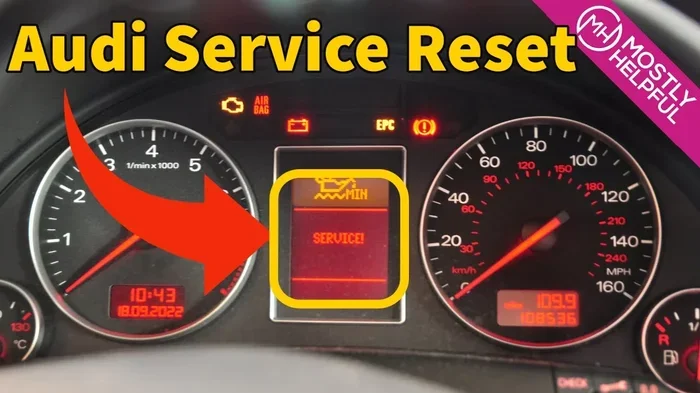
Audi A4 Inspection Reset The Complete Step by Step Guide
This audi a4 inspection reset guide shows you exactly how to clear the service reminder on any A4 model. You’ll learn the simple button sequence for B5 through B9 generations, plus how to use an OBD2 scanner if needed. Keep your Audi’s maintenance schedule on track without a dealer visit.
Have you ever seen that little wrench or inspection light flash on your Audi A4 dash? It is a reminder that your car is due for service. Ignoring it can lead to missed maintenance, which might affect your warranty or resale value. The good news is that you can clear the audi a4 inspection reset yourself in just a few minutes. This guide walks you through every method, from the simple button sequence to using an OBD2 scanner. Whether you own a 2002 B5 or a 2023 B9, you will find the right steps here.
Many owners think they need a dealer to reset the service light. That is not true. With the right knowledge, you can handle the audi a4 inspection reset at home. It saves time and money. You will also learn why resetting the light matters and how to avoid common errors. Let us dive in.
Key Takeaways
- Reset the inspection light yourself: You can clear the service reminder on any Audi A4 with a few button presses or a simple scan tool.
- Works for all generations: The method covers B5, B6, B7, B8, and B9 models from 1995 to 2024.
- No special tools needed: Just the steering wheel buttons or a cheap OBD2 scanner for older models.
- Reset after every service: Clearing the indicator confirms the maintenance was done and keeps your service history accurate.
- Avoid common mistakes: Don’t reset without completing the actual service, and double-check the oil life system if equipped.
- Quick process: The entire reset takes less than five minutes once you know the steps.
📑 Table of Contents
- What Is an Audi A4 Inspection Reset?
- Why You Should Reset the Inspection Light
- How to Perform an Audi A4 Inspection Reset
- Reset the Audi A4 Inspection Light with an OBD2 Scanner
- Common Mistakes to Avoid When Resetting the Inspection Light
- Quick Tips for Maintaining Your Audi A4 Service Schedule
- Expert Insights: When to Seek Professional Help
- Final Thoughts
What Is an Audi A4 Inspection Reset?
The audi a4 inspection reset clears the maintenance reminder after you complete a service. It does not change the actual service interval. The car’s computer tracks mileage and time to prompt an oil change or inspection. When the light stays on, it can be annoying. Resetting it tells the system that the service is done. This is part of basic Audi A4 ownership. You will often hear it called the service interval reset or maintenance light reset.
The inspection light is different from a red warning light. A red light means stop driving immediately. A yellow wrench or inspection symbol means a scheduled service is due. The service interval reset only clears the yellow symbol. It does not fix a real mechanical problem. Always check your owner’s manual to understand your specific dashboard symbols.
Why You Should Reset the Inspection Light
Resetting the audi a4 inspection reset light is more than just clearing a nuisance. It keeps your vehicle’s service records clean. A clean dashboard means no distracting warnings. It also helps when you sell the car, because buyers trust a well-maintained history. Skipping the reset can cause the light to stay on, which might trigger a failed inspection or confuse the next owner. So always perform the service interval reset after each oil change or inspection.
- Keeps service history accurate: A clean reset log shows you stay on top of maintenance.
- Avoids false warnings: A stuck light can distract you from real issues.
- Prevents unnecessary dealer visits: You do not have to pay a mechanic for a simple reset.
- Maintains resale value: Buyers look for complete service records.
- Ensures warranty compliance: Some warranties require proof of timely service.
How to Perform an Audi A4 Inspection Reset
The exact steps depend on your Audi A4 generation. Below is a quick comparison table, followed by detailed instructions for each model range.
| Generation | Years | Reset Method |
|---|---|---|
| B5 / B6 | 1995–2005 | Instrument cluster trip button |
| B7 / B8 | 2005–2016 | Turn signal lever reset stem |
| B9 | 2016–Present | MMI infotainment menu |
Reset Method for B5 and B6 Models (1995–2005)
These early Audis use a simple button on the instrument cluster. Follow these numbered steps:
- Turn the ignition to the ON position. Do not start the engine.
- Locate the trip reset button on the instrument cluster. It is usually a small pinhole or button near the odometer.
- Press and hold the trip reset button.
- While holding it, turn the ignition to the OFF position, then back to ON.
- Keep holding the button until the display shows “Service Due” or “Inspection Due.”
- Release the button. Then press and release the trip button once more to reset.
- The light should now be off. Start the engine to confirm.
Reset Method for B7 and B8 Models (2005–2016)
B7 and B8 models use the steering wheel reset stem. Here is how to do it:
- Turn the ignition to ON without starting the engine.
- Press the reset stem on the end of the left turn signal lever.
- Hold the stem for about 10 seconds. The display will show “Service Due.”
- Release the stem. Then press it once quickly to reset the audi a4 inspection reset counter.
- The light should disappear. You may need to cycle the ignition off and on to confirm.
Reset Method for B9 Models (2016–Present)
Newer Audis use the MMI infotainment system. The process is slightly different:
- Press the MENU button on the steering wheel.
- Navigate to Car Setup.
- Select Service.
- Choose Service Interval.
- Select Reset.
- Confirm the reset when prompted.
- The inspection light will turn off. You can also use voice commands by saying “Reset service interval.”
Quick Tips for Button and Stem Resets
- Use a pen tip to press the small trip button on older models.
- Ensure the ignition is in ON, not START. Starting the engine will cancel the sequence.
- Hold the button or stem firmly. Do not release too early.
- If the display does not change, try cycling the ignition off and on again.
- Always reset immediately after the service is complete.
Common Mistakes in Button and Stem Resets
- Turning the key to START instead of ON. This resets the sequence.
- Releasing the button too soon. You must hold it until the message appears.
- Pressing the wrong button. The trip button is not the same as the reset button on some models.
- Trying to reset the light without actually doing the service. This can mask real maintenance needs.
Reset the Audi A4 Inspection Light with an OBD2 Scanner
An OBD2 scanner is a handy tool for any Audi owner. It reads and clears the audi a4 inspection reset code quickly. You can buy a basic scanner for under $30. This method works even if the button sequence fails. It also lets you check for hidden fault codes. Here is how to do it:
- Locate the OBD2 port under the dashboard on the driver’s side.
- Plug the scanner into the port.
- Turn the ignition to ON.
- Wait for the scanner to connect to the car’s computer.
- Select “Clear Codes” or “Reset Service Interval” from the menu.
- Confirm the action. The scanner will clear the inspection light.
- Disconnect the scanner and start the engine to verify the light is off.
Using an OBD2 scanner is the most reliable method for stubborn lights. It also stores a record of the reset. This can be useful for service history. A service interval reset with a scanner takes about two minutes. It is worth owning one if you do your own oil changes.
Common Mistakes to Avoid When Resetting the Inspection Light
One of the biggest mistakes is resetting the audi a4 inspection reset light without actually doing the service. The light is a reminder, not just a nuisance. If you clear it without changing the oil, you risk engine damage. Another mistake is confusing the oil life system with the inspection counter. Some Audis track both separately. You may need to reset both. Always check your owner’s manual. Never reset the light repeatedly to silence it. If the light returns, there is an underlying issue that needs attention. Avoid these errors, and your service interval reset will be smooth.
- Resetting without servicing: This hides the real maintenance need.
- Confusing oil life and inspection: Some models require two separate resets.
- Using the wrong ignition position: Always use ON, not START.
- Not holding the button long enough: The system needs time to register the command.
- Ignoring a returning light: A light that comes back means something is wrong.
Quick Tips for Maintaining Your Audi A4 Service Schedule
Keeping your Audi A4 in top shape goes beyond just resetting the light. A few simple habits make a big difference. Set a calendar reminder for your next oil change. Keep a service log in your glovebox. Use OEM or high-quality parts. Check the oil level every month. Reset the light immediately after the service is done. Use a quality OBD2 scanner for regular diagnostics. These steps keep your maintenance schedule on track and your car running smoothly.
- Set reminders: Use your phone or a dashboard sticker to note the next due date.
- Keep a log: Write down every oil change and inspection. It boosts resale value.
- Use quality oil: Stick to Audi-recommended oil grades.
- Check tire pressure monthly: Proper pressure improves fuel economy and safety.
- Reset immediately: Do not let the light linger after service is complete.
Expert Insights: When to Seek Professional Help
In rare cases, the audi a4 inspection reset will not clear with the standard method. This often points to a deeper issue. The inspection module may have stored a fault code. A professional with a VAG-COM or VCDS diagnostic tool can access the Audi-specific systems. They can clear stubborn codes and verify the service was recorded. If your dashboard shows a red warning instead of a yellow wrench, stop driving and get help. A red light means urgent attention. A yellow wrench or inspection light is usually a scheduled reminder. Knowing the difference keeps you safe.
Key Takeaways for Professional Help
- Stubborn lights need a pro: A VAG-COM can clear codes that basic methods cannot.
- Red vs. yellow lights: Red means stop; yellow means schedule service.
- Deep faults require diagnosis: A returning light may indicate a sensor problem.
- Warranty considerations: If your car is still under warranty, check with the dealer first.
Final Thoughts
Performing an audi a4 inspection reset is a simple skill every Audi A4 owner should have. It keeps your car running smoothly and your service records clean. Whether you use the button method, the steering wheel controls, or an OBD2 scanner, the process takes less than five minutes. Always reset the light right after you complete the service. Avoid the common mistakes we covered, and you will never have a nagging warning light. Share this guide with fellow Audi owners. A little knowledge goes a long way in maintaining your vehicle.
Now you know exactly how to handle the audi a4 inspection reset. You can save time, money, and trips to the dealer. Keep this guide handy for your next service. Your Audi A4 will thank you with reliable performance for years to come.
Frequently Asked Questions
How do I reset the inspection light on my Audi A4?
The method depends on your model year. For B5 and B6 models, use the trip button on the instrument cluster. For B7 and B8, press and hold the reset stem on the turn signal lever. For B9 models, use the MMI menu under Car Setup > Service > Reset. You can also use an OBD2 scanner for all generations.
Can I reset the Audi A4 inspection light without a scanner?
Yes, you can reset the light without a scanner on most model years. The button sequence on the instrument cluster or the steering wheel stem works for B5 through B8 models. B9 models use the infotainment screen. An OBD2 scanner is only needed if the standard method fails or if you want to read hidden fault codes.
What does the Audi A4 inspection light mean?
The inspection light is a yellow wrench or service symbol. It means your Audi is due for scheduled maintenance, such as an oil change or inspection. It is not an emergency warning. A red light on the other hand indicates a serious problem that needs immediate attention. Always check the color and symbol to know the difference.
How often should I reset the inspection interval?
You should reset the interval every time you complete a service. This includes oil changes, tire rotations, and multi-point inspections. Resetting confirms that the maintenance was done. It keeps the service history accurate and prevents the light from coming back prematurely.
Is it safe to drive with the inspection light on?
Yes, it is generally safe to drive with the inspection light on. The light is a reminder, not a breakdown warning. However, you should schedule service soon. Ignoring the light for too long can lead to missed maintenance, which may affect engine health over time.
Why won’t my Audi A4 inspection light reset?
The light may not reset if you did not hold the button long enough, if you turned the ignition to START instead of ON, or if there is a stored fault code. Try the correct sequence again. If it still fails, an OBD2 scanner can clear it. A persistent light might indicate a sensor issue that requires professional diagnosis.