Reset Subaru Display
Resetting your Subaru display is simpler than you think. Whether your screen is frozen, glitching, or just needs a fresh start, this guide walks you through every method. You will learn soft resets, hard resets, and factory reset steps for any Subaru model. Follow our tips to save time and avoid costly dealer visits.
Have you ever stared at a frozen or blank screen on your Subaru dashboard? It happens to the best of us. A reset Subaru display can fix most of these annoying problems in just a few minutes. Whether you own a Subaru Outback, Forester, or Legacy, the display system can act up over time. Software glitches, frozen touchscreens, and unresponsive buttons are all too common. The good news is you do not need a mechanic to solve most of these issues. This guide gives you every method you need to get your screen working again. Let us walk through it together, step by step.
Your Subaru display is more than just a fancy screen. It controls your audio, navigation, climate settings, and even driver assistance features. When it stops working properly, it can throw off your whole driving experience. A Subaru infotainment reset can bring everything back to life. We will cover soft resets, hard resets, and factory resets. Each method serves a different purpose, and we will explain exactly when to use each one. By the end of this article, you will feel confident tackling any display issue on your own.
Key Takeaways
- A soft reset fixes most minor glitches and frozen screens in seconds.
- A hard reset requires disconnecting the battery and resolves deeper system issues.
- A factory reset erases all custom settings and returns the display to original defaults.
- Knowing your Subaru model helps you choose the right reset method.
- Common causes of display problems include software bugs, loose connections, and outdated firmware.
- Regular resets can improve overall system performance and responsiveness.
- Always back up settings before performing a factory reset on your Subaru display.
📑 Table of Contents
Why Does Your Subaru Display Need a Reset?
Before we jump into the how-to, let us talk about why displays act up in the first place. Understanding the cause helps you pick the right fix. Several common factors lead to display problems in Subaru vehicles.
Software Glitches and Bugs
Like any computer system, the Subaru infotainment unit runs on software. Over time, small bugs can build up and cause the screen to freeze or lag. A simple Subaru screen reset clears these temporary glitches and refreshes the system. Think of it like restarting your phone when it starts running slow.
Loose or Corroded Connections
Behind your dashboard, there are wires and connectors linking the display to the main system. Vibration from driving can loosen these connections over time. When the connection weakens, the display may flicker, go black, or show strange lines. A reset can sometimes re-establish the connection, but physical inspection may also be needed.
Outdated Software or Firmware
Subaru releases updates for its multimedia systems from time to time. If your software is outdated, the display may not work as it should. While a reset does not install updates, it can prepare the system for a fresh firmware download or help after an update goes wrong.
Power Surges and Electrical Issues
Your Subaru electrical system experiences small power fluctuations during normal use. These surges can confuse the display unit and cause it to malfunction. A Subaru head unit reset clears the memory and allows the system to start fresh.
How to Soft Reset Your Subaru Display
A soft reset is the easiest and quickest method. It works like restarting a computer. You do not lose any settings, saved addresses, or paired phones. Use this method first whenever your display acts up.
Method 1: The Ignition Cycle
This is the most common way to soft reset a Subaru display. Here is exactly what to do:
- Put your Subaru in Park and press the brake pedal.
- Turn the ignition off completely. Wait at least 10 seconds.
- Turn the ignition back on without starting the engine.
- Wait for the display to fully boot up.
- Start the engine and check if the screen is working normally.
This simple reset Subaru display trick fixes the majority of minor screen freezes and glitches. Most drivers see results immediately after the restart.
Method 2: The Power Button Hold
Some Subaru models allow you to reset the display by holding the power button. Here is how:
- Locate the power button on your display or audio unit.
- Press and hold the button for 10 to 15 seconds.
- The screen will go dark and then restart on its own.
- Release the button once the Subaru logo appears.
This method works well for Subaru touchscreen reset situations where the screen is completely frozen and unresponsive. It is a quick fix you can do while stopped at a traffic light if needed.
Quick Tips for Soft Resets
- Always wait at least 10 seconds before turning the ignition back on.
- Make sure your car is in Park before attempting any reset.
- If the screen does not respond, try both methods in order.
- Keep your ignition key or push-button start working properly before you begin.
How to Perform a Hard Reset on Your Subaru Display
A hard reset goes deeper than a soft reset. It clears the system memory and forces the unit to reload all settings from scratch. Use this method when a soft reset does not solve the problem.
When Should You Do a Hard Reset?
You should try a hard reset when:
- The screen remains frozen after a soft reset.
- Your Subaru navigation reset is needed and maps are not loading.
- Audio cuts out randomly even after restarting the car.
- The display shows error messages that will not go away.
- Touchscreen responsiveness is poor across the entire interface.
Steps to Hard Reset the Display
Follow these steps carefully to perform a hard reset on your Subaru display:
- Turn off the engine and remove the key from the ignition.
- Open the hood and locate the battery terminal.
- Use a wrench to loosen the negative (black) battery cable.
- Disconnect the cable and let it sit for 5 to 10 minutes.
- Reconnect the negative cable and tighten it securely.
- Close the hood and start your Subaru.
- Wait for the display to fully reboot and load.
This Subaru display factory reset method drains all residual power from the system. It resets the infotainment unit to its default state without erasing your personal data in most cases. However, you may need to re-pair your phone and re-enter some preferences.
Common Mistakes During a Hard Reset
- Disconnecting the wrong cable. Always remove the negative terminal first. Removing the positive cable can cause sparks and damage.
- Not waiting long enough. Five minutes is the minimum. Short waits may not fully clear the system memory.
- Rushing to reconnect. Make sure the cable is tight and secure before starting the car again.
- Ignoring warning lights. If other warning lights stay on after the reset, there may be a separate electrical issue.
How to Factory Reset Your Subaru Display
A factory reset is the most thorough option. It wipes all custom settings, saved data, and personal preferences from the display system. Use this method as a last resort when nothing else works.
Factory Reset Through the Settings Menu
Many newer Subaru models let you factory reset the display directly from the settings menu:
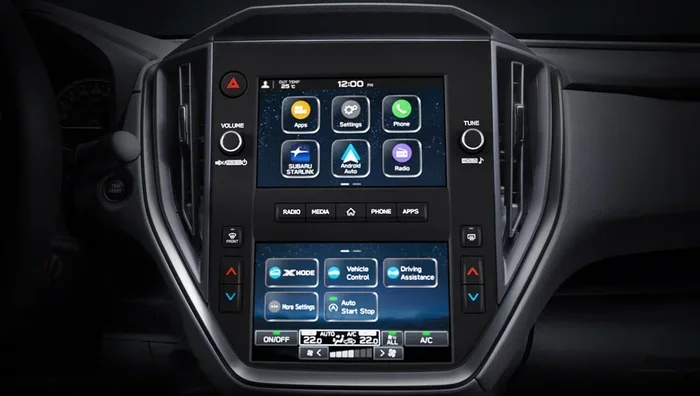
- Tap the Settings icon on your Subaru display.
- Scroll down to System or Setup.
- Look for an option labeled Reset or Factory Reset.
- Confirm your choice when prompted.
- Wait for the system to erase and reboot.
This Subaru multimedia system reset restores the unit to the exact state it was in when you first bought the car. You will need to set up your preferences again, including radio stations, Bluetooth pairings, and display brightness.
Factory Reset Using the Physical Reset Button
Some Subaru models have a small reset pinhole on the back of the display unit or near the audio system:
- Locate the tiny reset button on the unit.
- Use a paperclip or SIM ejector tool to press it.
- Hold the button for 5 to 10 seconds.
- The display will power off and then restart automatically.
This method is especially useful when the touchscreen is completely unresponsive and you cannot access the settings menu.
What Gets Wiped During a Factory Reset
| Data Type | Deleted? |
|---|---|
| Saved navigation addresses | Yes |
| Bluetooth pairings | Yes |
| Radio station presets | Yes |
| Display settings and themes | Yes |
| Climate control preferences | Yes |
| User profiles and accounts | Yes |
| Vehicle settings (except mechanical) | Yes |
| System software | No |
Subaru Model-Specific Reset Instructions
Not all Subaru displays work the same way. Different models and years have slightly different reset procedures. Here is a quick guide for popular Subaru models.
Subaru Outback Display Reset
The Outback uses either the legacy or the newer Starlink infotainment system. For models from 2015 and older, the ignition cycle method works best. For 2016 and newer models with the larger touchscreen, you can also access reset options through the Settings menu. A Subaru Outback display reset often fixes issues with the backup camera display and audio sync problems.
Subaru Forester Display Reset
The Forester has a relatively simple display system. Most Forester owners find that holding the power button for 15 seconds resolves freezing issues. For models with the upgraded infotainment, the factory reset through Settings is available and very effective.
Subaru Legacy and Impreza Display Reset
The Legacy and Impreza share similar display platforms. The hard reset method using the battery disconnect works well for these models. If your Subaru Legacy display reset or Impreza screen is unresponsive, try the ignition cycle first, then move to the battery disconnect method if needed.
Preventing Future Display Problems
Once you have successfully reset your Subaru display, you will want to keep it working smoothly. Prevention is always better than fixing problems after they happen.
Keep Your Software Updated
Subaru periodically releases firmware updates for its infotainment systems. These updates fix known bugs and improve performance. Check for updates through the Settings menu or visit your local Subaru dealer. An Subaru infotainment update can prevent many of the issues that lead to display freezes in the first place.
Avoid Overloading the System
Adding too many apps, large music files, or excessive navigation data can slow down the display system. Keep your stored data organized and delete files you no longer need. A clean system runs faster and experiences fewer glitches.
Protect the Display from Extreme Temperatures
Excessive heat or cold can affect the internal electronics of your display unit. If you live in an area with extreme temperatures, consider parking in a garage or using a sunshade. Temperature extremes are a common cause of display problems that many Subaru owners overlook.
Regular Maintenance
Just like any other part of your car, the display benefits from regular attention. Clean the screen gently with a microfiber cloth. Check connections during routine maintenance visits. A little care goes a long way toward preventing Subaru touchscreen reset situations down the road.
When to Seek Professional Help
Most display issues respond well to the reset methods we have covered. However, some problems require professional attention. You should see a Subaru dealer or qualified technician if:
- The display remains completely blank after multiple reset attempts.
- You notice physical damage to the screen, such as cracks or dead pixels.
- Error codes appear on the dashboard alongside display problems.
- The display issues are accompanied by other electrical problems in the vehicle.
- Your Subaru display problem fix attempts have not resolved the issue after several tries.
A trained technician can diagnose hardware failures and wiring issues that a simple reset cannot fix. There is no shame in visiting a professional when the problem goes beyond software glitches.
Final Thoughts
Knowing how to reset Subaru display systems puts you in control of your vehicle’s technology. A soft reset handles most everyday glitches, while a hard reset tackles deeper issues. The factory reset is your ultimate tool when nothing else works. Each method has its place, and now you know exactly when and how to use them. Keep this guide saved for the next time your screen gives you trouble. With the right approach, you can get back on the road quickly and confidently.
Remember to back up your settings before any major reset, keep your software updated, and protect your display from extreme conditions. These simple habits will keep your Subaru infotainment system running smoothly for years to come. Do not let a frozen screen ruin your drive. Take action, follow the steps, and enjoy a clear, responsive display every time you get behind the wheel.
Frequently Asked Questions
How do I reset my Subaru display screen?
The easiest way is to perform a soft reset by turning the ignition off, waiting 10 seconds, and turning it back on. For tougher issues, you can try holding the power button for 15 seconds or disconnecting the battery for a hard reset. Choose the method that matches your problem level.
Will resetting my Subaru display delete my saved data?
A soft reset will not delete any data. A hard reset usually keeps your personal settings intact. However, a factory reset will erase saved addresses, Bluetooth pairings, radio presets, and display preferences. Always back up important data before performing a factory reset.
Why does my Subaru touchscreen keep freezing?
Freezing screens are often caused by software glitches, outdated firmware, or loose electrical connections. A Subaru touchscreen reset through the ignition cycle or power button hold usually fixes the issue. If freezing persists, consider updating your software or visiting a dealer for a deeper inspection.
How long does a Subaru display reset take?
A soft reset takes about 30 seconds to one minute. A hard reset using the battery disconnect takes around 10 to 15 minutes total. A factory reset can take several minutes as the system erases and reloads all settings. The exact time depends on your Subaru model and the reset method you choose.
Can I reset the Subaru display while driving?
No, you should never reset the display while driving. Always perform a reset when the car is parked and in a safe location. The screen going dark or restarting while driving can be distracting and dangerous. Pull over safely before attempting any reset procedure.
What should I do if the reset does not fix my Subaru display?
If a reset does not solve the problem, the issue may be hardware-related. Check for loose connections behind the display unit. Make sure your firmware is up to date. If none of these steps work, visit a Subaru dealer or qualified technician for a professional diagnosis. Some display problems require specialized tools and expertise to repair.
=== CONCLUSION ===
A reset Subaru display is one of the simplest and most effective ways to solve common screen problems. Whether you choose a soft reset, hard reset, or factory reset, you now have the knowledge to handle each situation with confidence. Start with the soft reset and work your way up to more thorough methods if needed. Keep your system updated, protect your display, and enjoy a smooth, responsive infotainment experience every time you drive. Share this guide with fellow Subaru owners who might be struggling with display issues. A quick reset can make all the difference.