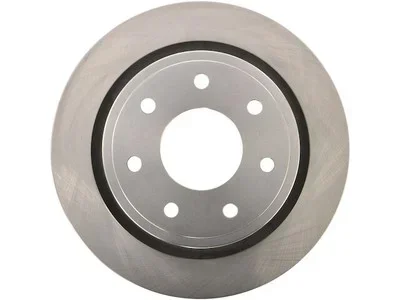
How to Change Rear Brakes on 2013 Ford F150
Changing the rear brakes on your 2013 Ford F150 is a straightforward DIY job that saves money and keeps your truck safe. This guide walks you through how to change rear brakes on 2013 Ford F150 in just a few hours with basic tools. You’ll learn to remove the caliper, replace pads and rotors, and bleed the brakes properly.
If you own a 2013 Ford F150, you know this truck handles tough jobs every day. Keeping the brakes in great shape is essential for your safety and the safety of others. When the rear brakes start to wear, you might hear a squeal or feel a vibration. This guide will show you exactly how to change rear brakes on 2013 Ford F150 in just a few hours. You will learn the steps, the tools you need, and the mistakes to avoid. By the end, you will feel confident doing the job yourself.
Changing your own brakes is one of the most rewarding DIY tasks you can do. It saves you hundreds of dollars and gives you a deeper understanding of your truck. The rear brake system on the 2013 F150 uses disc brakes with a brake caliper, rotors, and pads. This guide covers the entire process from start to finish. We will also share tips that mechanics use every day. Let’s get started.
Key Takeaways
- Save Money: Doing it yourself avoids costly shop fees.
- Improve Safety: Fresh brakes give you confident stopping power.
- Complete Guide: We cover every step from lifting the truck to bleeding the brakes.
- Basic Tools: You only need a few common hand tools and jack stands.
- Prevent Damage: Learn the common mistakes that ruin rotors and calipers.
- Expert Tips: Get pro-level results with our insider advice.
📑 Table of Contents
Why Changing Your Rear Brakes Matters
Your brakes are the most important safety system on your F150. Worn brakes increase stopping distance and can cause accidents. The rear brakes do a lot of work, especially when you haul heavy loads or tow a trailer. Over time, rear brake pads wear down and need replacement. Ignoring them can damage the rotors and reduce braking performance.
Regular maintenance keeps your truck stopping like new. It also prevents expensive repairs down the road. When you notice signs of wear, it is time to act. The 2013 Ford F150 rear brake system is straightforward and easy to access. You do not need special tools or years of experience. Just follow the steps carefully.
Understanding the Brake System on a 2013 F150
The rear brakes on a 2013 Ford F150 consist of a brake caliper, two rotors, and rear brake pads. The caliper squeezes the pads against the rotors to create friction. This friction slows the truck down. The brake hardware includes clips, shims, and wear indicators that help the pads glide smoothly. The parking brake cable also connects to the rear caliper on some models. Understanding these parts helps you work confidently.
The brake dust shield protects the components from dirt and debris. Over time, brake dust builds up and can cause noise. The rotor thickness is critical for safe stopping. If the rotors are too thin, they can warp or crack. Always check the rotor thickness with a micrometer before installing new parts.
Signs Your Rear Brakes Need Attention
Your truck gives clear warnings when the rear brakes need service. Watch for these signs:
- Squealing or grinding noise when you press the brake pedal.
- Vibration or pulsation in the pedal or steering wheel.
- Longer stopping distances than usual.
- Brake warning light on the dashboard.
- Worn brake pads visible through the wheel spokes.
- Braking pull to one side.
If you notice any of these symptoms, inspect the rear brakes soon. Replacing them early prevents damage to the rotors and calipers. The wear indicators on the pads will squeal when the pad material is low. Do not ignore that sound.
Quick Tip: Always check the brake fluid level before starting. Low fluid can mean worn pads or a leak. Top it off if needed, but do not overfill.
Tools and Materials You’ll Need
Gathering the right tools makes the job faster and safer. You will need basic hand tools and a few specific items for the brake system. Here is what to have ready before you start.
Essential Tools
- Lug wrench or impact wrench
- Jack and jack stands
- Socket set and ratchet
- C-clamp or brake caliper tool
- Torque wrench
- Brake cleaner spray
- Wire brush
- Brake bleeding kit
- Penetrating oil (for stuck bolts)
- Safety glasses and gloves
Using a torque wrench ensures you tighten bolts to the correct specification. This prevents damage and keeps your brakes secure. Never rely on a guess when it comes to brake line fittings.
Replacement Parts
Choose high-quality rear brake pads and rotors for your 2013 Ford F150. You can select OEM (Original Equipment Manufacturer) or aftermarket parts. Both options work well if you pick reputable brands. Here is a quick comparison to help you decide.
| Type | Pros | Cons |
|---|---|---|
| OEM Pads | Perfect fit, reliable performance, quiet operation | Higher price |
| Aftermarket Pads | Often cheaper, many options for performance | Quality varies by brand |
| OEM Rotors | Exact specification, durable | Can be pricey |
| Aftermarket Rotors | Good value, some offer better cooling | May need more bedding-in |
Always check the rotor thickness specification for your truck. The 2013 F150 rear rotors should be at least 11.5 mm thick. If they are below that, replace them with new ones. Also, consider replacing the brake hardware kit, which includes clips, shims, and abutment clips. Fresh hardware ensures smooth pad movement and prevents noise.
Expert Insight: Many DIYers skip the brake dust shield or wear sensor. Replacing these small parts takes only a few minutes and prevents future headaches. It is worth the extra cost.
How to Change Rear Brakes on 2013 Ford F150: Step-by-Step Guide
This section walks you through the entire process. Follow each step in order for the best results. Work on a flat, level surface and never rely on just a jack. Always use jack stands.
Step 1: Lift the Vehicle and Remove the Rear Wheel
Park your F150 on a flat surface and engage the parking brake. Loosen the lug nuts on the rear wheel slightly before lifting. Place the jack under the rear axle and raise the truck until the wheel is off the ground. Secure the truck with jack stands under the designated lift points. Remove the lug nuts completely and pull the rear wheel off. Set the wheel aside.
Quick Tip: Put the loose lug nuts in your pocket so they do not get lost. Keeping them organized saves time later.
Step 2: Remove the Brake Caliper and Pads
Locate the brake caliper on the rear wheel hub. It sits on top of the rotor. Remove the two caliper mounting bolts at the back of the caliper. Use a socket wrench and penetrating oil if the bolts are stuck. Carefully pull the caliper off the rotor. Do not let it hang by the brake line. Secure the caliper to the suspension with a bungee cord or wire to avoid stressing the line.
Slide the old rear brake pads out of the caliper bracket. Inspect the pads for uneven wear. Note how the brake hardware clips and shims are positioned. Remove the old clips and shims. You will install new hardware later.
Step 3: Inspect the Rotors and Caliper Bracket
Now is a great time to check the rotors and caliper bracket. Look for deep grooves, cracks, or rust spots. Use a micrometer to measure the rotor thickness. Compare the measurement to the minimum spec for your 2013 Ford F150. If the rotor is below the minimum or has deep scoring, replace it. If it is within spec and smooth, you can reuse it after a light sanding.
Clean the caliper bracket with a wire brush. Remove any brake dust or corrosion from the slide pins. The slide pins allow the caliper to float and apply even pressure. If the pins are sticky or corroded, clean them with brake cleaner and a wire brush. Apply a thin layer of brake grease to the pins before reassembly.
Common Mistake: Never let the caliper piston pop out forcefully. This can damage the brake line or the piston seal. Use a C-clamp to slowly push the piston back in when needed.
Step 4: Install New Brake Pads and Hardware
Start by installing the new brake hardware clips and shims into the caliper bracket. These small parts are crucial for reducing noise and ensuring the pads slide correctly. Place the new rear brake pads into the bracket, making sure the wear sensors are positioned correctly. The wear sensor usually goes on the inboard pad.
If your 2013 F150 has a wear sensor, make sure it makes contact with the rotor. This sensor alerts you when the pads are too thin. Apply a thin film of brake grease to the back of the pads where they touch the caliper and bracket. This prevents squealing and ensures smooth movement.
Quick Tip: Do not get brake grease on the friction side of the pad. Grease on the pad surface causes braking problems.
Step 5: Replace the Rotors (If Needed)
If you decided to replace the rotors, now is the time. The 2013 Ford F150 rear rotor is held on by a few screws or bolts. Remove them carefully. The rotor may be stuck due to rust. A few taps with a rubber mallet will free it. Pull the old rotor straight off the hub.
Before installing the new rotor, clean the hub surface with a wire brush. Remove any rust or old grease. This ensures the new rotor seats flush and does not wobble. Place the new rotor onto the hub and secure it with the screws or bolts. Finger-tighten them first, then torque to spec.
Expert Insight: New rotors often have a thin layer of oil from the factory. Clean them with brake cleaner before installing the pads. This prevents brake noise and ensures proper bedding-in.
Step 6: Reassemble and Bleed the Brakes
Now it is time to put everything back together. Slide the caliper over the new pads and rotor. Secure it with the mounting bolts. Torque the bolts to the factory specification, usually around 28 ft-lbs for the 2013 F150. Make sure the caliper moves freely on the slide pins.
Put the rear wheel back on and hand-tighten the lug nuts. Lower the truck off the jack stands. Use a torque wrench to tighten the lug nuts in a star pattern to 80 ft-lbs. Now you need to bleed the brakes to remove any air from the system.
Have a helper press the brake pedal slowly and hold it. Open the brake bleeder valve on the caliper with a wrench. Fluid will come out with air bubbles. Tighten the valve before your helper releases the pedal. Repeat this process until the fluid runs clear with no bubbles. Check the brake fluid reservoir often and top it off to prevent air from entering.
Common Mistake: Forgetting to bleed the brakes can cause a spongy pedal and reduced stopping power. Always bleed all four corners if you open any brake line fittings.
After bleeding, pump the brake pedal several times to firm it up. Start the engine and press the pedal. You should feel firm resistance. Take the truck for a slow test drive in a safe area. Apply the brakes gently a few times to bed in the new pads and rotors. Avoid hard stops for the first 200 miles to allow the brake pads to fully seat.
Common Mistakes to Avoid
Even experienced DIYers can make mistakes when changing brakes. Avoid these common errors to keep your brakes working perfectly.
- Skipping the wear sensor: This can cause a constant warning light or damage to the rotor.
- Forgetting to clean the slide pins: Sticky pins cause uneven pad wear and dragging brakes.
- Over-tightening caliper bolts: This can strip the threads or damage the caliper bracket.
- Using worn rotors: Thin or warped rotors cause vibrations and reduce braking power.
- Not bleeding the brakes: Air in the system leads to a spongy pedal and longer stopping distances.
- Greasing the wrong side: Brake grease on the friction surface causes noise and reduced stopping power.
Take your time and double-check each step. The brake system is critical to your safety. Do not rush the process.
Expert Tips for a Perfect Brake Job
Here are a few extra tips that will help you achieve professional-quality results.
- Bedding-in the pads: After installation, perform several moderate stops from 40 mph to 20 mph without coming to a complete stop. This helps the pads transfer material evenly to the rotor.
- Check the brake pedal feel: After bleeding, the pedal should feel firm. If it still feels spongy, repeat the bleeding process on all four corners.
- Inspect the brake line fittings: Look for any leaks or corrosion. Tighten them if needed, but do not over-torque.
- Use a torque wrench: Always torque bolts to the factory spec. Over-tightening can cause damage, and under-tightening can be dangerous.
- Record the rotor thickness: Write down the measurement on the rotor with a marker. This helps you track wear over time.
Expert Insight: Many people wonder how long the job takes. On average, changing the rear brakes on a 2013 Ford F150 takes about 1.5 to 2 hours for a first-timer. With experience, you can do it in under an hour.
Conclusion
Learning how to change rear brakes on 2013 Ford F150 is a valuable skill that saves money and keeps your truck safe. You now know the steps, the tools, and the common pitfalls. By following this guide, you can complete the job with confidence. Remember to take your time, use the right parts, and never skip the bleeding process. Your F150 will reward you with strong, reliable stopping power for many miles to come. Get your tools ready and give it a try today.
Frequently Asked Questions
How long does it take to change rear brakes on a 2013 Ford F150?
Most DIYers complete the job in about 1.5 to 2 hours. If you have experience, it can take less than an hour. The time depends on how rusty the bolts are and whether you replace the rotors.
Can I reuse the old rotors when I change rear brakes?
You can reuse rotors if they are above the minimum thickness and have no deep grooves or warping. Always measure the rotor thickness with a micrometer. If the rotor is below spec or shows signs of damage, replace it with a new one.
Do I need to bleed the brakes after changing rear pads?
Yes, if you opened the caliper or pushed the piston back in, you need to bleed the brakes. Air in the system causes a spongy pedal and reduces braking power. Bleed all four corners to ensure safe stopping.
What torque should I use for the caliper mounting bolts?
The factory torque spec for the 2013 Ford F150 rear caliper bolts is typically 28 ft-lbs. Always check your owner’s manual for the exact specification. Using a torque wrench prevents over-tightening and thread damage.
Is it hard to change rear brakes on a 2013 Ford F150?
It is a moderate difficulty job that most DIYers can handle with basic tools. The process involves removing the wheel, caliper, and old pads, then installing new parts. If you have never done it before, follow a step-by-step guide and take your time.
How often should I replace the rear brakes on my 2013 F150?
Rear brake pad life varies based on driving habits, towing, and road conditions. Most drivers replace the rear pads every 30,000 to 50,000 miles. Listen for squealing sounds and check the pad thickness regularly to know when it is time.