Mazda CX-5 Service Reset How to Clear the Warning Light
Learn how to perform a mazda cx-5 service reset and clear the dashboard warning light in just a few simple steps. This guide covers the exact procedure, common mistakes, and expert tips to keep your maintenance schedule on track. You’ll also discover when to visit a service center and how to avoid unnecessary trips.
Mazda CX-5 Service Reset: How to Clear the Warning Light
If you own a Mazda CX-5, you might see a service light on your dashboard. A mazda cx-5 service reset is something many owners need to do after an oil change or inspection. This light is part of the maintenance reminder system. It tells you when your vehicle is due for service. Clearing the light is simple, but you need to follow the right steps. In this guide, I will show you exactly how to reset the service light on your Mazda CX-5. You will learn the button sequence, what to do if it does not work, and how to keep your car in top shape.
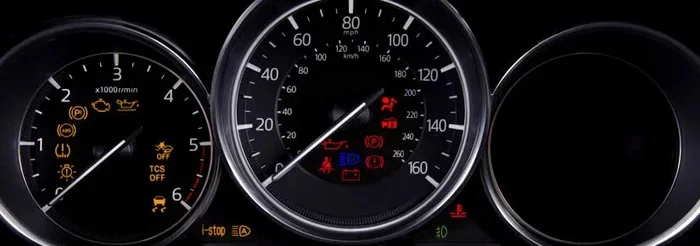
The service warning light can look like a wrench or the words “Service Required.” It is not the same as the check engine light. The check engine light signals a serious problem. The service light simply means it is time for routine maintenance. Understanding this difference helps you stay calm. You do not need to rush to the dealer. You can handle the reset yourself with a few easy actions.
Key Takeaways
- Easy DIY reset: You can clear the service light yourself using the trip meter and steering controls.
- Understand the light: The service reminder is different from the check engine light and appears for routine maintenance.
- Follow the steps: Turn the ignition, press and hold the trip reset button, then toggle the menu to confirm.
- Avoid common mistakes: Don’t turn the key off too quickly, and make sure you are in the right menu.
- When to seek help: If the light stays on after a reset, a diagnostic scan may reveal a hidden issue.
- Stay on schedule: Regular oil changes and inspections keep your Mazda CX-5 running smoothly and prevent future warnings.
📑 Table of Contents
Understanding the Mazda CX-5 Service Light
The dashboard of your Mazda CX-5 has many indicators. Each one communicates a specific message. The service light is one of the most common. It appears based on the maintenance schedule. The car’s computer tracks mileage and time. When you reach the service interval, the light turns on. This interval is usually every 5,000 to 7,500 miles. It depends on your driving habits and the model year.
What Does the Service Light Mean?
The service light means your car needs an inspection or an oil change. It might also remind you to check other fluids. The light is a helpful nudge. It keeps your vehicle running safely and efficiently. Ignoring it for a long time can lead to bigger problems. Regular service helps the engine last longer. It also improves fuel economy. The maintenance reminder system is designed to protect your investment.
Service Light vs. Check Engine Light
People often confuse the service light with the check engine light. The check engine light looks like an engine shape. It means the car’s computer has detected a fault. This could be a loose gas cap or a serious emission problem. The service light looks like a wrench or says “Service.” It is strictly for scheduled maintenance. If the check engine light is on, do not just reset it. Find the root cause first. A service reset only clears the maintenance reminder, not a real fault.
Why the Service Warning Light Comes On
Several things can trigger the service light on a Mazda CX-5. The most common reason is reaching a mileage milestone. The car’s computer counts the miles since the last reset. Other triggers include time intervals. For example, the system might remind you every 6 months. Some drivers also see the light after a battery disconnect. The computer loses its memory and defaults to service mode. Understanding these triggers helps you prevent false alarms.
Common Triggers for the Service Reminder
- Mileage interval reached: The primary trigger. You have driven the set distance since the last service.
- Time interval reached: Some models remind you based on months, not just miles.
- Battery replacement: A new battery can reset the computer, causing the light to appear.
- Oil change completed: After an oil change, the mechanic should reset the light. If they forget, it stays on.
- Dashboard battery drain: A weak battery can cause the system to glitch and show the light.
Step-by-Step Mazda CX-5 Service Reset
Resetting the service light on a Mazda CX-5 is a quick process. You do not need special tools for most models. The procedure uses the steering wheel controls and the trip meter. Follow these steps carefully to get the job done right.
Method 1: Using the Trip Meter and Steering Controls
This is the most common method for Mazda CX-5 models from 2013 to 2023. It works on both the older and newer generations. You will use the steering wheel buttons and the instrument cluster display.
- Turn the ignition to the “ON” position. Do not start the engine. Just press the start button once without pressing the brake. The dashboard lights will come on.
- Locate the trip meter reset button. It is usually on the left side of the steering wheel. It may be labeled “TRIP” or “RESET.”
- Press and hold the trip reset button. Keep holding it for about 10 seconds. The display will start to change.
- Look for the “Settings” or “Maintenance” menu. While still holding the button, use the steering wheel up/down arrows to scroll.
- Select “Maintenance Reset” or “Service Reset.” Press the OK button or the trip button again to enter.
- Choose “Reset” for the service item. The system will ask you to confirm. Select “Yes” or “Reset.”
- Turn the ignition off and then back on. The service light should now be off. If it is, you are done.
Quick Tips:
- Make sure the car is stationary and the parking brake is on.
- If the display does not change, try holding the button for 15 seconds.
- Some models require you to press the trip button and the steering wheel OK button at the same time.
- Always refer to your owner’s manual for model-specific details.
Method 2: Resetting Through the Infotainment System
Some newer Mazda CX-5 models have a touchscreen infotainment system. You can also reset the service light through the settings menu. This method is slightly different but just as easy.
- Press the power button to turn on the audio system. You do not need to start the engine.
- Tap the “Setup” or “Settings” icon. It usually looks like a gear.
- Select “System” or “Vehicle Information.” Scroll through the options.
- Find “Maintenance” or “Service Reset.” Tap on it.
- Choose the service item you want to reset. This might be “Oil Change” or “Inspection.”
- Press “Reset” and confirm. The system will clear the reminder.
Here is a quick comparison of the two methods:
| Feature | Method 1 (Trip Meter) | Method 2 (Infotainment) |
|---|---|---|
| Best for | Most CX-5 models (2013-2023) | Models with touchscreen (2019+) |
| Tools needed | Steering wheel buttons | Touchscreen |
| Time required | 1-2 minutes | 2-3 minutes |
| Difficulty | Easy | Very Easy |
| Works without engine | Yes | Yes |
Common Mistakes to Avoid When Resetting
Even a simple reset can go wrong if you rush. Many owners make small mistakes that cause the light to stay on or return. Learning what not to do saves you time and frustration.
- Turning the key off too soon: After you press reset, wait for the confirmation screen. Do not turn the ignition off immediately.
- Starting the engine during the process: The reset procedure works with the ignition in the “ON” position, not while the engine is running.
- Pressing the wrong button: The trip reset button is not the same as the odometer button. Find the correct one on your steering wheel.
- Forgetting to check other service items: The system might have multiple reminders. Reset all of them, not just the oil change.
- Ignoring the light after a reset: If the light comes back the next day, there is a real issue. Do not just reset it again and again.
When the Light Won’t Turn Off
Sometimes, you follow the steps perfectly, but the service light stays on. This can be frustrating. Do not panic. There are a few reasons this happens, and you can fix it.
Using a Diagnostic Tool
If the manual reset does not work, you may need a diagnostic scanner. A professional mechanic or a dealer can plug in a tool that talks to the car’s computer. The scanner reads the maintenance data and clears the code. This is the most reliable way to force a mazda cx-5 service reset when the buttons do not respond. You can also buy an OBD2 scanner for home use. They are affordable and easy to find online.
Another reason the light might stay on is a software glitch. The car’s computer sometimes needs a full reboot. To do this, disconnect the negative battery terminal for 15 minutes. Then reconnect it. This resets the entire electrical system. When you turn the key back on, the service light should be gone. If it returns, there is likely a deeper issue in the maintenance module.
Keeping Your Mazda CX-5 on Schedule
Resetting the light is only part of the job. The real goal is to keep your car well-maintained. A maintenance reset is just a way to clear the reminder after you have done the work. The best approach is to follow the factory maintenance schedule. This schedule is in your owner’s manual. It tells you exactly when to change the oil, rotate the tires, and inspect the brakes.
Maintenance Tips Between Service Intervals
- Check your oil monthly: Low oil can cause engine damage. Use the dipstick and top up if needed.
- Inspect tire pressure: Proper pressure improves safety and fuel economy. The recommended PSI is on the driver’s door jamb.
- Listen for strange noises: Squealing brakes or grinding sounds need immediate attention.
- Keep your records: Write down every service in a logbook. This helps you track your service history and resale value.
- Use genuine Mazda parts: OEM parts fit perfectly and last longer. They keep your warranty intact.
Regular care reduces the chance of unexpected breakdowns. It also keeps the dashboard indicator system accurate. When you do the work on time, the service light stays off until the next interval. This gives you peace of mind every time you drive.
Conclusion
A mazda cx-5 service reset is a simple task that every owner can do. You do not need to visit the dealer every time the light comes on. By following the steps in this guide, you can clear the warning light in minutes. Remember the difference between the service light and the check engine light. If the light returns or the car shows other symptoms, get a professional diagnosis. Stay on top of your maintenance schedule and your Mazda CX-5 will serve you well for years to come. Keep this guide handy for your next service reminder.
Frequently Asked Questions
How do I reset the service light on a 2017 Mazda CX-5?
For a 2017 model, use the trip meter method. Turn the ignition to ON without starting the engine. Press and hold the trip reset button on the left side of the steering wheel. Scroll to “Maintenance Reset” using the arrow buttons, then select “Reset.” Turn the ignition off and back on. The light should be gone.
Can I reset the service light myself, or do I need a mechanic?
You can absolutely reset it yourself. The process uses the steering wheel controls and the trip meter. No special tools are needed for most models. Only if the light stays on after a reset would you need a mechanic or a diagnostic scanner.
Why does my Mazda CX-5 service light keep coming back after I reset it?
If the light returns quickly, the car’s computer has not received confirmation that service was completed. This can happen if you reset too early or if there is a fault code stored. A diagnostic scan can reveal hidden issues. It is also possible the maintenance interval has not actually passed yet.
What is the difference between a service reset and clearing a fault code?
A service reset clears the maintenance reminder for oil changes or inspections. It does not affect the check engine light or fault codes. Clearing a fault code requires an OBD2 scanner and addresses actual engine or emission problems. The two processes are completely different.
Is it safe to drive with the service light on?
Yes, it is generally safe to drive. The service light is a reminder for routine maintenance, not an emergency. However, you should schedule service soon. Driving too long past the interval can lead to engine wear or reduced performance. Do not ignore it for weeks or months.
Will resetting the service light void my warranty?
No, resetting the light does not void your warranty. The warranty covers parts and labor for defects. However, if you skip required maintenance and it causes damage, the dealer might deny the claim. Always keep records of your service, even if you reset the light yourself.