How to Restart Your Mazda CX 5 Quickly and Easily Today
Restarting your Mazda CX-5 is a simple fix for many common issues like frozen screens, warning lights, and unresponsive systems. Whether you need a soft reset or a full restart, this guide walks you through every method clearly and safely. You will learn the exact steps, when each method works best, and how to prevent problems from returning.
Have you ever been sitting in your Mazda CX-5 and the screen just freezes? Or maybe the dashboard lights start acting weird and nothing seems right. It can feel frustrating, especially when you are trying to get somewhere on time.
The good news is that most of these problems go away with a simple restart Mazda CX-5 process. You do not need to be a car expert. You do not need expensive tools. A few minutes and some basic steps can bring your vehicle back to life.
In this guide, we will walk you through every way to restart your Mazda CX-5 quickly and safely. We will cover soft resets, hard resets, infotainment fixes, and common problems that call for a restart. By the end, you will feel confident handling these situations on your own.
Key Takeaways
- Easy Restart Methods: A standard restart takes just a few minutes and requires no special tools.
- Soft vs Hard Reset: Know when to use a soft reset for minor glitches versus a hard reset for deeper issues.
- Infotainment Fixes: Restarting the Mazda CX-5 screen can solve freezing and lag problems instantly.
- Safety First: Always follow proper restart procedures to protect your vehicle’s electronics.
- Preventive Tips: Regular maintenance and simple habits reduce the need for frequent restarts.
- Professional Help: Some issues need a mechanic, not a restart, and we explain which ones.
📑 Table of Contents
- Why You Might Need to Restart Your Mazda CX-5
- How to Restart a Mazda CX-5: Step-by-Step Methods
- Soft Reset vs Hard Reset for Mazda CX-5
- Common Problems That Require a Restart
- Tips to Keep Your Mazda CX-5 Running Smoothly
- When to See a Professional Instead of Restarting
- Quick Tips for a Smooth Restart Every Time
- Final Thoughts
Why You Might Need to Restart Your Mazda CX-5
Modern cars like the Mazda CX-5 are packed with computers and sensors. These systems control everything from your engine performance to your entertainment screen. Sometimes, these electronic systems need a fresh start. Just like your phone or laptop, your car’s computer can slow down or glitch over time.
Frozen Infotainment Screen
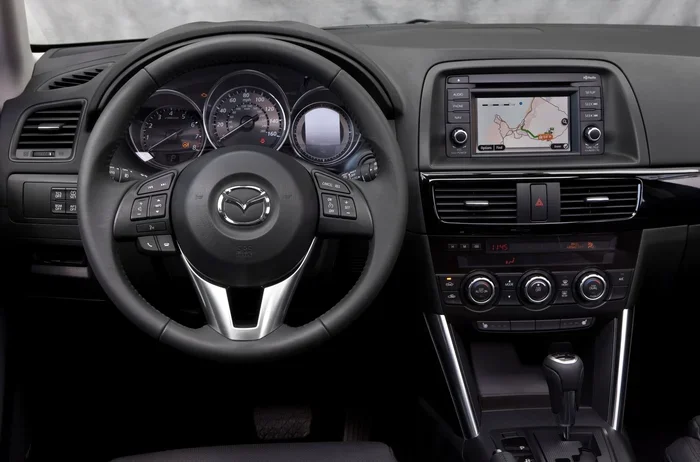
The Mazda CX-5 comes with a built-in infotainment system. This is the screen that controls your radio, navigation, Bluetooth, and camera displays. Every now and then, this screen may freeze or become unresponsive. A quick restart usually fixes this right away. You do not need to visit a dealership for this common issue.
Dashboard Warning Lights
Have you ever seen a warning light pop up on your dash and wondered what to do? Some lights, like the check engine light, need a deeper look. But others, such as the tire pressure monitor or the stability control light, may just need a Mazda CX-5 reset. Restarting the car clears temporary error signals and lets the system recalibrate.
Slow or Unresponsive Systems
Over time, your Mazda CX-5’s electronic systems can become sluggish. The buttons may lag. The backup camera might take longer to load. These small annoyances often point to a memory overload in the car’s computer. A restart clears the temporary data and helps everything run smoothly again.
After a Battery Change or Jump Start
If you have recently replaced your battery or had a jump start, your Mazda CX-5 may need a full restart. The electrical systems reset themselves, but sometimes they need a little help. Knowing how to properly restart after a battery event keeps all your settings and systems working correctly.
How to Restart a Mazda CX-5: Step-by-Step Methods
There are several ways to restart your Mazda CX-5 depending on the situation. We will cover the most common methods so you can pick the one that fits your needs. Each method is simple and safe when followed correctly.
Method 1: Normal Engine Restart
This is the simplest way to restart your Mazda CX-5. It works when the engine is running but you want to turn it off and back on again.
- Press the START/STOP button while the engine is running. The engine turns off.
- Wait about 10 seconds. This lets the systems power down fully.
- Press the START/STOP button again to restart the engine.
- Let the car idle for a few moments before driving.
This method is great for clearing minor electronic glitches. It is like giving your car’s brain a quick refresh.
Method 2: Soft Reset for the Infotainment System
A soft reset targets the Mazda CX-5 screen and electronics without turning off the engine. Use this when the screen freezes or the audio system acts up.
- Press and hold the power button on the infotainment screen for about 10 seconds.
- The screen will go black and then turn back on.
- Wait for the system to fully reload. This takes about 30 seconds.
- Check if the issue is resolved.
This is one of the fastest ways to restart Mazda CX-5 electronics. Most drivers find this solves the problem immediately.
Method 3: Hard Reset (Full Electrical Reset)
A hard reset is more thorough. It clears all temporary data from the car’s computer. Use this when a soft reset does not work or when multiple systems are acting up.
- Turn off the engine and make sure the car is in Park.
- Remove the key from the ignition if you have a traditional key.
- Open the hood and locate the negative battery terminal.
- Use a wrench to loosen the cable on the negative terminal.
- Wait at least 5 minutes. This lets the computer fully discharge.
- Reconnect the negative cable and tighten it securely.
- Close the hood and start the engine normally.
Warning: A hard reset may erase some of your personal settings. You may need to reset your radio presets, clock, and Bluetooth connections. Always make sure you know your radio codes before doing a hard reset.
Method 4: Forced Restart When the Car Will Not Respond
Sometimes the Mazda CX-5 will not respond at all. The buttons do nothing and the screen stays dark. In this case, a forced restart can help.
- Press and hold the START/STOP button for 15 seconds.
- Release the button and wait 30 seconds.
- Press the button again to start the engine.
This forces the car’s main computer to shut down and reboot. It is similar to holding the power button on a computer that has frozen.
Soft Reset vs Hard Reset for Mazda CX-5
It is important to understand the difference between a soft reset and a hard reset. Each one serves a different purpose and works in different situations.
| Feature | Soft Reset | Hard Reset |
|---|---|---|
| What it resets | Infotainment screen and minor systems | All electronic systems and car computer |
| Engine status | Stays running | Must be turned off |
| Time required | 30 seconds | 10-15 minutes |
| Settings lost | None | Possible loss of presets and codes |
| Best for | Frozen screen, lag, minor glitches | Multiple warning lights, persistent errors |
| Difficulty | Very easy | Moderate |
As a rule of thumb, always try a soft reset first. Only move to a hard reset if the soft reset does not solve the problem. This keeps your settings safe and saves you time.
Common Problems That Require a Restart
Not sure if your issue needs a Mazda CX-5 reset? Here are the most common problems that a restart can fix.
Check Engine Light Keeps Coming Back
A check engine light that comes on and then goes off after a restart is often caused by a temporary sensor error. The restart clears the error code. If the light comes back, you should get the codes read at a mechanic. But if it stays off after a restart, the issue was likely minor.
Backup Camera Not Working
The backup camera in the Mazda CX-5 is connected to the infotainment system. If the camera freezes or shows a blank screen, a soft reset usually fixes it. Simply hold the power button on the screen for 10 seconds and wait for it to reload.
Bluetooth Connectivity Issues
If your phone will not connect or keeps disconnecting, the Bluetooth module may need a refresh. A restart of the infotainment system often resolves this. You can also delete the paired device and reconnect after the restart for a cleaner connection.
Keyless Entry Not Responding
Sometimes the keyless entry system on the Mazda CX-5 stops recognizing your remote. This can happen after a battery change in the remote or after the car sits idle for a long time. Restarting the car resets the keyless entry module and usually fixes the problem.
Climate Control Acting Strange
If your AC or heater starts blowing air at the wrong temperature or the controls become unresponsive, a restart can help. The climate control system is managed by the car’s central computer, so a reboot often clears the issue.
Tips to Keep Your Mazda CX-5 Running Smoothly
Preventing problems is always better than fixing them. Here are some simple tips to reduce the need for frequent restarts.
- Keep your software updated: Mazda releases updates for the infotainment system. Check with your dealer for the latest software. Updated software has fewer bugs and runs more smoothly.
- Restart your car weekly: Just like your phone, giving your Mazda CX-5 a fresh start once a week keeps the systems running well. Turn the car off and wait a minute before restarting.
- Avoid leaving electronics on when the engine is off: Running the radio or screen with the engine off drains the battery and can cause electronic issues over time.
- Keep your battery healthy: A weak battery causes all kinds of electronic problems. Get your battery tested at every oil change. Replace it every 3-5 years to stay ahead of issues.
- Clear temporary data regularly: Delete unused Bluetooth connections and clear your navigation history. This frees up memory and helps the system run faster.
- Use genuine Mazda parts: Aftermarket accessories can sometimes interfere with your car’s electronics. Stick with genuine Mazda parts and accessories for the best compatibility.
When to See a Professional Instead of Restarting
Most issues with the Mazda CX-5 can be solved with a simple restart. But some problems go beyond what a restart can fix. Knowing when to seek help saves you time and prevents bigger issues.
If you notice any of the following signs, it is time to visit a mechanic:
- The check engine light stays on after multiple restarts.
- Your engine stalls frequently, even after a full restart.
- You hear unusual grinding or clicking sounds from the engine.
- The dashboard lights flash rapidly and do not stop after a restart.
- Your Mazda CX-5 will not start at all, even after trying all the restart methods above.
- You smell burning or notice fluid leaks under the car.
These symptoms point to mechanical or electrical problems that go deeper than a simple reset. A trained Mazda technician has the tools to run diagnostic tests and find the root cause. Do not ignore these signs. Early attention can save you from expensive repairs down the road.
Quick Tips for a Smooth Restart Every Time
Here are some extra tips to make your Mazda CX-5 restart process as smooth as possible every single time.
- Always park on a flat surface before doing a hard reset. This prevents any accidental movement.
- Keep your owner’s manual handy. It has specific instructions for your model year and trim level.
- Write down your radio codes before doing a hard reset. This saves you time and frustration later.
- Be patient. After a restart, give the car 30-60 seconds to fully boot up before driving.
- Do not restart repeatedly in quick succession. This can strain the electrical system. Wait at least 30 seconds between restarts.
- Keep jumper cables in your trunk. If a restart causes a power issue, you may need a jump start to get going again.
Following these simple tips keeps your Mazda CX-5 in great shape and reduces the chances of needing frequent restarts. A little prevention goes a long way.
Final Thoughts
Restarting your Mazda CX-5 is one of the easiest and most effective ways to fix many common problems. Whether you are dealing with a frozen screen, a stubborn warning light, or unresponsive electronics, the methods in this guide will help you get back on track quickly.
Start with the simplest method and work your way up. A normal restart or soft reset solves most issues. Save the hard reset for situations where the simpler methods do not work. And always know when to call a professional for problems that go beyond a simple Mazda CX-5 reset.
Keep these steps in mind, stay proactive with maintenance, and your Mazda CX-5 will keep running smoothly for years to come. A quick restart can save you time, money, and a lot of frustration on the road.
Frequently Asked Questions
How long does it take to restart a Mazda CX-5?
A normal restart takes about 30 seconds to a minute. A soft reset for the infotainment system takes roughly 30 seconds. A hard reset takes about 10 to 15 minutes including the waiting time for the battery to discharge.
Will restarting my Mazda CX-5 erase my saved settings?
A soft reset will not erase any settings. A hard reset may reset your radio presets, clock, and Bluetooth pairings. Always note your important codes before doing a hard reset.
How often should I restart my Mazda CX-5?
There is no need to restart your Mazda CX-5 regularly. Only restart when you experience issues like freezing screens, warning lights, or unresponsive systems. A weekly restart can help keep the system fresh but is not required.
Can I restart my Mazda CX-5 while driving?
No, you should never restart the engine while driving. Always pull over to a safe location, put the car in Park, and then restart. A forced restart while driving can cause loss of power steering and brakes temporarily.
What should I do if the restart does not fix the problem?
If a restart does not solve the issue, try the method one level up. For example, if a soft reset does not work, move to a hard reset. If the hard reset also fails, it is time to visit a Mazda dealer or qualified mechanic for a professional diagnosis.
Is it safe to disconnect the battery to restart my Mazda CX-5?
Yes, it is safe as long as you follow the proper steps. Always disconnect the negative terminal first, wait at least 5 minutes, and reconnect it securely. Make sure the engine is off and the car is in Park before you begin.