Vehicle Code Audi
Vehicle code Audi refers to the diagnostic and fault codes specific to Audi automobiles. Understanding these codes helps car owners and mechanics quickly identify problems with the engine, transmission, brakes, and more. This guide breaks down everything you need to know about Audi diagnostic codes in simple, easy-to-follow steps.
Driving an Audi comes with a premium feel, advanced tech, and a reputation for engineering excellence. But when that little check engine light pops up on your dashboard, it can feel confusing and stressful. That is where vehicle code Audi information becomes your best friend.
Every Audi vehicle uses a system of diagnostic codes to tell you exactly what is going wrong under the hood. These Audi fault codes act like a secret language between your car and the person reading them. Once you understand how these codes work, you can save time, money, and a lot of headaches.
In this guide, we will walk you through everything related to vehicle code Audi systems. You will learn how to read codes, what the most common ones mean, which tools to use, and when to call a professional. Whether you are a DIY car enthusiast or just someone who wants to understand their Audi better, this article has you covered.
Key Takeaways
- Vehicle code Audi systems use standardized OBD-II codes along with brand-specific codes for deeper diagnostics.
- Common Audi codes cover engine issues, ABS faults, airbag warnings, and transmission problems.
- Using a quality OBD-II scanner or VCDS tool is the easiest way to read and clear Audi fault codes.
- Ignoring warning lights can lead to costly repairs down the road.
- DIY code reading saves money, but complex issues still need a professional Audi technician.
- Regular maintenance reduces the chance of unexpected Audi error codes appearing.
📑 Table of Contents
- What Are Vehicle Codes in Audi Cars?
- Common Audi Diagnostic Codes and What They Mean
- Tools You Need to Read Vehicle Code Audi
- How to Clear and Reset Audi Diagnostic Codes
- When to See a Professional for Audi Code Issues
- Preventing Audi Diagnostic Code Issues
- Understanding Audi Dashboard Warning Lights
- Conclusion
What Are Vehicle Codes in Audi Cars?
When we talk about vehicle code Audi, we are referring to the standardized and brand-specific codes that your Audi uses to report problems. These codes are part of the onboard diagnostics system, commonly known as OBD-II. Every car sold in the United States since 1996 uses this system, and Audi vehicles are no different.
Each code is a combination of letters and numbers that points to a specific issue. For example, a code might tell you that your Audi oxygen sensor is failing or that there is a problem with the Audi ABS module. The codes are stored in your car’s computer memory and can be retrieved using the right diagnostic tool.
How the OBD-II System Works in Audis
The OBD-II system constantly monitors your Audi’s engine, emissions, and other critical systems. When it detects something out of the normal range, it stores a diagnostic trouble code, also called a DTC. This code triggers a warning light on your dashboard.
Here is how the system works in simple steps:
- Sensors throughout the car monitor performance data.
- If a value falls outside the expected range, the system flags it.
- A trouble code is saved in the car’s computer.
- A warning light appears on the dashboard.
- A mechanic or owner can read the code using a scanner.
Audi vehicles use the standard OBD-II framework but also include manufacturer-specific codes. These extra codes give deeper insight into issues that are unique to Audi engineering. Tools like VCDS (VAG-COM Diagnostic System) are specifically designed to read these Audi-only codes.
Common Audi Diagnostic Codes and What They Mean
Not all Audi error codes are the same. Some are very common across all Audi models, while others are specific to certain engines or systems. Let us look at the most frequently encountered vehicle code Audi issues.
Engine-Related Audi Codes
The engine is the heart of your Audi, and it has many sensors that can trigger codes. Here are some of the most common engine-related Audi diagnostic codes:
- P0171 — System Too Lean (Bank 1). This means the engine is running with too much air and not enough fuel.
- P0300 — Random/Multiple Cylinder Misfire Detected. This can indicate spark plug issues or fuel delivery problems.
- P0420 — Catalyst System Efficiency Below Threshold. This often points to a failing catalytic converter.
- P0128 — Coolant Thermostat (Coolant Temperature Below Thermostat Regulating Temperature). This suggests the thermostat is stuck open.
Transmission and Drivetrain Codes
Audi vehicles, especially those with automatic transmission, can develop transmission fault codes over time. Common ones include:
- P0700 — Transmission Control System Malfunction. This is a general code that signals a broader issue in the transmission system.
- P0730 — Incorrect Gear Ratio. This often means the transmission is not shifting properly.
- P0841 — Transmission Fluid Pressure Sensor Range/Performance. This relates to the fluid pressure system inside the gearbox.
ABS and Brake System Codes
Audi’s ABS and braking systems are advanced and sensitive. When something goes wrong, your Audi will store a code. Common brake-related codes include:
- C0034 — Left Front Wheel Speed Sensor Malfunction. This is one of the most common Audi ABS codes.
- C0040 — Right Front Wheel Speed Sensor Malfunction. Similar to the above but affects the opposite side.
- C1234 — ABS Hydraulic Pump Motor Malfunction. This requires more in-depth diagnosis.
Airbag and Safety System Codes
Audi vehicles also monitor the airbag and restraint systems. These codes are critical and should never be ignored:
- B0010 — Driver Airbag Circuit Malfunction. This means there is an electrical issue in the driver’s airbag system.
- B0090 — Passenger Airbag Circuit Malfunction. Similar to the driver side but affects the front passenger.
Tools You Need to Read Vehicle Code Audi
Reading Audi fault codes does not require a trip to the dealership every time. There are several tools available that let you check your car yourself. The right tool depends on your budget and how much detail you want.
Basic OBD-II Scanners
A basic OBD-II scanner is the most affordable way to read codes. These devices plug into the OBD-II port under your Audi’s dashboard. Once connected, they display any stored trouble codes in plain text.
Some popular options include:
- FIXD Scanner — A simple plug-and-play device that connects to your smartphone.
- BlueDriver Bluetooth OBD-II Scanner — Works with iOS and Android apps for easy reading.
- Ancel X7 — A more advanced scanner with live data and code definitions.
Basic scanners read standard OBD-II codes, which covers most engine and emissions issues. However, they may not read Audi-specific codes for the transmission, ABS, or airbag systems.
VCDS (VAG-COM) for Full Audi Diagnostics
If you want the full picture, VCDS is the gold standard for vehicle code Audi diagnostics. VCDS stands for VAG-COM Diagnostic System, and it is designed specifically for Volkswagen Group vehicles, which includes Audi.
With VCDS, you can:
- Read and clear manufacturer-specific Audi codes.
- View live sensor data in real time.
- Perform adaptive coding and module programming.
- Check all systems, including doors, windows, lights, and climate control.
VCDS requires a laptop or tablet and a compatible cable. The software costs around $150 to $330, which is a one-time purchase. For serious Audi owners and DIY mechanics, this tool is worth every penny.
Audi Dealership Diagnostics
Audi dealerships use proprietary diagnostic software called ODIS (Audi Diagnostic Information System). This is the most powerful tool available, but it is also the most expensive. Dealerships use ODIS for warranty work, recalls, and complex diagnostics.
For most car owners, a VCDS setup or a quality OBD-II scanner is more than enough. You should only visit a dealership for issues that require specialized software or warranty coverage.
How to Clear and Reset Audi Diagnostic Codes
Once you have identified the Audi diagnostic codes causing the check engine light, you may want to clear them. Clearing codes is simple, but it is important to do it correctly.
Using a Scanner to Clear Codes
Most OBD-II scanners and VCDS have a clear or erase function. Here is the basic process:
- Connect the scanner to the OBD-II port under the dashboard.
- Turn the ignition to the “On” position (do not start the engine).
- Navigate to the “Clear Codes” or “Erase DTCs” option.
- Confirm the action and wait for the scanner to complete.
- Turn the ignition off, wait 30 seconds, then restart the engine.
If the underlying problem is fixed, the check engine light should stay off. If it comes back on, the issue has not been resolved, and the code will return.
Important Tips for Clearing Codes
Here are some quick tips to keep in mind:
- Never clear codes before diagnosing the problem. You will lose valuable information about what went wrong.
- Drive the car for a few days after clearing codes to see if the light returns.
- Note down all codes before erasing them. You can write them in a notebook or take a photo with your phone.
- Use a code reference guide or an online database to look up each code before clearing it.
When to See a Professional for Audi Code Issues
Reading and clearing codes is great for basic diagnostics, but some Audi fault codes require professional attention. Knowing when to DIY and when to seek help can save you from costly mistakes.
Signs You Need a Professional
You should visit a qualified Audi technician if:
- The check engine light is flashing instead of staying solid. A flashing light usually indicates a serious engine misfire that can damage the catalytic converter.
- You see multiple red warning lights on the dashboard at the same time.
- The code relates to the airbag system. Airbag repairs are safety-critical and should always be handled by a professional.
- You have cleared the code, but it returns within a few days.
- The issue involves the transmission or quattro drivetrain, which requires specialized knowledge.
Finding the Right Audi Mechanic
Not all mechanics are familiar with Audi-specific systems. Look for a shop that specializes in European or German cars. Ask if they have experience with VCDS or ODIS diagnostics. A good independent Audi specialist can often save you 40 to 60 percent compared to a dealership visit.
Preventing Audi Diagnostic Code Issues
The best way to deal with vehicle code Audi problems is to prevent them from happening in the first place. Regular maintenance and good driving habits go a long way in keeping your Audi running smoothly.
Routine Maintenance Tips
- Change your oil every 5,000 to 7,500 miles, or as specified in your owner’s manual.
- Replace spark plugs on schedule. Worn spark plugs are a common cause of misfire codes.
- Check your coolant level regularly. Low coolant can trigger temperature-related fault codes.
- Inspect brake pads and sensors every 15,000 miles. Worn brake pads can cause ABS and brake warning codes.
- Keep your fuel system clean by using quality fuel and adding a fuel cleaner every few thousand miles.
Driving Habits That Help
- Avoid short trips when possible. The engine needs time to reach full operating temperature.
- Do not ignore warning lights. The longer you wait, the worse the problem can get.
- Keep your gas cap tight. A loose gas cap is one of the simplest causes of Audi check engine codes.
- Address small issues early before they become expensive repairs.
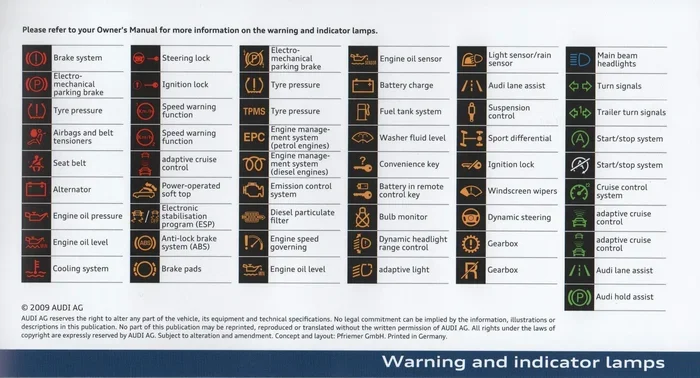
Understanding Audi Dashboard Warning Lights
Audi dashboards are packed with warning lights, and each one tells you something specific. While the check engine light is the most common trigger for diagnostic codes, other lights deserve your attention too.
Here are some of the most important Audi warning lights to recognize:
- Check Engine Light (yellow engine icon) — Indicates a problem detected by the OBD-II system. Often linked to a stored vehicle code Audi.
- Oil Pressure Warning (oil can icon) — Signals low oil pressure. Stop the engine immediately and check the oil level.
- Battery/Charging Warning (battery icon) — Means the charging system is not working properly. Check the alternator and battery.
- ABS Warning (ABS letters in a circle) — Indicates a problem with the anti-lock braking system.
- Airbag Warning (person with a circle) — Signals an issue with the airbag system. Have this checked right away.
- Coolant Temperature Warning (thermometer icon) — Means the engine is overheating. Pull over safely and let the engine cool.
Understanding these lights helps you respond quickly and appropriately. If you see a warning light that you do not recognize, it is always better to get it checked out. A quick scan with an Audi code reader can reveal the hidden fault code behind the light.
Conclusion
Vehicle code Audi systems are designed to protect your car and keep it running at its best. By understanding how these codes work, what the common ones mean, and how to read them, you take control of your Audi’s health. Whether you use a basic OBD-II scanner or invest in VCDS for full diagnostics, knowing your codes empowers you as a car owner.
Remember that Audi fault codes are not something to fear. They are simply your car’s way of communicating with you. The more you learn about these codes, the better equipped you are to handle issues early, save money on repairs, and keep your Audi performing at the highest level. Stay proactive, stay informed, and your Audi will reward you with years of reliable service.
Frequently Asked Questions
What is the most common Audi diagnostic code?
The most common vehicle code Audi is P0171, which indicates the engine is running too lean. This often results from vacuum leaks, a faulty oxygen sensor, or a weak fuel pump. It is also one of the easiest codes to diagnose and fix.
Can I drive my Audi with the check engine light on?
You can drive a short distance if the light is solid, but you should get the codes read as soon as possible. If the light is flashing, stop driving immediately and have the vehicle towed. A flashing check engine light usually indicates a serious issue that can cause further damage.
Do I need a special scanner for Audi codes?
A basic OBD-II scanner will read standard engine and emissions codes. However, for Audi-specific codes related to the transmission, ABS, airbag, and other systems, a VCDS scanner or ODIS software is recommended. These tools give you much deeper access to your Audi’s diagnostic data.
How much does it cost to diagnose an Audi check engine light?
If you use your own scanner, the cost is zero. If you visit a shop, diagnostic fees typically range from $75 to $150. Many independent Audi specialists offer free or low-cost diagnostics when you proceed with the repair. Dealerships tend to charge more, often between $100 and $200 for diagnostics alone.
Can I clear Audi codes myself?
Yes, you can clear codes using any OBD-II scanner or VCDS tool. However, always make sure you have fixed the underlying problem first. If you clear codes without fixing the issue, the check engine light will return, and you will have wasted your time.
How often should I scan my Audi for codes?
You do not need to scan your Audi regularly if it is running well. However, it is a good practice to scan your car whenever you notice a warning light, unusual behavior, or during routine maintenance checks. Some owners also scan their vehicles before buying a used Audi to uncover any hidden issues.