How to Reset the Service AWD Light on 2019 Dodge Journey
The service AWD light on a 2019 Dodge Journey can be confusing, but resetting it is often simple. This guide walks you through every step, from understanding what triggers the warning to using an OBD-II scanner or performing a manual reset. You will learn the common causes, the tools you need, and how to prevent the light from coming back.
Have you ever glanced at your dashboard and spotted a warning light that made your stomach drop? If you own a 2019 Dodge Journey and the service AWD light just turned on, you are not alone. This guide will show you exactly how to reset the service AWD light on a 2019 Dodge Journey in just a few simple steps.
Your all-wheel drive system is a complex setup that keeps your vehicle stable and safe. When the warning light pops up, it can mean many things — from a simple maintenance reminder to a sensor glitch. Either way, knowing how to handle it gives you confidence and saves you a trip to the mechanic.
In this article, you will find everything you need. We cover what the light means, the tools required, a full step-by-step reset process, troubleshooting tips, and how to keep your Dodge Journey AWD system running strong. Let us dive in.
Key Takeaways
- Simple process: Resetting the service AWD light on a 2019 Dodge Journey can be done with or without an OBD-II scanner.
- Common causes: Low fluid levels, sensor issues, and service intervals are the top reasons the light appears.
- Two methods work: You can use a diagnostic scanner or follow a manual dashboard reset procedure.
- Prevention matters: Regular maintenance keeps your AWD system healthy and prevents the warning light from returning.
- Safety first: Always address the root cause before resetting the light to avoid masking a real problem.
📑 Table of Contents
- Understanding the Service AWD Light on Your 2019 Dodge Journey
- Tools You Will Need for the Reset Process
- Step-by-Step Guide to Reset the Service AWD Light
- When the Light Won’t Go Away: Troubleshooting Tips
- Preventing the Service AWD Light from Returning
- Expert Tips for Maintaining Your Dodge Journey AWD System
- Frequently Asked Questions
- Conclusion
Understanding the Service AWD Light on Your 2019 Dodge Journey
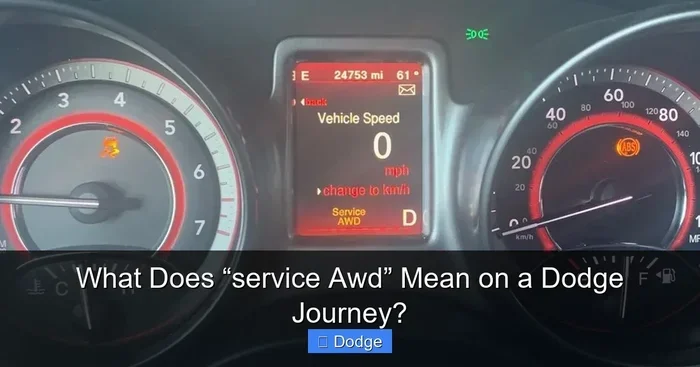
The service AWD light is a dashboard indicator that alerts you to a potential issue with your all-wheel drive system. On the 2019 Dodge Journey, this light looks like a truck with wavy lines underneath. It is your vehicle’s way of saying, “Hey, something needs attention with the drivetrain.”
Unlike the check engine light, the AWD warning is specific to your transfer case and the electronic systems that manage power distribution to all four wheels. Ignoring it for too long can lead to reduced traction, poor fuel economy, or even drivetrain damage over time.
What Triggers the AWD Warning Light
Several things can cause the service AWD light to illuminate on a 2019 Dodge Journey. Here are the most common triggers:
- Service interval reminders: The system reminds you when it is time for scheduled maintenance.
- Low transfer case fluid: Insufficient fluid levels affect AWD performance.
- Faulty wheel speed sensors: These sensors monitor wheel rotation and feed data to the electronic control module.
- Electrical issues: Wiring problems or loose connectors can send false signals.
- Fault codes stored in memory: Even after a minor issue resolves, the system may keep the light on until you clear it.
Common Causes Behind the Service AWD Light
Understanding the root cause helps you decide whether a quick reset is enough or if you need deeper repairs. Here is a closer look at the usual culprits:
1. Routine Maintenance Reminder — The most common reason is simply that your vehicle is due for service. The 2019 Dodge Journey tracks service intervals, and the light reminds you to visit a mechanic or perform DIY upkeep.
2. Transfer Case Fluid Change — The transfer case distributes power to the front and rear axles. When the fluid gets old or low, the AWD system detects the change and triggers the warning.
3. Sensor Malfunction — Your Journey has multiple wheel speed sensors. When one fails or gets dirty, the AWD control module loses accurate data and illuminates the light.
4. Software Glitch — Sometimes, a temporary software hiccup causes the light to turn on for no real reason. A reset usually fixes this.
Tools You Will Need for the Reset Process
Before you start, gather the right tools. Having everything ready makes the process smooth and frustration-free. Here is what you need:
- OBD-II scanner: A quality diagnostic scanner lets you read and clear fault codes. Popular brands include Autel, Innova, and BlueDriver.
- Owner’s manual: Your 2019 Dodge Journey manual has specific reset instructions for the dashboard.
- Basic hand tools: You may need a wrench or socket set if you are checking fluid levels.
- Clean rags: Useful when inspecting sensors or connectors.
- Replacement fluids: If your transfer case fluid is low, have the correct type ready.
Quick Tip: A basic OBD-II scanner costs under $40 and works great for most home mechanics. It is a worthwhile investment if you own a Dodge Journey or any other vehicle.
Step-by-Step Guide to Reset the Service AWD Light
Now for the part you have been waiting for — actually resetting the light. There are two main methods you can use. Choose the one that fits your comfort level and tools available.
Method 1: Using an OBD-II Scanner
This is the most reliable method, especially if the light is caused by a stored fault code. Follow these steps:
- Turn off the ignition. Make sure the engine is completely off and the key is removed.
- Locate the OBD-II port. On the 2019 Dodge Journey, it is under the dashboard on the driver’s side. It is a trapezoid-shaped connector.
- Plug in the scanner. Connect your OBD-II tool firmly into the port.
- Turn the ignition to the ON position. Do not start the engine. Just turn the key to the “ON” or “ACC” setting.
- Read the fault codes. The scanner will display any stored codes. Write them down so you can address the root cause later.
- Clear the codes. Use the scanner menu to erase the codes and reset the service AWD light.
- Turn the ignition off and back on. Check if the light has gone out.
If the light stays off after this process, you have successfully completed the reset. If it comes back right away, there is an underlying issue you need to fix first.
Method 2: Manual Dashboard Reset
If you do not have a scanner, you can try the manual reset method. This works best when the light is triggered by a simple service reminder or a minor glitch:
- Turn the ignition off. Make sure the vehicle is completely powered down.
- Press and hold the trip reset stalk. On the 2019 Dodge Journey, this is the stalk on the steering column that controls the trip odometer.
- Turn the ignition to the ON position. Keep holding the stalk while you turn the key.
- Wait for the dashboard lights to cycle. The warning lights will illuminate briefly as the system boots up.
- Release the stalk after the lights cycle. The system should now reset the service indicators.
- Start the engine and check. See if the AWD light has turned off.
This method is not as foolproof as using a scanner, but it works in many cases. If the light persists, go back to the OBD-II scanner method.
When the Light Won’t Go Away: Troubleshooting Tips
Sometimes the service AWD light keeps coming back even after you reset it. This is frustrating but common. Here is what to do when the light refuses to stay off:
Check the Transfer Case Fluid Level
Low fluid is one of the top reasons the AWD light stays on. Open the hood and locate the transfer case fill plug. Use a clean rag to wipe the area around the plug, then remove it and check the fluid level. If it is low, add the manufacturer-recommended fluid and try the reset again.
Inspect the Wheel Speed Sensors
Dirty or damaged wheel speed sensors send incorrect data to the AWD control module. Check each sensor for debris, corrosion, or loose wiring. Clean them with a soft brush and reconnect any loose connectors. A new set of sensors costs around $20 to $50 each and is easy to swap out.
Scan for Persistent Fault Codes
If you cleared the codes but the light returned, the scanner may show the same codes again. This means the root problem is still present. Common persistent codes on the 2019 Dodge Journey include issues with the transfer case motor, the rear differential, or the electronic stability control system.
Check for Software Updates
Dodge occasionally releases software updates that fix AWD-related glitches. Visit a Dodge dealership or a qualified mechanic who can check if your vehicle’s electronic control module needs a firmware update.
Preventing the Service AWD Light from Returning
Resetting the light is only half the battle. The real goal is to keep it from coming back. Here are simple habits that protect your Dodge Journey AWD system:
- Follow the maintenance schedule. Stick to the service intervals listed in your owner’s manual. Regular fluid changes and inspections go a long way.
- Check fluid levels monthly. A quick check of the transfer case fluid takes just a few minutes and catches problems early.
- Keep sensors clean. Road grime and debris can foul wheel speed sensors over time. A quick wipe during car washes helps.
- Address warning signs promptly. If you notice unusual noises, vibrations, or handling changes, get the vehicle checked right away.
- Use quality parts. When replacing sensors or fluids, stick with OEM or high-quality aftermarket parts designed for the 2019 Dodge Journey.
Common Mistakes to Avoid:
- Resetting the light without fixing the root cause. This just masks the problem and could lead to expensive repairs later.
- Using the wrong transmission fluid. Always use the fluid specified in your owner’s manual.
- Ignoring persistent lights. If the light comes back three or more times, a professional diagnosis is the smart move.
- Skipping regular service intervals. Neglecting maintenance is the number one reason AWD warning lights return.
Expert Tips for Maintaining Your Dodge Journey AWD System
Taking care of your 2019 Dodge Journey AWD system does not have to be complicated. A few simple practices keep everything running smoothly:
Stay on top of fluid changes. The transfer case and differential fluids should be changed at the recommended intervals. Fresh fluid keeps the gears lubricated and the system running cool.
Listen to your vehicle. Unusual clicking sounds during turns or a humming noise at highway speeds can point to AWD wear. Catching these early saves you from major repairs.
Drive with awareness. If you frequently tow heavy loads or drive in rough terrain, your AWD system works harder. Check fluid levels and inspect components more often in these conditions.
Keep a maintenance log. Write down every service, fluid change, and reset. This helps you spot patterns and stay ahead of potential issues.
Build a relationship with a trusted mechanic. A mechanic who knows your 2019 Dodge Journey well can spot problems before they become expensive. Regular check-ups are worth every penny.
Frequently Asked Questions
What does the service AWD light mean on a 2019 Dodge Journey?
The service AWD light on a 2019 Dodge Journey means the vehicle’s all-wheel drive system needs attention. It could be a routine maintenance reminder, low fluid, a faulty sensor, or a stored fault code. Checking the specific cause with an OBD-II scanner is the best first step.
Can I drive my 2019 Dodge Journey with the AWD light on?
You can usually drive short distances with the light on, but it is not recommended for extended periods. The AWD system may not function properly, which can affect traction and safety — especially in wet or icy conditions. Have the issue diagnosed as soon as possible.
How much does it cost to reset the service AWD light?
If you use your own OBD-II scanner, the reset costs nothing. If you visit a mechanic or dealership, expect to pay between $50 and $150 for the diagnostic and reset service. The cost depends on whether additional repairs are needed to address the root cause.
Why does the AWD light keep coming back after I reset it?
The light returns when the underlying problem has not been fixed. Common reasons include low transfer case fluid, a failing wheel speed sensor, or a wiring issue. Clearing the light without addressing the cause just masks the real problem.
Do I need a special scanner to reset the AWD light?
A standard OBD-II scanner works for most resets on the 2019 Dodge Journey. However, for deep system resets or firmware updates, a dealership-level diagnostic tool may be required. A basic scanner handles 90% of home resets just fine.
How often should I check my Dodge Journey AWD fluid?
It is a good practice to check the transfer case and differential fluid every 3,000 to 5,000 miles or during every oil change. Regular checks help you catch low fluid levels early and prevent the service AWD light from turning on unexpectedly.
Conclusion
Resetting the service AWD light on a 2019 Dodge Journey is a task most owners can handle on their own. Whether you use an OBD-II scanner or the manual dashboard method, the process is straightforward and takes just minutes. The key is to understand what triggered the light in the first place and address that issue before resetting.
Regular maintenance, fluid checks, and sensor inspections keep your all-wheel drive system healthy and your warning lights off. By following the steps in this guide, you save money, gain confidence, and keep your Dodge Journey running at its best. Now you know exactly what to do the next time that service AWD light shows up on your dashboard.
Take action today. Grab your tools, reset the light, and enjoy the peace of mind that comes with a well-maintained vehicle. Your 2019 Dodge Journey deserves it, and so do you.