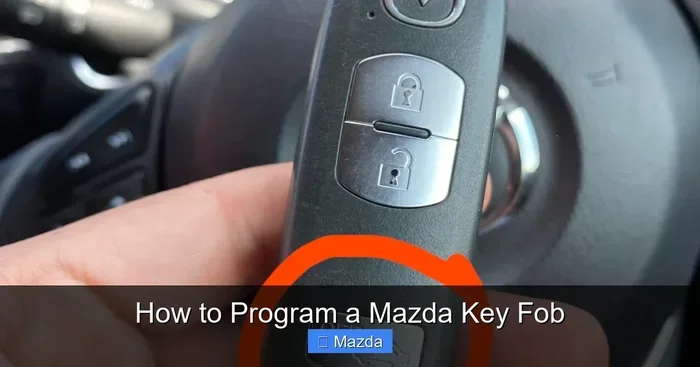
Change Mazda Key Fob Settings Now for Better Control
Changing your Mazda key fob settings gives you more control over your vehicle’s remote features, locks, and smart key functions. Whether you want to adjust the remote start, customize door lock behavior, or reprogram your Mazda smart key, the process is simpler than you think. This guide walks you through every step with clear instructions and practical tips. You will learn how to change Mazda key fob settings quickly and avoid common mistakes along the way.
Your Mazda key fob does more than just lock and unlock your car. It controls remote start, panic alarms, trunk releases, and even proximity sensors. But many Mazda owners never explore the full range of Mazda key fob settings available to them. If you have been driving with the default factory settings, you are missing out on a smoother, more personalized driving experience.
Changing your Mazda key fob settings is one of the easiest ways to take back control of your vehicle. Whether you want quicker lock responses, a different remote start delay, or simply a fresh reprogram after buying a used car, the process is straightforward. In this guide, we will walk you through everything you need to know. You will learn how to adjust your settings, troubleshoot common issues, and keep your key fob running at its best.
Let us be honest. Most people only touch their key fob when the battery dies or the remote stops working. But spending a few minutes to customize your Mazda key fob can save you time, frustration, and even money on dealer visits. So let us dive in and explore how simple it really is.
Key Takeaways
- Easy Customization: You can change Mazda key fob settings to match your driving preferences and daily habits.
- Better Vehicle Control: Adjusting key fob features lets you control locks, remote start, and proximity sensor behavior.
- Simple Step-by-Step Process: Reprogramming and resetting your Mazda key fob takes just a few minutes with the right guidance.
- Battery Maintenance Matters: A fresh key fob battery ensures your settings work reliably every time.
- Common Problems Have Simple Fixes: Most key fob issues come from dead batteries or incorrect reprogramming steps.
- Professional Help Is Available: When DIY methods fail, a Mazda dealer or locksmith can assist with advanced key fob programming.
📑 Table of Contents
Why You Should Change Mazda Key Fob Settings
Factory settings on any Mazda key fob are designed to work for the widest range of users. That means they are safe but not always personalized. When you take a few minutes to adjust your settings, you unlock features that match your daily routine.
Here are some real reasons to change your Mazda key fob settings today:
- Faster lock and unlock responses tailored to your preferences.
- Customized remote start delays so your car warms up or cools down before you get in.
- Adjusted proximity sensor sensitivity for the Mazda push button start system.
- Personalized door lock behavior, such as automatic locking when you walk away.
- Better security settings that reduce false alarms or unnecessary alerts.
When you change Mazda key fob settings, you are not just tweaking numbers on a screen. You are making your car work the way you want it to. That small shift makes a big difference in your daily driving experience.
Think about it. You already customize your phone, your computer, and your music playlists. Why would you leave your car on default settings? Your Mazda key fob is the bridge between you and your vehicle. Making it work for you is a no-brainer.
Understanding Your Mazda Key Fob Features
Before you dive into reprogramming, it helps to know what your key fob can do. Most modern Mazda models come with a smart key system that includes several buttons and sensors. Here is a quick look at what you can typically adjust:
- Remote lock and unlock timing and behavior.
- Remote start duration and temperature settings.
- Trunk release activation and delay.
- Panic alarm sensitivity and duration.
- Proximity detection for push button start.
- Auto-lock when you walk away from the vehicle.
Not every Mazda model supports all of these features. But most newer models from 2016 and onward offer a solid range of key fob customization options. Check your owner manual or the Mazda infotainment system to see what is available for your specific model.
How to Change Mazda Key Fob Settings Step by Step
Now let us get into the actual process. Changing your Mazda key fob settings involves a few simple steps. The exact process may vary slightly depending on your model year and trim level, but the general approach stays the same.
Step 1: Prepare Your Vehicle and Key Fob
Start by sitting in the driver seat with all doors closed. Make sure your key fob is within reach. Put the ignition in the “On” or “Accessory” position. Some newer Mazda models let you do this by pressing the push button start without pressing the brake pedal.
Next, check your key fob battery. A weak battery can cause intermittent problems during reprogramming. If your battery is more than a year old, consider replacing it before you start. A fresh CR2025 or CR2032 battery works for most Mazda key fobs.
Step 2: Access the Vehicle Settings Menu
On the Mazda infotainment screen, navigate to the “Settings” menu. Look for a section labeled “Key Fob,” “Smart Key,” or “Vehicle Settings.” This is where you will find most of the adjustable options for your Mazda remote start and lock behavior.
If you cannot find the key fob menu, try searching for “key” in the settings search bar. Mazda has been making this menu easier to find with each new model year.
Step 3: Adjust Your Preferred Settings
Once you are in the key fob settings menu, you can start making changes. Here are the most common adjustments:
- Lock confirmation beep: Turn this on or off based on your preference.
- Auto-lock speed: Set the speed at which your doors automatically lock.
- Remote start duration: Choose how long the engine stays running before shutting off.
- Proximity sensor range: Adjust how close you need to be for the push button start to activate.
- Trunk release delay: Set how long the trunk stays unlocked after pressing the button.
Make your changes and press “Save” or “Apply.” The system will confirm your new settings. Test each feature outside the vehicle to make sure everything works as expected.
Step 4: Reprogram the Key Fob (If Needed)
Sometimes adjusting settings is not enough. You may need to fully reprogram your Mazda key fob after a battery change or if you bought a used vehicle. Here is a quick overview of the process:
- Turn the ignition to the “On” position.
- Press and hold the “Unlock” button on the key fob for about five seconds.
- Within ten seconds, turn the ignition to the “Off” position.
- Turn the ignition back to “On” within five seconds.
- Wait for the hazard lights to flash twice. This confirms the fob is in programming mode.
- Press any button on the key fob to complete the pairing.
Always refer to your specific model year owner manual for the exact reprogramming steps. Mazda has refined this process over the years, and the steps can differ between models like the Mazda3, Mazda6, CX-5, and CX-90.
Key Fob Features You Can Customize
One of the best parts about owning a Mazda is the level of control you get over your vehicle. The key fob is no exception. Let us look at some of the most useful features you can customize through your Mazda key fob settings.
Remote Start Customization
The Mazda remote start feature lets you start your engine from a distance. You can adjust the run time, typically between 10 and 20 minutes. In cold climates, a longer remote start time helps warm up the engine and defrost the windshield before you step inside.
You can also set the temperature target if your Mazda supports dual-zone climate control. This means your car is already comfortable when you arrive. It is a small luxury that adds up over time.
Door Lock Behavior
Do you want your Mazda to lock automatically when you reach a certain speed? Or maybe you prefer manual locking every time. You can change this in the key fob settings menu. Some owners also like to adjust whether the doors unlock automatically when you shift into park.
These small tweaks make your daily commute feel more natural and less like a checklist of tasks.
Proximity Sensor and Push Button Start
The Mazda push button start system uses a proximity sensor to detect your key fob inside the vehicle. If you find the system too sensitive or not sensitive enough, you can adjust the detection range. This is especially helpful if you carry multiple key fobs or if the sensor struggles to detect your fob in certain positions.
Panic Alarm and Security Settings
The panic alarm on your Mazda key fob can be customized for sensitivity and duration. If you live in a noisy area or park in a busy lot, reducing the alarm sensitivity can prevent false triggers. You can also adjust how long the alarm sounds before it automatically stops.
Common Problems When Changing Key Fob Settings
Even with clear instructions, things can go wrong. Here are the most common issues people face when they try to change Mazda key fob settings and how to fix them.
Key Fob Not Responding After Settings Change
This usually happens when the key fob battery is low or the reprogramming was not completed correctly. Try replacing the battery first. If that does not work, repeat the reprogramming process from the beginning. Make sure you follow the timing steps carefully, especially the ten-second window for switching between “On” and “Off.”
Settings Not Saving
If your new settings keep reverting to factory defaults, the key fob may not be properly paired with the vehicle. Try resetting the entire system and re-pairing the fob. Also, make sure your Mazda infotainment system is updated to the latest software version. Outdated software can cause compatibility issues with newer key fob features.
Remote Start Not Working
Remote start problems are often caused by a dead key fob battery or a settings conflict. Check that the remote start feature is enabled in your vehicle settings. Also, make sure you are within the approved range for remote start, which is typically around 200 feet.
Push Button Start Not Detecting Key Fob
If your Mazda does not recognize the key fob when you press the start button, try placing the fob closer to the start button. Some models have a secondary antenna near the steering column. You can also check the proximity sensor settings and adjust the sensitivity upward.
Tips for Maintaining Your Mazda Key Fob
Once you have changed your Mazda key fob settings and everything is working perfectly, you want to keep it that way. Regular maintenance goes a long way toward preventing problems.
- Replace the battery every 12 to 18 months. A fresh battery ensures reliable signal strength and prevents unexpected failures.
- Keep the key fob clean. Wipe it down with a soft, damp cloth to remove dirt and grime from the buttons.
- Avoid extreme temperatures. Leaving your key fob in a hot car or freezing outdoors can damage the internal electronics.
- Store a spare fob at home. Having a backup key fob saves you from a stressful lockout situation.
- Update your vehicle software regularly. Mazda releases updates that improve key fob performance and add new features.
These simple habits keep your Mazda smart key system running smoothly for years. They take only a few minutes but pay off big time when you need your key fob the most.
When to Seek Professional Help for Key Fob Settings
Most key fob settings adjustments are easy to do on your own. But there are times when professional help makes sense. If you have tried reprogramming multiple times and the fob still does not pair, it is time to call in the experts.
A Mazda dealership has access to specialized diagnostic tools that can reprogram your key fob quickly. They can also check for underlying issues with the vehicle’s receiver module or antenna system. Similarly, a certified automotive locksmith can handle key fob replacements and advanced programming at a lower cost than the dealership.
If you recently bought a used Mazda and the previous owner’s key fob settings are still loaded, a professional reset ensures a clean start. This is especially important for Mazda security features like immobilizer pairing and alarm system configuration.
Do not hesitate to seek help when you need it. Trying to force a fix can sometimes cause more problems than it solves. A quick visit to a dealer or locksmith saves you time and frustration in the long run.
Final Thoughts
Changing your Mazda key fob settings is one of the simplest and most rewarding things you can do as a Mazda owner. It gives you more control, better convenience, and a more personalized driving experience. From adjusting remote start delays to customizing door lock behavior, every small change adds up to a much better daily drive.
Remember to keep your key fob battery fresh, update your vehicle software, and do not be afraid to seek professional help when needed. Your Mazda key fob is a powerful tool. Taking a few minutes to optimize its settings ensures you get the most out of every drive.
So go ahead and make those changes today. Your future self will thank you every time you step into your perfectly prepared Mazda.
Frequently Asked Questions
Can I change Mazda key fob settings without going to a dealer?
Yes, you can change most Mazda key fob settings through the infotainment system on your own. The settings menu allows you to adjust lock behavior, remote start duration, proximity sensor sensitivity, and more. Only advanced reprogramming tasks, like pairing a completely new fob, may require a dealer or locksmith.
How often should I replace my Mazda key fob battery?
It is best to replace your Mazda key fob battery every 12 to 18 months. A fresh battery ensures reliable signal strength and prevents unexpected lockout situations. If you notice the remote range getting shorter or buttons feeling sluggish, it is time for a replacement.
What should I do if my Mazda key fob stops working after a settings change?
First, check the key fob battery and replace it if needed. Next, try resetting the fob by following the reprogramming steps in your owner manual. If the issue persists, the infotainment system may need a software update or a reset. Contact a Mazda dealer for assistance if basic troubleshooting does not resolve the problem.
Can I customize the remote start duration on my Mazda?
Yes, most Mazda models allow you to customize the remote start duration through the key fob settings menu. You can typically choose a run time between 10 and 20 minutes. Check your specific model year to confirm the available options and maximum duration.
Is it safe to reprogram a used Mazda key fob?
Yes, reprogramming a used Mazda key fob is safe and recommended. It ensures the previous owner’s settings are cleared and the fob is properly paired with your vehicle. Always follow the official reprogramming steps in your owner manual to avoid any issues with the Mazda security system.
What is the difference between a Mazda smart key and a regular key fob?
A Mazda smart key uses a proximity sensor and push button start for hands-free operation. A regular key fob requires you to press a button to lock or unlock the car. Smart keys offer more customization options, including proximity detection range and auto-lock behavior, which you can adjust through the vehicle settings menu.
=== CONCLUSION ===
Changing Mazda key fob settings is a quick, easy, and rewarding process that puts you in full control of your vehicle’s remote features. From customizing lock behavior to adjusting remote start timing, every change makes your daily drive more convenient and personalized. Follow the steps in this guide, maintain your key fob regularly, and do not hesitate to seek professional help when needed. Your Mazda is designed to work for you, and the right settings make all the difference.