DIY How to Fix Computer Issues on a VW by Yourself
Learning how to fix computer issues on a VW by yourself is easier than you think. This guide covers everything from VW diagnostic trouble codes to fixing your VW instrument cluster and resetting your VW onboard diagnostics system. You will learn practical steps to handle common VW electrical problems, clear error codes, and tackle basic VW ECU repair without visiting a mechanic.
Your VW is more than just a car. It is a complex machine packed with computers, sensors, and electronic modules that keep everything running smoothly. But when something goes wrong, those same computers can cause frustrating problems. Dashboard lights flicker, error codes pop up, and suddenly your daily driver feels like a puzzle. If you have ever searched for how to fix computer issues on a VW by yourself, you are in the right place.
This guide walks you through every step of diagnosing and fixing common VW computer problems. You do not need to be a mechanic. You just need curiosity, a few basic tools, and the confidence to get your hands dirty. We will cover everything from VW diagnostic trouble codes to fixing your VW instrument cluster and handling VW electrical problems like a pro.
By the end of this article, you will know exactly what to do when your VW acts up. You will save money on mechanic bills and gain skills that make you a smarter car owner. Let us dive in and take control of your VW’s computer system.
Key Takeaways
- OBD-II Scanner: A VW OBD-II scanner is your best friend for diagnosing VW computer problems quickly and accurately.
- Common Issues Are Fixable: Most VW computer issues like battery drain, dashboard warning lights, and error codes can be resolved at home.
- Ground Wires Matter: Loose or corroded VW ground wires cause many electrical problems that mimic computer failures.
- Reset Steps Are Simple: A VW computer reset often clears persistent issues and restores normal function.
- Know When to Call a Pro: Some VW ECU repair tasks need professional tools, and knowing the limits saves time and money.
- Preventive Maintenance: Regular checks of your VW wiring harness and fuse box prevent most computer issues before they start.
📑 Table of Contents
Understanding Your VW Computer System
Before you start fixing anything, it helps to understand what is actually going on inside your VW. Modern Volkswagens use multiple computers, often called modules, that talk to each other. Each module has a specific job. Together, they form the nervous system of your vehicle.
What Does the VW Computer Do?
The main computer in your VW is the Engine Control Unit, or ECU. It manages fuel injection, ignition timing, and emissions. But your VW also has other important computers. The Body Control Module, or BCM, handles things like power windows and door locks. The ABS module controls your anti-lock brakes. The infotainment system manages your audio and navigation. When any of these modules have a problem, your VW computer problems start to show up in strange ways.
How Do the Computers Talk to Each Other?
Your VW uses something called the CAN bus system. Think of it as a network cable that connects all the computers. They send data back and forth constantly. If one computer sends a bad signal, other computers can react in unexpected ways. This is why a simple VW ground wire issue can cause a cascade of dashboard warning lights and error codes.
Common Signs of VW Computer Issues
How do you know your VW has a computer problem? Watch for these signs:
- Dashboard warning lights that stay on or flicker randomly
- Error codes that keep coming back after you clear them
- Battery drain even when the car is off
- Unresponsive gauges on the instrument cluster
- Strange behavior from power windows, locks, or mirrors
- Check engine light that turns on without an obvious reason
- Infotainment screen freezing or resetting randomly
If you notice any of these symptoms, do not panic. Most of the time, these issues have simple fixes that you can handle yourself.
Tools You Need for DIY VW Computer Repair
You do not need a garage full of expensive equipment. A few key tools will cover most DIY VW computer troubleshooting situations. Here is what you should have on hand before you start.
Essential Tools for VW Diagnostics
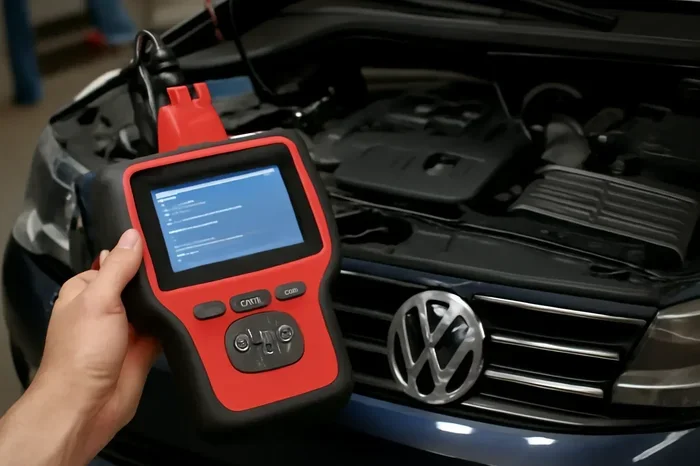
- OBD-II Scanner: A good VW OBD-II scanner reads and clears diagnostic trouble codes. It is the single most important tool for any DIY car owner. Look for one that supports VW-specific protocols.
- Multimeter: This tool measures voltage, resistance, and continuity. It helps you test VW ground wires, fuses, and wiring harness connections.
- Basic Socket Set: You need standard sockets to access fuse boxes and modules under the hood and inside the cabin.
- Wire Brush and Electrical Contact Cleaner: Corroded connections cause many VW electrical problems. These two items clean up dirty terminals fast.
- Repair Manual or Online Resource: A VW-specific repair manual gives you wiring diagrams and pin-out details for your exact model year.
Nice-to-Have Tools
Once you get comfortable, consider adding these to your toolkit:
- USB cable for VW infotainment updates
- Insulated crimping tool for fixing wiring harness connections
- LED flashlight for looking under the dashboard
- Laptop with VCDS software for advanced VW ECU repair tasks
Having the right tools makes the difference between guessing and knowing exactly what is wrong. Invest in a quality OBD-II scanner first. Everything else builds from there.
Step-by-Step Guide to Fixing VW Computer Issues
Now that you understand the system and have your tools ready, let us walk through the actual repair process. Follow these steps in order for the best results.
Step 1: Read the Diagnostic Trouble Codes
Plug your VW OBD-II scanner into the diagnostic port. This port is usually under the dashboard on the driver’s side. Turn the ignition to the “on” position without starting the engine. Read all stored codes and write them down. These VW error codes tell you exactly which module has the problem and what type of issue it is.
Step 2: Research the Codes
Look up each code in your VW repair manual or online database. Not all codes mean the same thing across different VW models. A code that points to the VW BCM in a Golf might mean something different in a Passat. Understanding the code in context of your specific vehicle is crucial.
Step 3: Check the Simple Things First
Before you dive into complex VW ECU repair, check the basics. Start with the fuse box. A blown fuse can mimic a computer failure every single time. Open the fuse box under the hood and inside the cabin. Look for any fuses that are blown. Replace them with the correct amperage rating.
Next, check the VW ground wires. These wires connect the electrical system to the chassis. Loose or corroded ground wires are one of the most common causes of VW electrical problems. Find the main ground points and clean them with your wire brush and electrical contact cleaner.
Step 4: Inspect the Wiring Harness
Follow the wiring harness connections to the affected module. Look for frayed wires, loose connectors, or signs of water damage. The VW wiring harness can deteriorate over time, especially in older models. A damaged wire in the harness can send incorrect signals to your VW computer and trigger false error codes.
Step 5: Clear the Codes and Test
After making your repairs, use the OBD-II scanner to clear all codes. Start the engine and drive for a few minutes. Then scan again to see if any codes return. If the codes are gone and the symptoms have stopped, you have successfully fixed the issue.
Step 6: Perform a VW Computer Reset
Sometimes the computer needs a full reset to clear lingering issues. To do this, disconnect the negative battery terminal for at least 15 minutes. This resets all the modules and clears temporary memory. Reconnect the terminal and start the car. Let it idle for a few minutes so all the computers relearn their settings.
Quick Tip: Before disconnecting the battery, make sure you know your radio code and any other security codes. A battery disconnect can reset these and lock you out of features.
Common VW Computer Problems and Their Fixes
Some VW computer issues show up more often than others. Here are the most common problems and how to fix them yourself.
Dashboard Warning Lights Staying On
Dashboard warning lights are the most obvious sign of VW computer problems. If a light stays on after you clear the code, the underlying issue has not been fixed. Common causes include a faulty sensor, a loose connector, or a failing VW ground wire. Start by checking the connector at the sensor. Unplug it, clean the pins, and plug it back in firmly. This simple step fixes more dashboard lights than most people realize.
Battery Drain Caused by Computer Modules
A dead battery in the morning is always frustrating. In many cases, a VW module stays awake after you turn off the car and slowly drains the battery. This is a common VW electrical problem. To fix it, you need to identify which module is drawing too much power. Use your multimeter to test the current draw at the battery. If it is above 50 milliamps with everything off, you have a parasitic draw. Disconnect modules one at a time until the draw drops. That tells you which module is the culprit.
VW Instrument Cluster Malfunctions
If your speedometer, tachometer, or fuel gauge act erratically, the instrument cluster may be the issue. This is a common problem in older VW models. Before replacing the cluster, check the connector behind the dash. Corrosion on the cluster connector causes many of these symptoms. Clean the connector pins with electrical contact cleaner and a small brush. If the problem persists, the cluster itself may need replacement or professional repair.
Infotainment System Freezing or Rebooting
The VW infotainment system can freeze or restart randomly, especially in older models. This is often a software issue rather than a hardware failure. Try performing a soft reset by holding the power button for 10 seconds. If that does not work, check for software updates from your VW dealer or online forums. Some owners have successfully resolved freezing issues by updating the infotainment firmware using a USB drive.
ABS and Traction Control Light Issues
If the ABS or traction control light comes on, the VW ABS module may have a problem. Start by checking the ABS sensor connectors at each wheel. Clean them and make sure they are secure. A dirty or loose ABS sensor is the most common cause of these lights. If the sensors are fine, the issue may be in the ABS module wiring or the module itself.
| Problem | Most Likely Cause | DIY Fix Difficulty | Cost if DIY |
|---|---|---|---|
| Dashboard lights flickering | Loose ground wire or bad fuse | Easy | Under $10 |
| Battery drain overnight | Parasitic draw from a module | Moderate | $0 (tool investment) |
| Instrument cluster acting up | Corroded connector or failing cluster | Easy to Moderate | $5-$50 for connector cleaning |
| Infotainment freezing | Software glitch or firmware issue | Easy | Free (software update) |
| ABS/traction control light | Dirty ABS sensor or wiring issue | Easy to Moderate | $10-$30 for sensor cleaning |
| Check engine light with codes | Sensor failure or ECU issue | Moderate to Hard | $20-$200 depending on sensor |
When to Call a Professional for VW ECU Repair
DIY repair is empowering, but it is important to know your limits. Some VW computer issues need professional tools and expertise. Here is when you should consider calling a mechanic.
Signs You Need Professional Help
- Multiple modules failing at once: This usually points to a CAN bus wiring problem that requires specialized diagnostic equipment.
- ECU needs reprogramming: Reprogramming a VW ECU requires dealer-level software and licensing. Most DIYers do not have access to this.
- Water damage to modules: If a computer module has been submerged in water, internal corrosion may need professional cleaning or replacement.
- Intermittent issues you cannot reproduce: Some VW electrical problems come and go unpredictably. A professional with advanced diagnostic tools can catch these issues more reliably.
Expert Insight
Many VW owners try to save money by tackling complex ECU repair jobs on their own. While this works for simple fixes like cleaning connectors or replacing fuses, attempting to repair or replace an ECU without the right tools often leads to more problems. If your VW OBD-II scanner shows codes pointing to the ECU itself, it is usually worth getting a professional diagnosis first. A $100 diagnostic visit can save you hundreds of dollars in parts and wasted effort.
The key is to start simple and work your way up. Most VW computer issues fall into the easy or moderate category. Save the complex jobs for when you have more experience or when a professional diagnosis gives you a clear path forward.
Preventing Future VW Computer Problems
The best way to deal with VW computer issues is to prevent them from happening in the first place. A little regular maintenance goes a long way toward keeping your VW’s computers happy and healthy.
Simple Preventive Steps
- Check ground wires every 6 months: Inspect your VW ground wires for corrosion or looseness. Clean them with a wire brush if needed. Clean connections prevent most electrical problems.
- Keep the fuse box dry: Moisture inside the fuse box causes corrosion and blown fuses. If you live in a rainy climate, check the fuse box seals annually.
- Update software when available: VW occasionally releases software updates for the infotainment system and other modules. Check with your dealer or look for updates in VW owner forums.
- Use a battery maintainer: If you park your VW for long periods, a battery maintainer keeps the voltage stable and prevents module memory loss.
- Address warning lights immediately: Do not ignore dashboard warning lights. A small issue today can become a big computer problem tomorrow if left unchecked.
- Inspect the wiring harness periodically: Look for chafed wires, especially near moving parts like the steering column or suspension. A damaged wire in the harness can cause intermittent computer issues that are hard to diagnose.
Following these simple steps dramatically reduces your chances of dealing with VW computer problems. Prevention is always easier and cheaper than repair.
Key Takeaways
- VW OBD-II Scanner: Every DIY VW owner needs a quality scanner to read and clear diagnostic trouble codes. It is the starting point for all computer diagnostics.
- Ground Wires and Fuses: Most VW electrical problems that look like computer failures are actually caused by loose ground wires or blown fuses. Always check these first.
- VW Computer Reset: Disconnecting the battery for 15 minutes resets all modules and often clears persistent issues without any part replacements.
- Know Your Limits: Simple fixes like cleaning connectors and replacing fuses are great DIY tasks. Complex ECU repair and reprogramming are best left to professionals.
- Prevention Wins: Regular maintenance of ground wires, fuse boxes, and wiring harnesses prevents most VW computer issues before they ever start.
Conclusion
Learning how to fix computer issues on a VW by yourself gives you confidence and saves real money. Most VW computer problems are not as scary as they seem. With a basic OBD-II scanner, a multimeter, and a little patience, you can handle the majority of issues that come up. Start with the simple things, work through the diagnostic steps, and you will be surprised at how much you can fix on your own.
Remember to check your VW ground wires, inspect the fuse box, and keep your wiring harness in good shape. These small habits prevent most problems before they start. And when a job is beyond your skill level, do not hesitate to call a professional. The goal is to be a smart, capable car owner who knows when to DIY and when to seek help.
Your VW is a sophisticated machine, but it does not have to be intimidating. Take it one step at a time, learn from each repair, and you will be amazed at what you can accomplish. Now grab your tools and get under that hood. Your VW is counting on you.
Frequently Asked Questions
Can I really fix VW computer issues by myself?
Yes, absolutely. Most VW computer problems are caused by simple issues like loose ground wires, blown fuses, or corroded connectors that you can fix at home. A VW OBD-II scanner helps you identify the exact problem, and the repair is often straightforward. Start with the easy fixes and work your way up as you gain confidence.
What is the best OBD-II scanner for VW diagnostics?
Look for an OBD-II scanner that supports VW-specific protocols and reads manufacturer codes, not just generic codes. Popular choices include the Veepeak OBDLink MX+ and the Autel MaxiCOM series. These scanners provide detailed VW diagnostic trouble codes and work well with VW models from different years.
How do I know if my VW has a parasitic battery drain?
Use your multimeter set to measure DC current in series with the negative battery terminal. With everything off and all doors closed, the current draw should be under 50 milliamps. If it is higher, you have a parasitic draw. Disconnect modules one at a time until the draw drops to identify the culprit.
Is it safe to disconnect the battery to reset the VW computer?
Yes, it is generally safe and is a common DIY troubleshooting step. However, you should know your radio code and any security codes before disconnecting. Some VW models also need the front windows recalibrated after a battery disconnect. The reset clears temporary memory and often resolves persistent error codes.
What causes VW dashboard warning lights to come on randomly?
Random dashboard warning lights are often caused by a faulty VW ground wire, a loose connector, or a failing sensor. Corroded ground connections are the most common culprit. Start by checking and cleaning all ground wires and connectors related to the affected system. If the problem persists, use your OBD-II scanner to read the specific error codes.
When should I stop DIY repairs and see a professional?
Stop DIY repairs and see a professional if you need to reprogram or replace the VW ECU, if multiple modules are failing at the same time, or if you suspect water damage to any computer module. These situations require specialized tools and software that most DIYers do not have. A professional diagnosis can also save you from buying unnecessary parts.