How to Reset Your Kia The Complete Step by Step Guide
Resetting your Kia is simpler than you think, and this guide walks you through every method step by step. Whether you need to clear a dashboard warning, restart the infotainment system, or reset the oil life monitor, we have you covered. You will learn quick fixes for common Kia systems and save time and money on dealer visits.
Your Kia is a smart machine. But sometimes it acts like it forgot everything. A warning light stays on. The radio freezes. The oil life counter refuses to reset. That is where a kia reset comes in handy. This guide shows you exactly how to reset every major system in your Kia. You do not need to be a mechanic. You just need a few minutes and the right steps.
We have tested these methods across many Kia models. From the Kia Soul to the Sorento and everything in between, the kia reset process is surprisingly similar. You will learn how to handle dashboard warnings, infotainment glitches, battery issues, and more. Let us get started.
Key Takeaways
- A kia reset can fix many common issues like dashboard warnings, infotainment freezes, and oil life reminders without visiting a mechanic.
- Different Kia systems need different reset methods, including button combos, ignition cycles, and menu navigation.
- Resetting the oil life monitor is one of the most common reasons Kia owners look up a kia reset procedure.
- Battery and electrical resets help after a jump start, battery replacement, or when lights stay on.
- Knowing when to seek professional help saves you from frustration when a simple kia reset does not solve the problem.
- Regular maintenance resets keep your Kia running smoothly and help you track service intervals accurately.
📑 Table of Contents
- Why You Might Need to Reset Your Kia
- How to Reset the Kia Dashboard Warning Lights
- How to Reset the Kia Infotainment System
- How to Reset the Kia Oil Life Monitor
- How to Reset the Kia Battery and Electrical Systems
- How to Reset the Kia Engine Light Without a Scanner
- When to Seek Professional Help for Kia Resets
- Tips to Keep Your Kia Running Smoothly
- Final Thoughts on Resetting Your Kia
Why You Might Need to Reset Your Kia
Kia vehicles use computerized systems to monitor almost everything. When something goes wrong, the car tells you with a warning light or a message on the dashboard. Sometimes the system just needs a fresh start. A kia reset clears old data and brings everything back to normal.
Here are the most common reasons Kia owners need to reset their vehicles:
- Dashboard warning lights stay on after the problem is fixed
- Oil life monitor does not reset after an oil change
- Infotainment system freezes or becomes unresponsive
- Battery light appears after a jump start or battery replacement
- Tire pressure monitoring system needs recalibration
- Service reminder lights keep coming back
- Power windows need recalibration after battery disconnect
Each of these issues has a simple fix. And most of them are easy to do at home. Let us walk through each one.
How to Reset the Kia Dashboard Warning Lights
Dashboard warning lights can be scary. But many of them are easy to clear with a kia reset. The method depends on your Kia model and the type of light.
Resetting the Check Engine Light
The check engine light is one of the most common reasons people search for a kia reset. Here is what to do:
- Turn off the engine and let the car sit for a few minutes.
- Disconnect the negative battery terminal using a wrench.
- Wait for 10 to 15 minutes. This lets the car’s computer fully power down.
- Reconnect the battery terminal and tighten it securely.
- Turn the ignition to the ON position without starting the engine.
- Wait 30 seconds and then start the engine.
The check engine light should now be off. If it comes back on, there may be an underlying issue that needs attention. A kia reset clears the light, but it does not fix the root cause.
Resetting the Tire Pressure Warning Light
If your tire pressure light stays on after you fix a flat or add air, try this kia reset method:
- Turn the ignition to the ON position.
- Press and hold the TPMS reset button. It is usually located below the steering column.
- Hold it for about 3 seconds. The tire pressure light will start to blink.
- Start the engine and drive for about 20 minutes at speeds above 20 mph.
- The light should turn off once the system recalibrates.
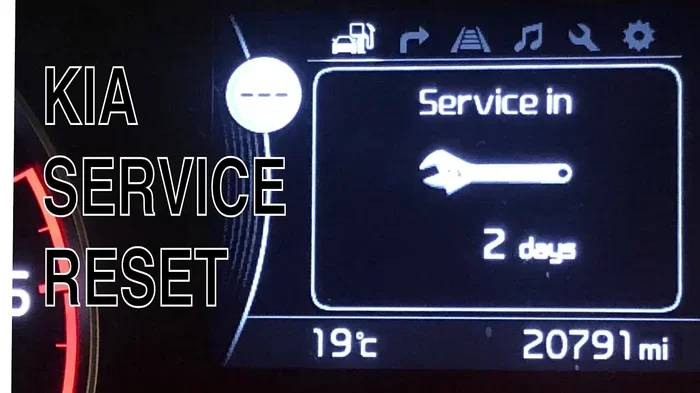
Resetting the Service Reminder Light
The service reminder light is easy to reset on most Kia models. Follow these steps for a quick kia reset:
- Turn the ignition to the OFF position.
- Press and hold the trip button on the instrument cluster.
- Turn the ignition to the ON position while still holding the trip button.
- Release the trip button after the service menu appears.
- Use the arrow buttons to navigate to the service reset option.
- Press and hold the trip button again for about 3 seconds.
- The service light should turn off.
Not all Kia models use the same button layout. Check your owner’s manual if these steps do not match your dashboard. A kia reset procedure can vary slightly between model years.
How to Reset the Kia Infotainment System
The infotainment system is the brain of your Kia’s entertainment and navigation features. When it freezes or acts up, a kia reset often solves the problem fast.
Soft Reset the Infotainment Screen
A soft reset restarts the system without erasing any data. This is the first thing you should try:
- Press and hold the power button on the infotainment screen for 10 seconds.
- The screen will go black. Wait another 5 seconds.
- Press the power button again to turn it back on.
- The system should restart normally.
Hard Reset the Infotainment System
If a soft reset does not work, you may need a hard reset. This is a deeper kia reset that clears temporary glitches:
- Turn off the ignition and make sure the screen is off.
- Disconnect the negative battery terminal.
- Wait for 5 to 10 minutes.
- Reconnect the battery terminal.
- Turn the ignition to the ON position.
- The infotainment system should boot up fresh.
A hard reset should be your last resort before visiting a dealer. Most infotainment issues resolve with a soft reset.
Resetting the Kia Radio
If your Kia radio is stuck or not responding, try this simple kia reset trick:
- Press and hold the power button on the radio for 15 seconds.
- The radio will turn off and back on.
- If that does not work, try holding the volume knob for 10 seconds.
- Some Kia models require you to hold the tuner button and the power button together.
After a radio reset, your presets should still be saved. If they are not, you may need to reprogram them. This is a small trade-off for a working radio.
How to Reset the Kia Oil Life Monitor
The oil life monitor tracks when your engine oil needs to be changed. After an oil change, you must reset this system. A kia reset of the oil life monitor is one of the most requested procedures.
Reset Oil Life on Older Kia Models
For Kia models from 2010 and earlier, follow these steps:
- Turn the ignition to the ON position (do not start the engine).
- Press the INFO button on the steering wheel repeatedly.
- Select the Oil Life option from the display menu.
- Press and hold the RESET button for about 5 seconds.
- The oil life indicator should reset to 100%.
Reset Oil Life on Newer Kia Models
Newer Kia models have a slightly different process for a kia reset:
- Turn the ignition to the ON position.
- Press the steering wheel menu button.
- Navigate to Settings, then Maintenance.
- Select Oil Life Reset.
- Confirm the reset. The oil life counter will return to 100%.
If you cannot find the oil life reset option in the menu, your model may use the trip button method described earlier. Always refer to your specific owner’s manual for the exact steps.
How to Reset the Kia Battery and Electrical Systems
A battery reset is one of the most useful types of kia reset procedures. It helps after a jump start, a battery replacement, or when electrical accessories behave strangely.
When to Reset the Kia Battery System
You should consider a battery reset in these situations:
- After replacing the car battery. The new battery needs to be recognized by the system.
- After a jump start. The electrical system may need to recalibrate.
- When the battery light stays on. Even after the battery is fine.
- When power windows or mirrors need reprogramming. A battery disconnect often triggers this need.
Steps to Reset the Kia Battery System
- Turn off all electrical accessories. Lights, radio, air conditioning, everything.
- Turn the ignition to the OFF position.
- Open the hood and locate the negative battery terminal.
- Use a wrench to loosen the cable. Remove it from the battery post.
- Wait for at least 15 minutes. This allows the computer to fully discharge.
- Reconnect the negative terminal. Tighten it securely.
- Turn the ignition to the ON position. Let the systems initialize for 30 seconds.
- Start the engine. The battery light should be off if the battery is healthy.
After a battery reset, some settings may return to default. Your radio presets, clock, and power window positions might need to be reprogrammed. This is normal and expected.
Resetting Power Windows After a Battery Disconnect
If your power windows stop working after a battery reset, you need to recalibrate them. Here is how:
- Turn the ignition to the ON position.
- Press and hold the window switch to roll the window fully down.
- Release the switch. Then press and hold it again for 3 more seconds.
- Repeat this for each window.
- The window system should now be calibrated.
This is a simple kia reset for the window system that most people overlook.
How to Reset the Kia Engine Light Without a Scanner
You do not always need an expensive OBD2 scanner to clear a kia reset for the engine light. The battery disconnect method works in most cases. But here are a few other tricks you can try.
The Drive Cycle Method
Some Kia models clear minor fault codes on their own after a specific driving pattern. Try this:
- Start the engine and let it idle for 2 minutes.
- Drive at 55 mph for 5 minutes.
- Slow down to 30 mph. Do not brake hard.
- Repeat this cycle 3 times.
- The check engine light may turn off if the issue was minor.
Using an OBD2 Scanner for a Kia Reset
If the battery disconnect method does not work, an OBD2 scanner is your best friend. Here is how to use one for a kia reset:
- Plug the scanner into the OBD2 port. It is usually under the dashboard on the driver’s side.
- Turn the ignition to the ON position.
- Follow the scanner’s prompts to read the fault codes.
- Note the codes before clearing them.
- Select the option to clear all codes.
- Turn off the ignition for 30 seconds.
- Restart the engine. The light should be off if the issue is resolved.
Even cheap OBD2 scanners work well for a kia reset. They cost around $20 to $40 and can save you hundreds in dealer fees.
When to Seek Professional Help for Kia Resets
Most kia reset procedures are simple and safe to do yourself. But there are times when you should let a professional handle it.
Here are signs that a kia reset is not enough:
- The check engine light comes back immediately after you reset it.
- Multiple warning lights appear at once. This suggests a serious electrical issue.
- The car will not start after a battery reset.
- Strange noises or vibrations accompany the warning lights.
- Error messages keep returning despite multiple reset attempts.
In these cases, a certified Kia technician has the tools and training to diagnose deeper problems. A kia reset is a great first step, but it is not a cure-all for every issue.
Finding a Kia Service Center
Kia offers a nationwide network of authorized service centers. You can find the nearest one on the Kia website or by calling their customer service line. Many centers offer free diagnostic checks, so it costs you nothing to get a professional opinion.
Tips to Keep Your Kia Running Smoothly
A kia reset is a great tool. But prevention is always better than cure. Here are some tips to keep your Kia in top shape and reduce the need for resets:
- Follow the maintenance schedule in your owner’s manual. Regular oil changes and inspections prevent most warning lights.
- Keep your battery terminals clean. Corrosion can cause electrical issues that mimic serious problems.
- Update your infotainment software. Kia occasionally releases updates that fix known bugs.
- Check tire pressure monthly. This keeps the TPMS light off and improves fuel economy.
- Do not ignore warning lights. Even if a kia reset clears them, the underlying issue may still exist.
Taking care of your Kia means fewer surprises and fewer resets. But when you do need one, you now know exactly what to do.
Final Thoughts on Resetting Your Kia
A kia reset is one of the simplest and most useful things you can do as a Kia owner. Whether it is clearing a stubborn dashboard light, restarting a frozen infotainment screen, or resetting the oil life monitor after an oil change, the steps are straightforward. You do not need special tools for most resets. A few minutes and a basic understanding of your vehicle are all you need.
Remember that a kia reset clears warnings and resets counters, but it does not fix mechanical problems. If a light keeps coming back, get your car inspected. Use the tips in this guide to handle common issues yourself and save time and money.
Your Kia is designed to be reliable and easy to maintain. With the knowledge in this article, you are now equipped to handle most reset situations confidently. Keep this guide bookmarked for future reference. And the next time your Kia acts up, you will know exactly what to do.
Frequently Asked Questions
How do I perform a kia reset on a Kia Soul?
The kia reset process for a Kia Soul is very similar to other Kia models. For dashboard lights, use the trip button method. For the infotainment system, hold the power button for 10 seconds. Check your Soul’s owner manual for model-specific details.
Can a kia reset fix a check engine light permanently?
A kia reset can clear the check engine light temporarily, but it will return if the underlying problem is not fixed. Use a diagnostic scanner to read the fault codes and address the root cause before resetting.
How long does a kia reset take?
Most kia reset procedures take between 5 and 15 minutes. A simple infotainment soft reset takes about 30 seconds. A battery disconnect reset needs 10 to 15 minutes of wait time. The oil life reset is the quickest of all.
Will a kia reset erase my saved settings?
It depends on the type of reset. A soft reset keeps all your settings intact. A hard reset or battery disconnect may reset the clock, radio presets, and power window calibration. These are easy to reprogram.
Do I need any special tools for a kia reset?
No special tools are needed for most kia reset procedures. A basic wrench for the battery terminal and your car’s built-in buttons are all you need. An OBD2 scanner is optional but helpful for clearing engine codes.
Is it safe to reset the Kia battery system myself?
Yes, it is safe to perform a kia reset on your battery system as long as you follow the steps carefully. Always turn off the ignition and all accessories before disconnecting the battery. Make sure the car is parked on a flat surface.
=== CONCLUSION ===
A kia reset is an essential skill for every Kia owner. Whether you are dealing with a dashboard warning light, a frozen infotainment screen, or an oil life monitor that will not reset, the methods in this guide will help you fix the problem quickly. You have learned how to reset dashboard lights, the infotainment system, the oil life monitor, the battery system, and more. Each procedure is simple and can be done at home with basic tools.
Remember that a kia reset is a troubleshooting tool, not a replacement for proper maintenance. Keep up with your scheduled services, and your Kia will reward you with years of reliable driving. The next time something goes wrong, do not panic. Refer back to this guide and handle it like a pro.