How to Set the Clock on Your Subaru Crosstrek Quickly
Setting the clock on your Subaru Crosstrek is a quick and easy process once you know the right steps. This guide covers the Subaru Crosstrek clock setting method for every model year and trim level. You will learn how to adjust the time, switch between 12-hour and 24-hour formats, and troubleshoot common clock issues.
Have you ever jumped into your Subaru Crosstrek and noticed the clock is showing the wrong time? It happens to all of us. Maybe you just swapped in a new battery, or perhaps daylight saving time snuck up on you again. Whatever the reason, knowing how to adjust your Subaru Crosstrek clock setting is a small skill that saves you from staring at the wrong time every time you start the car.
The good news is that setting the clock on a Subaru Crosstrek is straightforward. You do not need to be a tech expert or a mechanic. Whether you drive a 2018 model or the latest 2024 version, the steps are simple and fast. In this guide, we walk you through every method so you can get your vehicle clock displaying the right time in just a few minutes.
We will cover the two main ways to adjust the dashboard clock, explain how to switch between time formats, and share tips for fixing common problems. By the end, you will feel confident handling your Subaru Crosstrek clock setting on your own. No more guessing or waiting for the wrong time to throw off your schedule.
Key Takeaways
- Two easy methods: You can set the clock using steering wheel controls or the audio system menu.
- Works for all years: The process is similar across most Subaru Crosstrek model years from 2013 to 2024.
- Format flexibility: You can switch between 12-hour and 24-hour display formats in the settings menu.
- Common issues are fixable: Most clock problems like wrong time or resets after battery change have simple solutions.
- Keep it accurate: Regular small adjustments and a healthy battery help your clock stay precise.
- Dealer help is available: If DIY fixes do not work, a Subaru dealer can diagnose deeper electrical or software issues.
📑 Table of Contents
- Understanding Your Subaru Crosstrek Clock System
- Subaru Crosstrek Clock Setting: Step-by-Step Guide
- Choosing Between 12-Hour and 24-Hour Format
- Common Clock Problems and How to Fix Them
- Quick Tips for Keeping Your Crosstrek Clock Accurate
- When to Consult a Subaru Dealer
- Final Thoughts on the Subaru Crosstrek Clock Setting
Understanding Your Subaru Crosstrek Clock System
The clock in your Subaru Crosstrek is connected to the vehicle’s infotainment system. It is not a standalone unit. This means the clock shares power and settings with your audio system and display screen. Understanding this connection helps you troubleshoot issues later on.
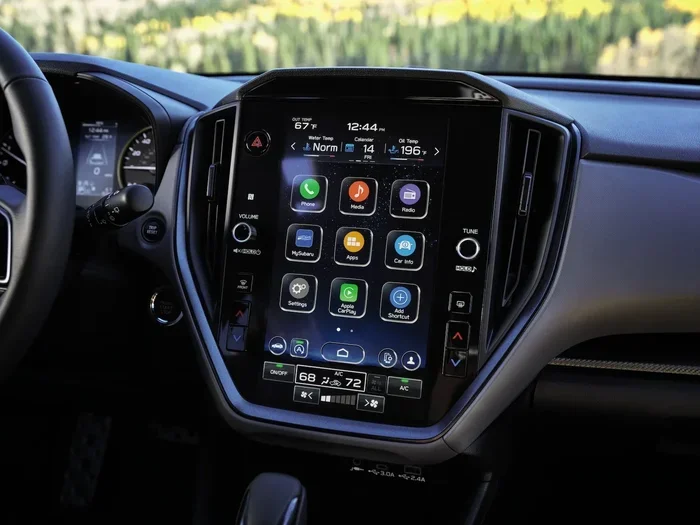
Most Crosstrek models use a digital display for the clock. It appears in the center of the dashboard or within the audio screen. The digital display shows the time in a clean, easy-to-read format. Some older models may have a simpler analog-style display, but the adjustment process is similar.
How the Clock Connects to the Infotainment System
Your Subaru Crosstrek uses a central display to control many functions. The clock sits within the audio and vehicle settings menu. When you adjust the time, you are actually sending a signal through the infotainment system to update the dashboard clock on your screen. This is true for most model years, from the early 2010s to the latest 2024 versions.
The vehicle clock also syncs with the internal memory. This is why the clock sometimes resets after a battery replacement or a power loss. The system loses its saved time data and needs you to re-enter it. Knowing this helps you understand why your Subaru Crosstrek clock setting might need a refresh from time to time.
Some higher trim levels also support GPS-based time zone detection. This feature automatically adjusts the vehicle clock based on your location. If your Crosstrek has this feature, you are in luck. The clock stays accurate without any manual input. However, if the feature is turned off or malfunctioning, you will need to set the time yourself.
Subaru Crosstrek Clock Setting: Step-by-Step Guide
There are two main ways to set the clock on a Subaru Crosstrek. Both methods are simple and take less than a minute. Let us walk through each one so you can pick the method that works best for you.
Method One: Using the Steering Wheel Controls
This is the fastest way to adjust the dashboard clock. If you just need to change the time by a few minutes, this method is ideal. Here is how to do it:
- Step 1: Press the Menu button on the steering wheel. The main settings screen will appear on the display.
- Step 2: Use the up and down arrow buttons to scroll to the Clock or Settings option.
- Step 3: Press the OK button to select it.
- Step 4: Use the left and right arrows to highlight the hour or minute.
- Step 5: Press the up or down arrows to adjust the selected value.
- Step 6: Press OK again to save the change.
This method works on most Subaru Crosstrek models from 2013 onward. If your steering wheel controls feel unresponsive, try turning the ignition to the “On” position without starting the engine. The display needs power to register your inputs. Also, make sure you are not accidentally pressing the wrong button. The audio system can sometimes intercept steering wheel inputs if the volume is being adjusted at the same time.
Method Two: Using the Audio System Menu
If you prefer using the touchscreen or knob controls, this method gives you more options. It also lets you change the clock format at the same time. Here is what to do:
- Step 1: Press the Home button on the audio system to return to the main screen.
- Step 2: Navigate to Settings using the rotary knob or touchscreen.
- Step 3: Select Clock Settings or Vehicle Settings depending on your model year.
- Step 4: Choose Time Adjustment to enter the Subaru Crosstrek clock setting mode.
- Step 5: Use the knob or touchscreen to set the correct hour and minute.
- Step 6: Confirm your selection by pressing OK or Apply.
This method is great if you want to adjust multiple settings at once. For example, you can also change the time zone or toggle between 12-hour and 24-hour formats while you are in the menu. The audio system menu gives you more control over the display screen layout and brightness too.
Quick Comparison of Both Methods
| Feature | Steering Wheel Method | Audio System Method |
|---|---|---|
| Speed | Fast (30 seconds) | Moderate (1 to 2 minutes) |
| Best For | Quick time changes | Full settings access |
| Format Options | Limited | Full control |
| Works Without Engine | Yes (ignition on) | Yes (ignition on) |
| Difficulty Level | Easy | Easy |
| Best For | Quick time changes | Full settings access |
Both methods are simple and effective. Pick whichever feels more natural to you. The Subaru Crosstrek clock setting process is designed to be user-friendly no matter which path you choose. If one method does not work for your specific model, try the other.
Common Mistakes to Avoid
Here are a few mistakes Crosstrek owners often make when adjusting the clock:
- Forgetting to save: Always press OK or Apply after making changes. Otherwise, the clock will not update.
- Adjusting while driving: Pull over before making changes. Adjusting the clock while driving takes your eyes off the road.
- Ignoring the time zone: If your clock is off by hours, check the time zone setting before adjusting the time manually.
- Using the wrong menu: Some models have the clock under Vehicle Settings, while others put it under Audio Settings. Check both if you cannot find it.
Choosing Between 12-Hour and 24-Hour Format
One of the most common questions about the Subaru Crosstrek clock setting is how to switch between 12-hour and 24-hour formats. Some drivers prefer the familiar AM/PM display. Others like the cleaner look of the 24-hour military-style format. Your audio system lets you choose.
Which Format Works Best for You?
If you grew up with the 12-hour format, it might feel more natural. It is the standard in the United States and many other countries. The 24-hour format is popular in Europe, the military, and among people who travel internationally. It removes the AM/PM confusion entirely.
To switch formats, go to the Clock Settings menu using either method above. Look for a Format or Display option. Toggle it between 12-hour and 24-hour. The change takes effect immediately. Your dashboard clock will update right away.
Quick Tip: If you travel frequently between countries, consider keeping your Subaru Crosstrek in 24-hour format. It avoids confusion when you are driving in regions that use the 24-hour standard. You can always switch it back when you return home.
Expert Insight: Many drivers who switch to the 24-hour format say they never want to go back. It eliminates the mental math of converting AM and PM times. If you are still on the fence, try it for a week and see how it feels. The Subaru Crosstrek clock setting menu makes it easy to toggle back if you do not like it.
Common Clock Problems and How to Fix Them
Even though the Subaru Crosstrek clock setting process is simple, things can go wrong from time to time. Here are the most common issues Crosstrek owners face and how to solve them.
Clock Resets After Battery Replacement
This is the number one complaint among Subaru Crosstrek owners. You replace the battery, start the car, and the clock shows 12:00 or blinks blank. This happens because the battery change cuts power to the memory system. The clock loses its saved time and needs to be reset.
The fix is simple. Just follow the Subaru Crosstrek clock setting steps above. Set the correct time and confirm the save. To prevent this from happening again, consider keeping a small backup battery handy or setting a reminder to check the clock after any battery work. This is especially common in older Crosstrek models where the battery tends to drain faster.
Clock Shows the Wrong Time Zone
Sometimes the dashboard clock is off by a few hours. This usually means the time zone setting is wrong. Your Subaru Crosstrek may have an automatic time zone feature that adjusts based on GPS data. If this feature is turned off or malfunctioning, the clock will display the wrong time.
Go to Settings and look for Time Zone or Location Services. Make sure the correct zone is selected. If your Subaru Crosstrek has GPS, the clock should adjust automatically when you cross time zone borders. If it does not, you may need to update your vehicle software or visit a dealer.
Clock Display Is Dim or Not Visible
In some cases, the digital display might be too dim to read, especially at night. This is not a clock problem but a display brightness issue. Go to Display Settings in the audio system menu and increase the brightness. You can also set the display to auto-dimming so it adjusts based on lighting conditions. This is a common vehicle clock issue that is often mistaken for a broken clock.
Clock Flashes or Freezes
A flashing or frozen clock usually indicates a software glitch. Try restarting the infotainment system by holding the power button for 10 seconds. If the problem continues, check for software updates through the MySubaru app or your dealer. A simple reset often fixes the issue without any cost.
Quick Tips for Keeping Your Crosstrek Clock Accurate
Keeping your Subaru Crosstrek clock setting accurate does not require much effort. A few simple habits can make a big difference over time:
- Check the time monthly. A quick glance at the clock once a month keeps it from drifting too far off.
- Update vehicle software. Subaru occasionally releases updates that improve clock sync and GPS accuracy. Ask your dealer about the latest updates.
- Keep the battery healthy. A weak battery causes clock resets. Have your battery tested during every oil change.
- Use the auto-time zone feature. If your Subaru Crosstrek has GPS, enable automatic time zone detection for hassle-free accuracy.
- Note daylight saving changes. Set a reminder to adjust the clock when daylight saving time begins or ends.
Expert Insight: Many Subaru Crosstrek owners do not realize that the clock can also be adjusted through the MySubaru app or by syncing with a connected smartphone. If your model supports Apple CarPlay or Android Auto, the clock may sync automatically with your phone’s time. This is a great option for people who want a hands-off approach to keeping the dashboard clock accurate. Just make sure your phone is connected and the feature is enabled in the vehicle settings menu.
Quick Tip: If you share your Crosstrek with family members, consider setting the clock to 24-hour format. It is harder to accidentally change the time when the display shows a 24-hour readout. This small trick can save you from constant clock adjustments if multiple people drive the same vehicle.
When to Consult a Subaru Dealer
Most clock issues are easy to fix on your own. But some problems need professional attention. If you have tried all the steps above and your Subaru Crosstrek clock setting still does not work correctly, it is time to see a dealer.
Here are signs that you need expert help:
- The clock flashes or freezes and does not respond to any inputs.
- The infotainment system crashes or restarts every time you try to adjust the clock.
- The clock resets every time you turn off the engine, even with a healthy battery.
- The display screen shows error messages related to time or settings.
- The clock drifts significantly even after you set it correctly.
These symptoms could point to a deeper electrical issue or a software glitch. A Subaru dealer has the tools to run diagnostics and fix the problem quickly. In most cases, it is a simple firmware update or a small electrical repair. Do not ignore these signs, as they can worsen over time and affect other vehicle settings as well.
Dealers can also check whether your specific model year and trim level have any known clock-related recalls or service bulletins. This is a free and valuable step that many owners skip. It costs nothing to ask, and it could save you from a bigger problem down the road.
Final Thoughts on the Subaru Crosstrek Clock Setting
Setting the clock on your Subaru Crosstrek is one of those small tasks that makes a big difference in your daily driving experience. Whether you use the steering wheel buttons or the audio system menu, the process is quick and easy. Once you have done it a couple of times, it becomes second nature.
Remember to check your vehicle clock regularly, especially after a battery change or when traveling across time zones. A correctly set clock helps you stay on schedule and avoids the small frustrations of being late or confused about the time. Your Subaru Crosstrek is a well-built subaru crossover and keeping its clock accurate is just one small way to get the most out of it.
Take a few minutes today to adjust your clock if needed. You will thank yourself the next time you glance at the dashboard and see the right time staring back at you. It is a simple task with a big payoff. Mastering the Subaru Crosstrek clock setting is a small win that adds to your overall confidence as a vehicle owner.
Frequently Asked Questions
How do I set the clock on a Subaru Crosstrek with the steering wheel buttons?
Press the Menu button on the steering wheel, scroll to the Clock option using the up and down arrows, and press OK. Then use the left and right arrows to highlight the hour or minute and adjust with the up and down arrows. Press OK again to save. This method works on most model years from 2013 onward.
Why does my Subaru Crosstrek clock reset after a battery change?
The clock shares its memory with the vehicle’s electrical system. When you disconnect or replace the battery, the power loss erases the saved time data. Simply follow the Subaru Crosstrek clock setting steps to re-enter the correct time. This is normal and happens to all Subaru owners.
Can I switch my Subaru Crosstrek clock to 24-hour format?
Yes. Go to the Clock Settings menu through the audio system or steering wheel controls. Look for a Format or Display option and toggle between 12-hour and 24-hour modes. The change takes effect immediately on your dashboard display.
What should I do if the clock on my Crosstrek is not responding?
First, make sure the ignition is in the On position. If the clock still does not respond, try restarting the infotainment system by holding the power button for 10 seconds. If the problem continues, check for software updates or visit a Subaru dealer for diagnostics.
Does the Subaru Crosstrek clock sync with GPS automatically?
Some model years and trims have a GPS-based auto time zone feature. When enabled, the clock adjusts automatically based on your location. Check the Vehicle Settings menu for the Time Zone or Location Services option and make sure it is turned on.
How often should I check my Subaru Crosstrek clock for accuracy?
A quick check once a month is usually enough. You should also verify the time after a battery replacement, a long trip across time zones, or when daylight saving time changes. Keeping the clock accurate is a small habit that prevents confusion and keeps your daily routine on track.
=== CONCLUSION ===
Mastering the Subaru Crosstrek clock setting is one of the easiest ways to keep your daily driving smooth and stress-free. Whether you use the steering wheel buttons or the audio system menu, you now know exactly how to adjust the time, switch formats, and fix common problems. Your dashboard clock is a small but important part of the driving experience, and keeping it accurate takes just a few minutes.
Remember the tips and steps in this guide whenever the clock needs attention. A well-set clock on your Subaru Crosstrek helps you stay on time, stay organized, and enjoy every drive. Take action today and make sure your clock is showing the right time. You will feel the difference the next time you hop behind the wheel.