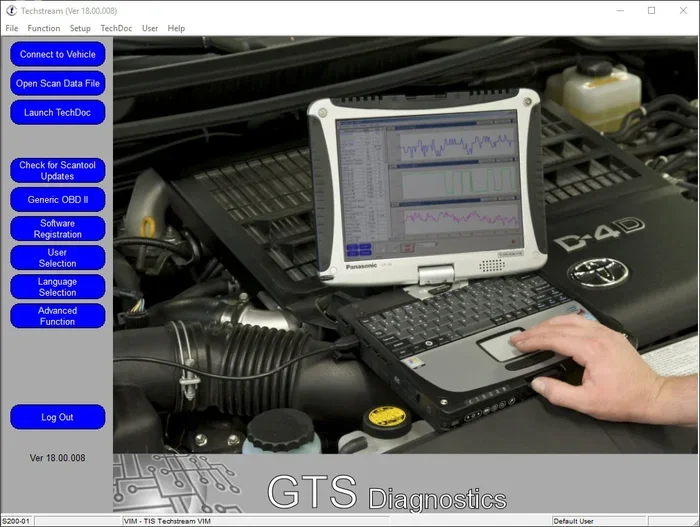
Toyota Techstream
Toyota Techstream is a powerful automotive diagnostic software designed specifically for Toyota and Lexus vehicles. It lets you read error codes, program ECU settings, and troubleshoot problems like a professional mechanic. Whether you are a DIYer or a shop owner, this tool saves time and money on vehicle diagnostics.
Toyota Techstream has become a household name among car enthusiasts and professional mechanics alike. If you own a Toyota or a Lexus, you have probably heard about this software. But what exactly is it, and why does it matter for your vehicle?
In simple terms, Toyota Techstream is a diagnostic tool that connects your computer to your car. It reads error codes, clears trouble codes, and even lets you reprogram certain parts of your vehicle’s computer system. Think of it as a bridge between your laptop and your engine.
The beauty of this software lies in its depth. Generic OBD-II scanners give you basic codes. Techstream goes much further. It provides Toyota-specific diagnostics, live data streams, and detailed wiring diagrams. For anyone who wants to understand their vehicle deeply, this tool is a game changer.
Key Takeaways
- What it is: Toyota Techstream is official diagnostic software for Toyota and Lexus vehicles.
- Key features: ECU programming, DTC reading, live data monitoring, and wiring diagrams.
- Who uses it: DIY car owners, independent shops, and Toyota dealership technicians.
- System requirements: Windows PC, diagnostic connector cable, and a Toyota vehicle.
- Cost advantage: It offers dealership-level capabilities at a fraction of the cost.
- Easy setup: Installation is straightforward with step-by-step guidance available.
- Top choice: It stands out from generic OBD-II scanners for Toyota-specific diagnostics.
📑 Table of Contents
What Is Toyota Techstream?
Toyota Techstream is a professional-grade diagnostic software developed by Toyota Motor Corporation. It is designed to work exclusively with Toyota and Lexus vehicles. The software communicates with your car’s onboard computer system through a diagnostic connector.
When you plug Techstream into your vehicle, it can access systems that most consumer-grade scanners cannot reach. These include the engine control unit, transmission control, ABS system, airbag system, and even the multimedia unit. The software supports a wide range of Toyota models from various years.
One of the standout aspects of Techstream is its Toyota TIS integration. TIS stands for Toyota Information System. This connection gives you access to technical service bulletins, wiring diagrams, and repair procedures. It essentially puts a dealership-level resource on your desktop.
How Does Techstream Work?
The software works by connecting to the OBD-II port in your Toyota vehicle. This port is usually located under the dashboard on the driver’s side. You use a compatible diagnostic cable to link the OBD port to your computer.
Once connected, Techstream establishes a communication link with the vehicle’s ECU. It then retrieves data such as diagnostic trouble codes, freeze frame data, and sensor readings. You can view this information in real time, which is incredibly helpful for diagnosing intermittent issues.
The software also allows you to perform active tests. This means you can command specific components to activate. For example, you can cycle the fuel pump, actuate the fuel injectors, or test the cooling fans. This feature is invaluable when you need to verify that a part is working before replacing it.
Key Features and Capabilities
Toyota Techstream is packed with features that make it one of the most powerful diagnostic tools available. Let us break down what you get when you use this software.
Diagnostic Trouble Code Reading and Clearing
The most basic and essential function of Techstream is reading and clearing DTCs. When your check engine light comes on, Techstream can tell you exactly what triggered it. The software provides a detailed description of each code, along with possible causes and repair steps.
After you fix the issue, you can clear the codes directly through the software. If the problem is resolved, the light will stay off. If it returns, Techstream will catch it again during the next scan.
Live Data Monitoring
Live data monitoring is one of the most useful features for troubleshooting. Techstream displays real-time sensor data from your vehicle. You can view engine RPM, coolant temperature, oxygen sensor readings, fuel trim values, and much more.
This feature helps you spot anomalies that are not always obvious. For instance, a fuel trim value that is consistently out of range can point to a vacuum leak or a failing sensor. Without live data, you might miss these subtle clues.
ECU Programming and Adaptation
Techstream allows you to program and adapt ECUs on Toyota and Lexus vehicles. This includes tasks like ECU reset, idle speed initialization, and steering angle sensor calibration. These functions are typically only available at a dealership, but Techstream brings them to your home workshop.
After certain repairs, such as replacing a battery or an ECU, you often need to relearn certain parameters. Techstream handles these adaptation procedures with clear, step-by-step instructions built into the software.
Wiring Diagrams and Technical Information
Access to accurate wiring diagrams can make or break a repair. Techstream pulls diagrams directly from Toyota’s technical database. You can trace circuits, identify connector pinouts, and understand how different systems interact.
This is especially helpful for electrical troubleshooting. Instead of guessing where a wire goes or what a connector does, you can look it up instantly in Techstream.
Vehicle Health Management
Techstream also includes a vehicle health management system. It tracks your maintenance history and reminds you of upcoming service intervals. This helps you stay on top of regular maintenance like oil changes, brake inspections, and fluid replacements.
How to Install and Set Up Techstream
Setting up Toyota Techstream is simpler than many people expect. The process involves a few key steps, and once you have it running, it works seamlessly.
System Requirements
Before you install Techstream, make sure your computer meets the requirements. The software runs on Windows operating systems. You will need a computer with sufficient processing power and storage space. A reliable USB connection is also important for stable communication with your vehicle.
You will also need a compatible diagnostic cable. The most common options include the Toyota Techstream USB cable or a VCI (Vehicle Communication Interface) adapter. Make sure the cable matches your vehicle year and model.
Installation Steps
Start by downloading the Techstream installer from the official Toyota website or your authorized source. Run the setup file and follow the on-screen prompts. The installation process is straightforward and typically takes just a few minutes.
After installation, connect your diagnostic cable to the OBD-II port and then to your computer. Launch Techstream, and the software should detect your vehicle automatically. You may need to select your vehicle model and year from a menu.
Quick Tips for Setup
- Always use the latest version of Techstream for the best compatibility.
- Keep your vehicle ignition in the ON position during setup.
- Make sure your computer recognizes the diagnostic cable before launching the software.
- Save your vehicle profile after the first successful connection for faster future use.
Who Should Use Toyota Techstream?
Toyota Techstream serves a wide range of users. Its versatility makes it valuable for different situations and skill levels.
DIY Car Enthusiasts
If you like working on your own car, Techstream is an incredible asset. It gives you access to information and tools that were once reserved for professionals. You can diagnose problems yourself, avoid costly shop visits, and learn more about how your vehicle works.
Many DIYers use Techstream to troubleshoot warning lights before taking their car to a shop. This saves money because you can often fix simple issues yourself or at least know exactly what needs to be done.
Independent Repair Shops
Independent shops benefit greatly from Techstream because it provides dealership-level diagnostics at a lower cost. Instead of investing in multiple expensive scan tools, a shop can use Techstream to service most Toyota and Lexus vehicles.
The software also helps shops build trust with customers. When you can show a customer the exact data behind a repair recommendation, it builds confidence and transparency.
Toyota Dealership Technicians
Of course, Techstream is the standard tool in Toyota dealerships. Technicians use it daily for diagnostics, programming, and service procedures. It ensures consistency and accuracy across all service tasks.
Automotive Students and Trainees
For those learning automotive repair, Techstream is an excellent training tool. It helps students understand how modern Toyota vehicles use computers to manage engine performance, emissions, and safety systems. Hands-on experience with professional software gives students a real edge in the industry.
Toyota Techstream vs Other Diagnostic Tools
The market is full of diagnostic tools, so how does Techstream compare? Let us look at some common alternatives.
Generic OBD-II Scanners
Generic OBD-II scanners are affordable and widely available. They can read and clear basic codes for any vehicle. However, they lack the depth and specificity that Techstream offers. Generic scanners do not provide Toyota-specific diagnostics, live data depth, or ECU programming capabilities.
If you only need to check a check engine light, a generic scanner might be enough. But for serious troubleshooting and Toyota-specific features, Techstream is far superior.
Other Brand-Specific Software
Other manufacturers have their own diagnostic software, such as Honda HDS or Ford IDS. These tools work similarly to Techstream but only for their respective brands. Techstream is the equivalent for Toyota and Lexus vehicles.
One advantage Techstream has is its comprehensive coverage across many Toyota models and years. It supports a vast range of systems beyond just the engine, including body electrical and chassis systems.
Aftermarket Scan Tools
Aftermarket scan tools like Autel or Launch offer multi-brand support and advanced features. They can be a good choice if you work on many different vehicle brands. However, for Toyota-specific diagnostics, Techstream often provides more accurate and detailed information.
The table below compares Techstream with some popular alternatives.
| Feature | Toyota Techstream | Generic OBD-II Scanner | Aftermarket Tool |
|---|---|---|---|
| Toyota-Specific Diagnostics | Yes | No | Limited |
| ECU Programming | Yes | No | Some Models |
| Live Data Depth | Comprehensive | Basic | Good |
| Wiring Diagrams | Yes | No | Some Models |
| Multi-Brand Support | No | Yes | Yes |
| Cost | Moderate | Low | High |
Common Issues and How to Troubleshoot
Like any software, Techstream can sometimes encounter issues. Here are some common problems and their solutions.
Software Not Detecting the Vehicle
If Techstream does not recognize your vehicle, check the cable connection first. Make sure the diagnostic cable is firmly plugged into both the OBD port and your computer. Try a different USB port if needed.
Also, confirm that you have selected the correct vehicle model and year in the software. Sometimes an incorrect selection causes communication failures.
Connection Drops During a Scan
A dropping connection can be frustrating. This issue often stems from a loose cable or a USB hub that does not provide enough power. Try connecting the cable directly to your computer’s USB port instead of through a hub.
Updating the cable drivers on your computer can also resolve this problem. Check the Techstream website or your cable manufacturer’s site for the latest driver downloads.
Software Errors or Crashes
If Techstream crashes or shows errors, make sure your system meets the minimum requirements. Running the software on an outdated operating system can cause compatibility issues.
Try reinstalling the software if problems persist. Always download Techstream from a trusted source to avoid corrupted files. Keeping your Windows system updated also helps prevent conflicts.
Final Thoughts
Toyota Techstream is more than just a diagnostic tool. It is a comprehensive platform that empowers you to understand and maintain your Toyota or Lexus vehicle with confidence. From reading error codes to programming ECUs, it covers a wide range of functions that rival dealership equipment.
Whether you are a weekend warrior turning wrenches in your garage or a professional technician running a busy shop, Techstream adds real value. It saves time, reduces guesswork, and gives you access to information that helps you make smarter repair decisions.
If you are serious about working on Toyota vehicles, investing in Toyota Techstream is one of the best decisions you can make. It brings professional-grade diagnostics into your hands and puts you in control of your vehicle’s health.
The automotive world is moving toward more complex computer systems every year. Having the right tools to keep up with that complexity is essential. Toyota Techstream ensures you are always ready for whatever your vehicle throws at you.
Frequently Asked Questions
Is Toyota Techstream free to use?
Toyota Techstream is not free. It requires a paid license to activate and use. However, compared to other professional diagnostic tools, the cost is reasonable given the range of features it offers. Some versions may be available through dealerships or authorized distributors.
Can Toyota Techstream work on Lexus vehicles?
Yes, Toyota Techstream fully supports Lexus vehicles. Since Lexus is Toyota’s luxury division, the software covers both brands. You can use Techstream for diagnostics, programming, and maintenance on most Lexus models.
What operating system does Techstream require?
Toyota Techstream is designed for Windows operating systems. It does not natively support Mac or Linux. Make sure your computer runs a compatible version of Windows before purchasing or downloading the software.
Do I need special hardware to use Techstream?
Yes, you need a compatible diagnostic cable or VCI adapter to connect Techstream to your vehicle. The software alone cannot communicate with your car without this hardware connection. Make sure to get the right cable for your specific Toyota model and year.
Can Techstream clear all types of error codes?
Techstream can clear most diagnostic trouble codes related to the engine, transmission, ABS, and other Toyota-specific systems. However, some codes may return if the underlying problem is not fixed. Always diagnose and repair the root cause before clearing codes.
How often should I update Toyota Techstream?
It is recommended to update Techstream whenever a new version is available. Updates often include support for newer vehicle models, improved functionality, and bug fixes. Regular updates ensure you get the most accurate and reliable diagnostics.
=== CONCLUSION ===
Toyota Techstream stands out as one of the best diagnostic tools for Toyota and Lexus vehicle owners. Its deep automotive diagnostic software capabilities, Toyota-specific features, and professional-grade functionality make it a must-have for anyone who takes car care seriously. From vehicle troubleshooting to ECU programming, Techstream covers it all with ease.
By using Techstream, you gain access to the same diagnostic power that Toyota dealerships rely on every day. This means fewer trips to the shop, lower repair costs, and a better understanding of your vehicle. Whether you are a DIY enthusiast or a professional, Toyota Techstream delivers real value and peace of mind.