How to Remove Maintenance Required on a 2024 Toyota Tundra
Removing the maintenance required light on a 2024 Toyota Tundra is a quick and easy process you can do at home. This guide walks you through the exact steps to reset the maintenance reminder on your Tundra without visiting a dealership. Whether it is after an oil change or a routine service, you will have your dashboard looking clean in just a few minutes.
That little “Maintenance Required” message on your 2024 Toyota Tundra dashboard can be annoying. You have just finished an oil change or completed a routine service, and yet the light stays on. It is a common situation for Tundra owners. The good news is that removing this light is straightforward and something you can handle on your own.
In this guide, we will walk you through every step to reset the maintenance required indicator on your 2024 Toyota Tundra. We will also cover why the light comes on, how the maintenance reminder system works, and a few tips to keep your Tundra running smoothly. No need to visit a dealership or pay a mechanic just to clear a dashboard message.
Let us get into it. By the end of this article, you will know exactly how to remove the maintenance required message and keep your Tundra’s dashboard clean and accurate.
Key Takeaways
- Simple process: Resetting the maintenance required light on a 2024 Toyota Tundra takes only a few minutes.
- No tools needed: You can do it yourself with just the steering wheel buttons and your ignition.
- Saves money: Avoid unnecessary trips to the dealer or mechanic for a basic reset.
- Works for all services: This method resets the oil life system and general maintenance counter.
- Quick reminder: Always note your service date before resetting so you do not forget when your next oil change is due.
- Owner’s manual matters: Keep your Tundra owner’s manual handy for reference on maintenance schedules.
📑 Table of Contents
- Why Does the Maintenance Required Light Come On?
- What You Need Before Starting the Reset
- Step-by-Step Guide to Remove Maintenance Required on a 2024 Toyota Tundra
- Common Mistakes When Resetting the Maintenance Light
- How Often Should You Reset the Maintenance Reminder?
- When to See a Professional for Maintenance Light Issues
- Tips to Keep Your 2024 Toyota Tundra in Great Shape
- Final Thoughts on Removing the Maintenance Required Light
Why Does the Maintenance Required Light Come On?
The maintenance required light is part of the Toyota Tundra’s oil life monitoring system. This system tracks your driving habits and engine conditions to estimate when your next service is due. It is not a complex sensor. Instead, it uses a simple algorithm based on time and mileage.
Here are the most common reasons the light appears:
- Oil change interval reached: The system counts down from 100% oil life to zero. When it hits zero, the light turns on.
- Time-based reminder: Even if you have not hit a mileage milestone, the system reminds you after a set period.
- After a service reset was missed: If the previous owner or technician forgot to reset the counter, the light stays on.
- Dashboard notification: Toyota designed this light as a friendly reminder, not a warning of a serious problem.
Understanding this helps you realize that the light is not something to fear. It is simply a nudge from your Tundra to keep up with regular maintenance. The 2024 Toyota Tundra uses an intelligent maintenance reminder that adapts to your driving style, so the intervals can vary slightly from one owner to another.
What You Need Before Starting the Reset
Before you begin, gather a few simple things. You do not need any special tools or expensive equipment. Just make sure you have the following ready.
Your 2024 Toyota Tundra Owner’s Manual
Every Toyota Tundra comes with an owner’s manual. This booklet contains specific instructions for your model year. While the reset process is similar across most Tundra models, the manual can confirm the exact steps for your trim level. Keep it in your glove box for future reference too.
A Clean Workspace
You do not need a garage. A flat surface and good lighting are enough. Park your Tundra on level ground, turn off the engine, and make sure the key or push-start button is accessible.
Your Service Records
Before you reset the light, write down the date and mileage of your last service. This way, you will not forget when your next oil change or maintenance appointment is due. The maintenance reminder resets to zero, so having a personal record keeps you on track.
Step-by-Step Guide to Remove Maintenance Required on a 2024 Toyota Tundra
Here is the core process. Follow these steps carefully, and you will have that maintenance required light off in no time.
Step 1: Turn the Ignition to the On Position
Sit in your 2024 Toyota Tundra and close the door. Press the push-start button without pressing the brake pedal. This puts the vehicle in accessory mode. The dashboard lights will turn on, but the engine will not start. This is the mode you need to access the maintenance menu.
Step 2: Locate the Trip Meter Reset Button
On the Tundra’s instrument cluster, look for the trip meter reset button. It is usually a small button on the left side of the steering wheel or on the dash near the odometer. Press and hold this button for a few seconds until the odometer display changes.
Step 3: Navigate to the Maintenance Menu
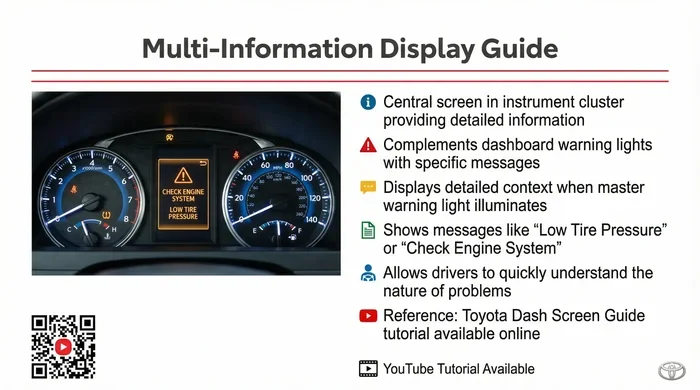
While holding the trip reset button, turn the ignition off and then back on to the on position. Keep holding the button for about 5 to 10 seconds. The maintenance menu should appear on the dashboard display. You may see options like “Oil Life,” “Maintenance Reset,” or “Service Due.”
Step 4: Select the Maintenance Reset Option
Use the arrow buttons on the steering wheel to scroll through the menu. Highlight the “Maintenance Reset” or “Reset” option. Press the OK or Enter button to select it. The system will ask you to confirm the reset.
Step 5: Confirm and Complete the Reset
Confirm the reset when prompted. The dashboard will show the maintenance counter returning to zero or displaying “Maintenance Due” with a percentage reset to 100%. Release the trip button and turn the ignition off. Then start the engine to verify the maintenance required light is gone.
That is it. Your 2024 Toyota Tundra maintenance reminder has been successfully reset. If the light does not turn off, try repeating the process. Sometimes the system needs a second attempt, especially if it was overdue before the reset.
Common Mistakes When Resetting the Maintenance Light
Even though the process is simple, mistakes can happen. Here are a few common errors Tundra owners make when trying to remove the maintenance required light.
- Not holding the button long enough: The system needs several seconds to register the input. Short presses will not work. Hold the button steadily for at least 5 to 10 seconds.
- Starting the engine instead of staying in accessory mode: If the engine starts during the reset process, the menu will not appear. Turn the key back to the off position and try again.
- Resetting before completing the service: Always finish your oil change or maintenance first. Resetting the light without doing the service defeats the purpose of the reminder system.
- Ignoring other maintenance items: The maintenance required light covers more than just oil changes. It also tracks tire rotations, brake inspections, and fluid checks. Make sure all scheduled services are complete before resetting.
Avoiding these mistakes will save you time and frustration. Take your time with each step, and the reset will go smoothly.
How Often Should You Reset the Maintenance Reminder?
The maintenance reminder on your 2024 Toyota Tundra resets with every service. After each oil change, tire rotation, or major inspection, you should clear the light. This keeps your service records accurate and your dashboard clean.
Most Toyota Tundra owners reset the maintenance reminder every 5,000 to 7,500 miles, depending on driving conditions. If you tow frequently or drive in dusty areas, you may need to reset it more often. The Tundra’s oil life system adjusts the interval based on your usage, so pay attention to when the light first appears.
Keeping a simple log in your phone or a notebook helps too. Write down the date, mileage, and type of service each time you reset the light. This personal record is more reliable than the dashboard counter alone and gives you a clear picture of your Tundra’s maintenance history.
When to See a Professional for Maintenance Light Issues
In most cases, resetting the maintenance required light is a DIY task. However, there are times when you should seek professional help. If the light stays on after multiple reset attempts, there may be an underlying issue with the Tundra’s onboard computer system.
Here are situations where a visit to the mechanic or dealer makes sense:
- The light flashes instead of staying solid: A flashing maintenance light could indicate a deeper problem with the engine or sensors.
- Multiple warning lights appear together: If other dashboard warnings show up alongside the maintenance light, do not ignore them.
- The reset menu does not appear: If you cannot access the maintenance menu at all, the instrument cluster may need professional diagnosis.
- You are uncomfortable doing it yourself: There is no shame in asking a Toyota dealer or trusted mechanic to handle the reset for you.
A certified Toyota technician can run diagnostic tools to check the maintenance system. They can also address any related issues that might be causing the light to behave abnormally on your 2024 Tundra.
Tips to Keep Your 2024 Toyota Tundra in Great Shape
Resetting the maintenance light is just one part of Tundra ownership. Here are a few extra tips to keep your truck running strong for years to come.
- Follow the recommended maintenance schedule: Check your owner’s manual for the service intervals specific to your Tundra trim. Staying on top of oil changes, brake inspections, and fluid replacements prevents bigger problems later.
- Keep a maintenance log: A written or digital record of every service makes it easy to track what has been done and what is coming next.
- Use genuine Toyota parts: Genuine OEM parts are designed specifically for the Tundra. They fit better and last longer than aftermarket alternatives.
- Check tire pressure regularly: Proper tire pressure improves fuel economy and safety. The Tundra’s maintenance system also tracks tire rotation intervals.
- Address dashboard warnings promptly: Do not ignore any warning light, even if it seems minor. Early attention prevents costly repairs down the road.
These habits keep your 2024 Toyota Tundra reliable and resale-ready. A well-maintained Tundra is a truck that performs at its best, whether you are hauling, towing, or just cruising down the highway.
Final Thoughts on Removing the Maintenance Required Light
Removing the maintenance required light on a 2024 Toyota Tundra is a simple process that anyone can do. You do not need special tools, mechanical skills, or a trip to the dealership. Just follow the steps outlined in this guide, and your dashboard will be clear in minutes.
Remember that the maintenance reminder exists to help you keep your Tundra in top shape. Reset it only after completing your service, and always keep a personal record of your maintenance schedule. This small habit goes a long way in protecting your investment and ensuring your Tundra stays reliable for every mile ahead.
Now that you know how to handle the maintenance required light, you can tackle it confidently the next time it shows up. Your 2024 Toyota Tundra is built to last, and with proper care, it will serve you well for many years to come.
Frequently Asked Questions
Can I reset the maintenance required light without completing a service?
Technically yes, but it is not recommended. The maintenance reminder exists to help you stay on track with important services like oil changes and inspections. Resetting it without completing the service means you could miss a critical maintenance window, which might affect your Tundra’s performance and longevity.
How long does the maintenance required reset process take?
The entire process takes about 2 to 3 minutes. Once you know the steps, it becomes second nature. Most Tundra owners complete the reset in under five minutes the first time they do it.
Will resetting the maintenance light clear any error codes?
No. The maintenance required light is a reminder, not an error code. It only tracks service intervals. If you have other warning lights on your dashboard, those may indicate separate issues that need professional diagnosis.
What if the maintenance required light keeps coming back after I reset it?
If the light returns shortly after a reset, your Tundra’s oil life system may have detected that the oil life has dropped to zero again. This can happen if the system was very low before the reset. Try resetting it again after confirming your oil level is full and the service is complete. If it persists, visit a Toyota dealer for a diagnostic check.
Do I need any special equipment to reset the maintenance light on a 2024 Tundra?
No special equipment is needed. You only need the steering wheel buttons and the ignition. The entire reset is done through the dashboard interface. Your owner’s manual can also guide you through the process if you get stuck.
Is it safe to drive my Tundra with the maintenance required light on?
Yes, it is generally safe. The maintenance required light is a scheduled service reminder, not an urgent warning. However, you should not ignore it for too long. Delaying oil changes and other routine services can lead to engine wear over time. Plan your service as soon as the light appears.
=== CONCLUSION ===
Resetting the maintenance required light on your 2024 Toyota Tundra is one of the simplest and most useful things you can do as a Tundra owner. It saves you time, money, and a trip to the dealer. With the steps laid out in this guide, you now have the knowledge to handle it yourself whenever the light comes on.
Remember to complete your service first, keep a personal maintenance log, and use the owner’s manual as your reference. Your Tundra is a powerful, reliable truck, and keeping up with its maintenance schedule ensures it stays that way. The next time you see that maintenance required message, you will know exactly what to do.