Nissan Rogue Radio Hard Reset Complete Step by Step Guide
A nissan rogue radio hard reset is a simple fix for frozen screens, audio failures, and system glitches. This guide covers three proven methods, from battery disconnect to touchscreen reset, so you can get your Nissan Rogue audio system working again quickly. Follow the steps carefully and avoid common mistakes for the best results.
Key Takeaways
- A nissan rogue radio hard reset is a simple, safe, and free way to fix most audio system problems.
- Three methods work reliably: battery disconnect, fuse box removal, and touchscreen soft reset.
- The battery disconnect method is the most thorough and handles the most stubborn issues.
- A hard reset clears temporary memory and forces the infotainment system to reload fresh.
- Prevention tips like keeping software updated and avoiding system overloads reduce future problems.
- See a professional if the hard reset does not work or if you notice warning signs like burning smells.
📑 Table of Contents
- Why Does Your Nissan Rogue Radio Need a Hard Reset?
- Method 1: The Battery Disconnect Method
- Method 2: The Fuse Box Reset
- Method 3: The Soft Reset Through the Touchscreen
- Common Problems Fixed by a Hard Reset
- Preventing Future Radio Issues
- When to Seek Professional Help
- Quick Tips for a Smooth Reset
- Key Takeaways
Why Does Your Nissan Rogue Radio Need a Hard Reset?
A hard reset is different from a simple restart. A soft reboot might clear a minor glitch, but a hard reset forces the entire system to shut down and start fresh. Think of it like restarting your phone when it freezes completely. Sometimes the normal power button trick does not work, and you need to cut the power entirely.
Here are the most common reasons a Nissan Rogue radio needs a hard reset:
- The touchscreen becomes unresponsive or frozen
- The audio system stops producing sound even when turned on
- The display shows a black screen or error message
- The radio turns on but does not connect to Bluetooth or Apple CarPlay
- A software update went wrong and the system is stuck
- The infotainment system freezes after a power surge
- The unit displays incorrect time or settings randomly
When any of these problems hit, a Nissan Rogue radio troubleshooting session with a hard reset should be your first move. It is safe, quick, and costs nothing.
How the Nissan Rogue Infotainment System Works
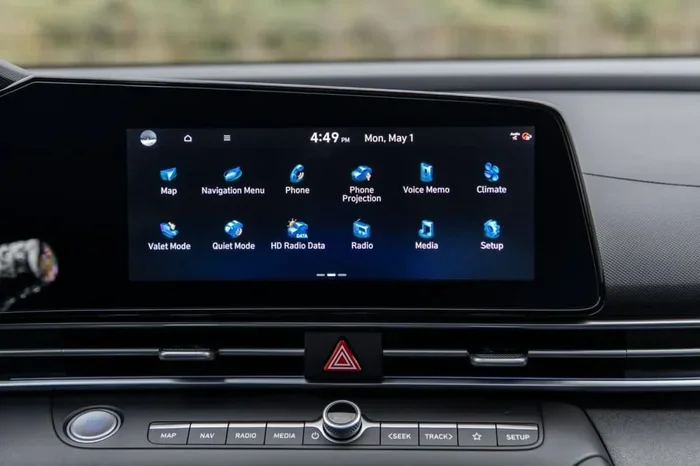
Your Nissan Rogue media system runs on a small computer inside the dashboard. Just like any computer, it can run into software bugs or memory issues. The system manages your radio, Bluetooth connections, navigation, and even the rear camera display. When the system gets overloaded or encounters a conflict, a hard reset clears the temporary memory and reloads everything from scratch.
Method 1: The Battery Disconnect Method
This is the most reliable way to perform a nissan rogue radio hard reset. It works by cutting all power to the electrical system and letting the capacitors drain completely. Here is how to do it step by step.
Step 1: Turn Off the Engine and Remove the Key
Make sure your Nissan Rogue is completely powered down. Turn the ignition to the off position and remove the key or push the start button. This prevents any electrical shorts while you work.
Step 2: Open the Hood and Locate the Battery
Pop the hood and find the car battery. You will see the positive terminal marked with a plus sign and the negative terminal marked with a minus sign. Always disconnect the negative terminal first for safety.
Step 3: Disconnect the Negative Battery Terminal
Use a wrench to loosen the nut on the negative terminal. Carefully lift the cable off the battery post and tuck it away so it does not touch the terminal again. Wait at least 15 minutes. This gives the system enough time to fully discharge and reset.
Step 4: Reconnect the Battery and Test the Radio
After 15 minutes, reconnect the negative terminal and tighten the nut securely. Start your Nissan Rogue and turn on the radio. The system should boot up fresh. You may need to reprogram your radio presets and Bluetooth connections, but everything else should work normally.
Method 2: The Fuse Box Reset
If you do not want to open the hood, you can try a fuse box reset instead. This method targets the radio circuit directly and is a great alternative for a Nissan Rogue radio troubleshooting session.
Step 1: Find the Interior Fuse Box
Most Nissan Rogues have an interior fuse box located under the dashboard on the driver side. Open the door and look for a panel on the lower left side of the dashboard. Pull the panel cover off to reveal the fuses.
Step 2: Locate the Radio Fuse
Check the fuse box diagram printed on the inside of the panel cover. Look for the fuse labeled “Radio” or “Audio.” It is usually a standard blade fuse with a specific amperage rating, often around 10 to 15 amps.
Step 3: Remove the Fuse and Wait
Use a fuse puller or a pair of needle-nose pliers to gently remove the radio fuse. Wait about 5 to 10 minutes. This allows the system to fully power down and reset.
Step 4: Reinsert the Fuse and Power On
Put the fuse back in its slot firmly. Start your vehicle and test the radio. If the nissan rogue radio hard reset worked, your screen should light up and the audio system should function normally.
Method 3: The Soft Reset Through the Touchscreen
Not all issues require a full hard reset. Sometimes a soft reset through the touchscreen does the trick. This method is quicker and does not involve any tools.
How to Perform a Soft Reset
Press and hold the power button on your Nissan Rogue touchscreen for about 10 to 15 seconds. The screen should go dark and then restart on its own. This is a simple Nissan Rogue reboot that clears minor software glitches.
When to Use a Soft Reset vs. a Hard Reset
Use a soft reset for minor issues like the screen freezing for a few seconds or audio cutting out briefly. Use a hard reset when the system is completely unresponsive or when the soft reset does not solve the problem. Think of the soft reset as a quick nap and the hard reset as a full power nap overnight.
Common Problems Fixed by a Hard Reset
A nissan rogue radio hard reset can solve a surprising number of issues. Here are some of the most common problems owners report and how a reset helps.
Black Screen or No Display
A black screen is one of the most common complaints. The radio might still be working, but you cannot see what you are doing. A hard reset forces the display to reload and usually fixes the issue immediately.
Bluetooth Connection Failures
If your phone will not connect to the Nissan Rogue media system, the Bluetooth module might be stuck. A hard reset clears the Bluetooth cache and allows fresh pairing. This is especially helpful after a software update or when switching phones.
Frozen Touchscreen
A frozen touchscreen is annoying and can make your car feel broken. Often, the system just needs a full power cycle to unfreeze. The hard reset does exactly that without any risk to your vehicle.
Radio Presets Lost or Incorrect Settings
After a hard reset, your radio presets and settings may revert to factory defaults. This is normal and not a cause for concern. Simply reprogram your favorite stations and settings once the system is back online.
Preventing Future Radio Issues
Once you fix your Nissan Rogue radio with a hard reset, you probably want to avoid dealing with this again. Here are some tips to keep your infotainment system running smoothly.
- Keep your system updated. Nissan occasionally releases software updates that fix known bugs and improve performance.
- Avoid overloading the system. Too many connected Bluetooth devices can slow down the Nissan Rogue infotainment system.
- Turn off the radio before shutting off the engine. This prevents power surges from affecting the system.
- Check your battery health regularly. A weak battery can cause electrical issues that affect the radio and display.
- Use genuine Nissan accessories. Aftermarket devices can sometimes conflict with the factory system and cause glitches.
When to Seek Professional Help
Most of the time, a hard reset solves the problem. But there are situations where you should take your Nissan Rogue to a professional. If you perform a hard reset and the radio still does not work, there may be a hardware issue. A blown speaker, a damaged wiring harness, or a faulty amplifier could be the real cause.
Also, if you notice a burning smell, see warning lights on the dashboard, or hear unusual clicking sounds, stop and get help. These signs point to a deeper electrical problem that a simple reset cannot fix. A certified Nissan technician can diagnose the issue properly and keep you safe on the road.
Quick Tips for a Smooth Reset
Here are some quick tips to make your Nissan Rogue radio hard reset go smoothly:
- Always write down your radio presets before starting the reset process
- Make sure you know your Bluetooth pairing codes
- Keep your owner manual handy for fuse box diagrams
- Work in a dry, safe area away from water sources
- Use the right tools so you do not damage any components
- Be patient and let the system fully power down before restarting
Key Takeaways
- A nissan rogue radio hard reset is a simple, safe, and free way to fix most audio system problems.
- Three methods work reliably: battery disconnect, fuse box removal, and touchscreen soft reset.
- The battery disconnect method is the most thorough and handles the most stubborn issues.
- A hard reset clears temporary memory and forces the infotainment system to reload fresh.
- Prevention tips like keeping software updated and avoiding system overloads reduce future problems.
- See a professional if the hard reset does not work or if you notice warning signs like burning smells.
Frequently Asked Questions
How long does a nissan rogue radio hard reset take?
The entire process takes about 15 to 30 minutes depending on the method you choose. The battery disconnect method requires the longest wait time of 15 minutes, while the fuse box method only needs 5 to 10 minutes. The soft reset through the touchscreen takes less than a minute.
Will a hard reset erase my saved radio stations and Bluetooth connections?
Yes, a hard reset typically clears saved presets and Bluetooth pairings. This is normal and expected. After the reset, you will need to reprogram your favorite radio stations and re-pair your phone. The process only takes a few minutes and your settings will be back to normal.
Is it safe to disconnect the battery on my Nissan Rogue?
Absolutely. Disconnecting the negative battery terminal is a standard and safe procedure recommended by Nissan itself. Just make sure the engine is off and the key is removed before you start. Always disconnect the negative terminal first and reconnect it last to avoid electrical shorts.
What should I do if the radio still does not work after a hard reset?
If a hard reset does not fix the problem, the issue may be hardware-related. A blown fuse, damaged wiring, or a faulty radio unit could be the cause. In this case, it is best to visit a certified Nissan dealer or a trusted auto electrician for a proper diagnosis.
Can I perform a nissan rogue radio hard reset without any tools?
Yes, if you use the touchscreen soft reset method. Simply hold the power button for 10 to 15 seconds and the system will restart. However, for the battery disconnect and fuse box methods, you will need a basic wrench and a fuse puller or a pair of pliers. These tools are inexpensive and easy to find at any auto parts store.
How often should I reset my Nissan Rogue radio system?
You should only perform a hard reset when you experience problems like freezing, black screens, or audio failures. Doing a reset regularly without a reason is not necessary and can wear out the system over time. Treat it as a troubleshooting step, not a maintenance routine.
=== CONCLUSION ===
A nissan rogue radio hard reset is one of the easiest and most effective fixes you can do at home. Whether your screen is frozen, your audio is dead, or your Bluetooth will not connect, a hard reset tackles the root cause quickly and safely. You do not need expensive tools or professional help. Just a little patience and the steps outlined in this guide.
Remember to start with the simplest method and work your way up to the battery disconnect if needed. Most Nissan Rogue owners find that a hard reset solves their radio problems on the first try. Keep your presets written down, stay patient, and your audio system will be back to normal in no time. Do not let a stubborn radio ruin your drive, take action today and get back on the road with confidence.
=== QUICK SUMMARY ===
A nissan rogue radio hard reset is a simple fix for frozen screens, audio failures, and system glitches. This guide covers three proven methods, from battery disconnect to touchscreen reset, so you can get your Nissan Rogue audio system working again quickly. Follow the steps carefully and avoid common mistakes for the best results.
=== KEY TAKEAWAYS ===
Key Takeaways
- A nissan rogue radio hard reset is a simple, safe, and free way to fix most audio system problems.
- Three methods work reliably: battery disconnect, fuse box removal, and touchscreen soft reset.
- The battery disconnect method is the most thorough and handles the most stubborn issues.
- A hard reset clears temporary memory and forces the infotainment system to reload fresh.
- Prevention tips like keeping software updated and avoiding system overloads reduce future problems.
- See a professional if the hard reset does not work or if you notice warning signs like burning smells.